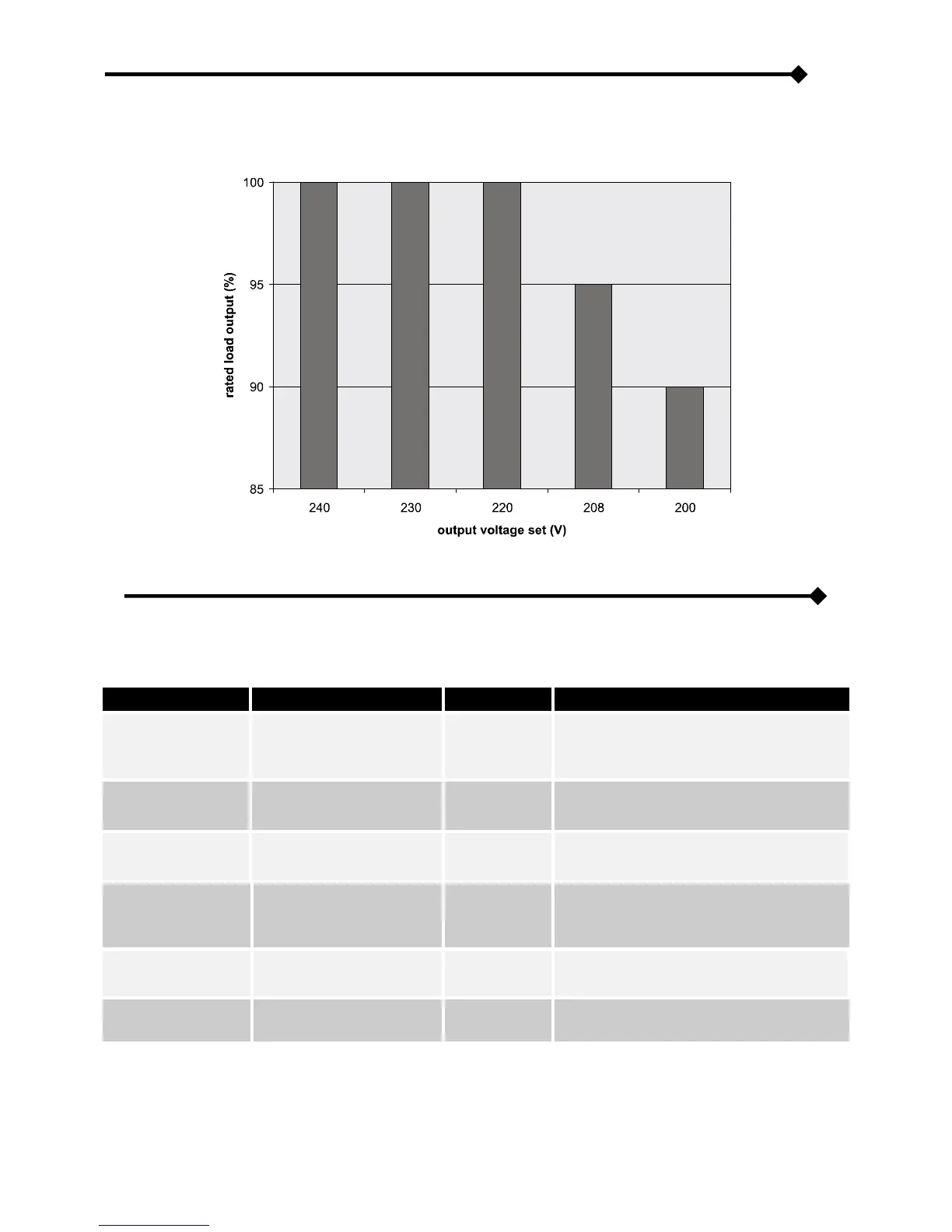
REDUCING THE LOAD (TO 200V AND 208V)
If the output voltage is set to 200V and 208V (see “Configuring the UPS” paragraph), the maximum power output of the UPS is
reduced with respect to its rated value, as shown in the graph below:
CONFIGURING THE UPS
Configurations which can be modified by the user from the control panel are listed in the table below.
Selects mimic panel language
language
Italian
German
French
Polish
Russian
Chinese
Selects the rated output
voltage
Selects the audible alarm
operating mode
Reduced: does not sound due to the
momentary intervention of the bypass
Selects one of five different
operating modes
ECO
SMART ACTIVE
STAND-BY OFF
Estimated autonomy time
remaining for “battery low”
warning
* Press keys F1 and F4 simultaneously for t > 2 sec. and English will automatically be reset.
** Function modification can be blocked by means of the configuration software.








 To Next Page