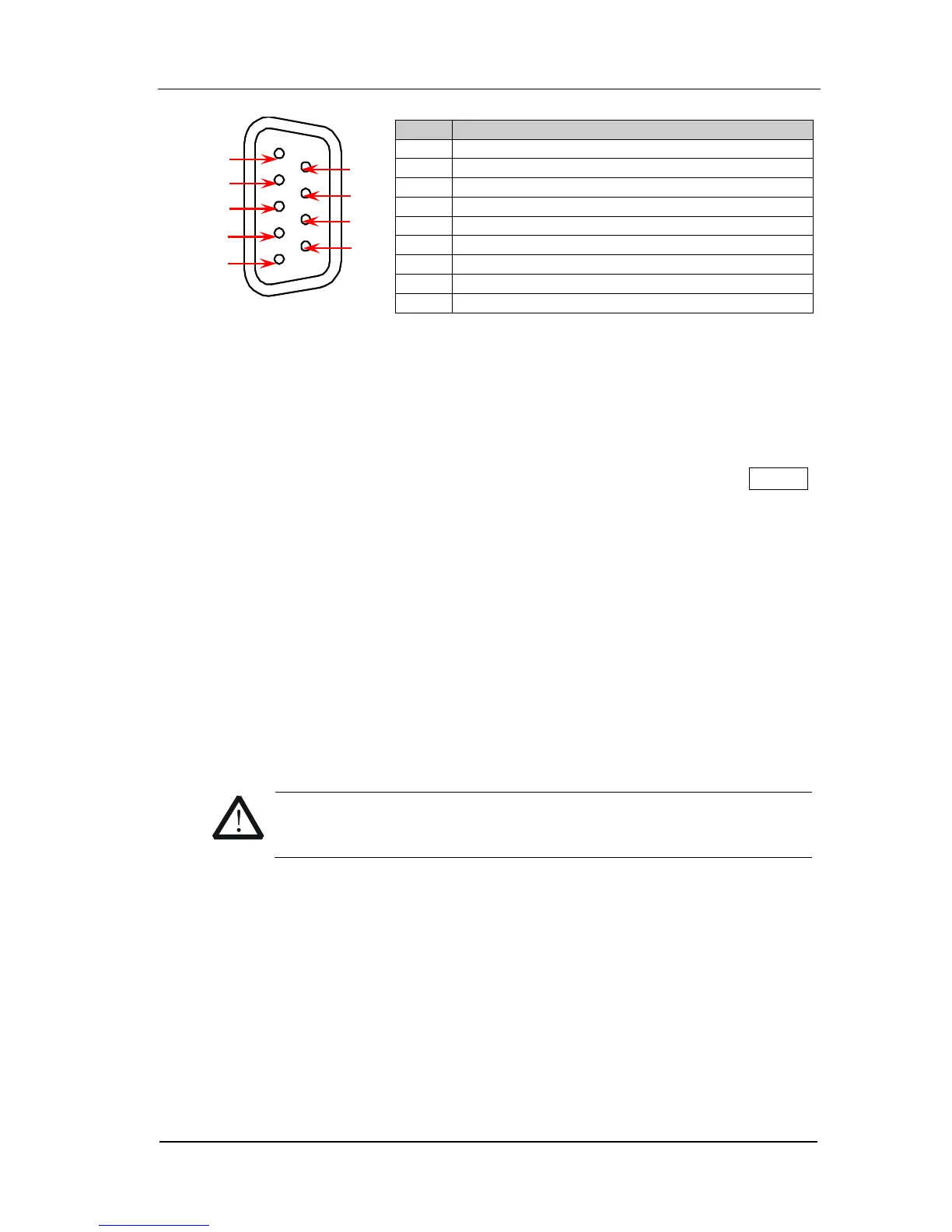
Alarms/Ext Trig Interface
Note:
The Pin 5 outputs a TTL negative pulse with about 2μs pulse width each time the
measurement is completed. The output rate is dependent upon the actual
measurement rate and 2500 times per second at most.
In external trigger mode, when the Pin 6 accepts external trigger signal (which
pulse width is equal to or greater than 2μs) with specified edge (press Config ,
select “External” trigger mode and select “Rising” or “Falling” in Edge item), the
instrument triggers. If the external trigger signal is continuous pulse, please
make sure the pulse period is larger than 100μs.
8. GPIB
M300 conforms to the IEEE-488.2 standard. Via this interface, M300 can
communicate with the PC and you can control the instrument remotely via the
PC.
9. Power Socket
M300 can accept two kinds of AC power supplies. Use the power cord provided
in the accessories to connect the AC power supply to the instrument via this
socket.
Before connecting the AC power supply, select the correct voltage
scale using the voltage selector.



 To Next Page