Table 6: User Setting Options
2.4 Zone Identification
Your Rinnai Dealer has divided your home into zones that can be
operated and controlled separately. The exact configuration of your
ZonePlus system will determine the programming features that are
enabled, as well as the number of zones that can be heated (or cooled)
simultaneously. You may operate your ZonePlus system in either
“Auto Program” or “Manual”.
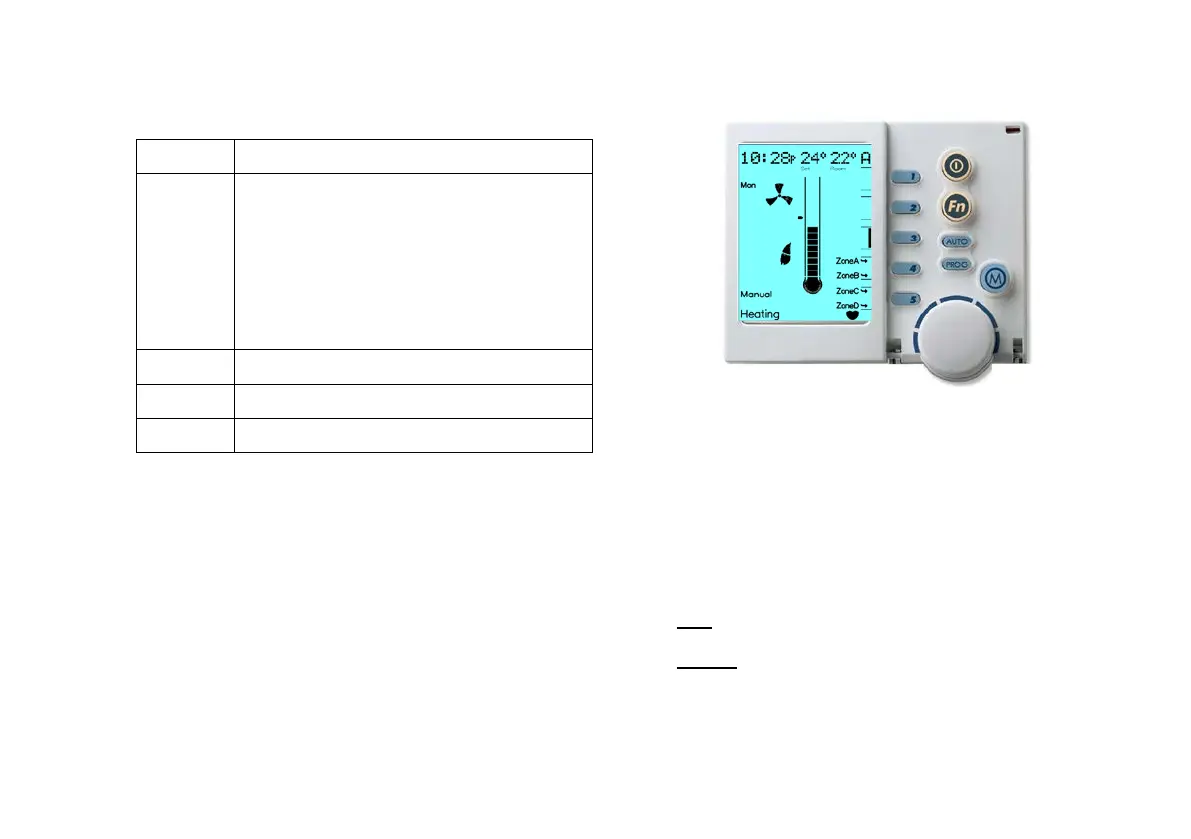
Diagram 6: NC-6 Heating Operation Display
Only the zones that have been installed and configured by the
installer will be displayed. For MTSP systems when the system is
OFF the available zones can be viewed by pressing Key “3”.
With a four zone system the NC-6 Controller will cycle through zones
“A”, “B”, “C” & “D” when Key “3” is pressed. The zone in view can
be identified in the top right hand corner of the screen. When the
system is ON the installed zones are displayed adjacent to Keys “4”
& “5”, as shown in Diagram 6.
The zone Arrow indicators:
• Solid indicates the associated zone is Heating (or Cooling) as the
zone set temperature has not been satisfied
• Flashing indicates the associated zone set temperature has been
satisfied
Key “1”
Changes the day grouping to one of the
following:
- Individual days: Selected when each day
flashes individually and sequentially
- Week day and weekend Block: Selected
when Mon to Fri flash and then Sat-Sun flash
- All week days: Selected as one group
when Mon to Sun are all displayed at once
Enables and disables the “Pre Sleep” option
Displays the temperature in either °C or °F
Displays the time in either 12hr or 24hr format


 To Next Page