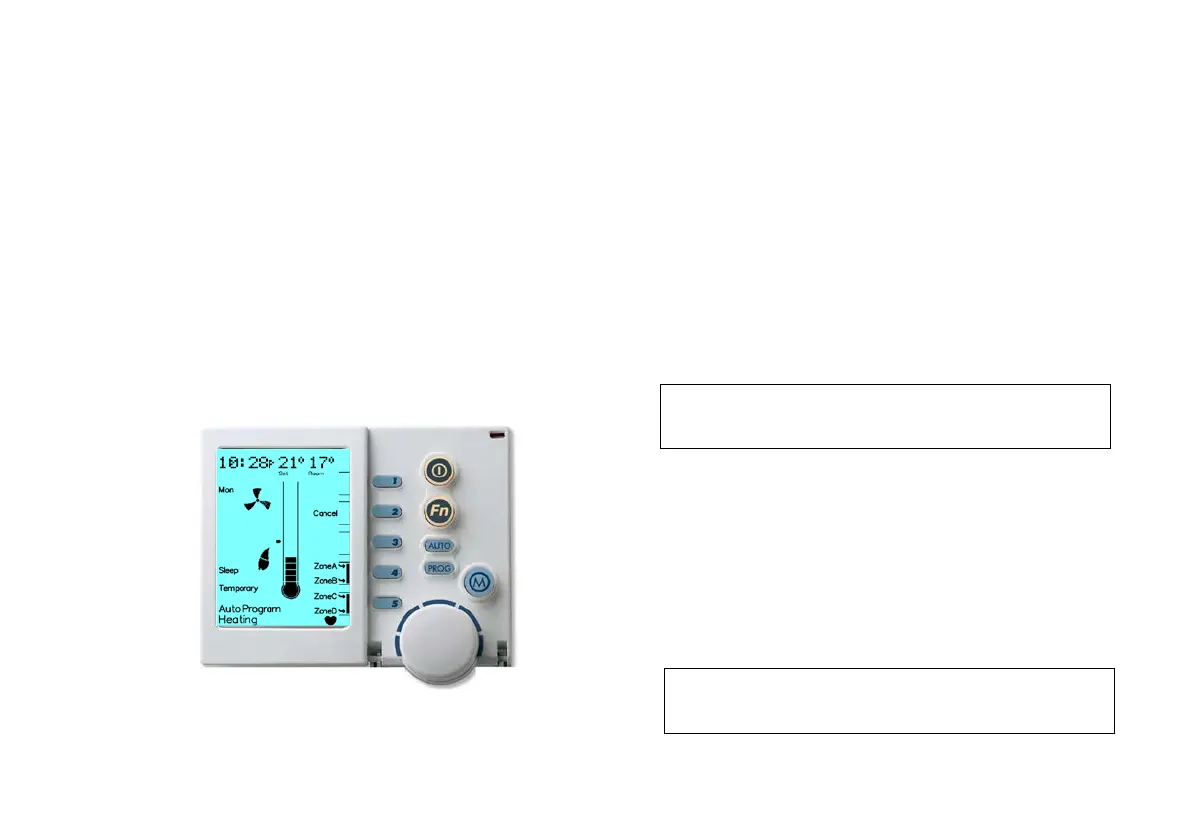
3.6.2 Operating in “Auto Program”
1. Determine the desired Mode, either Heating or Cooling by pressing
the Mode Key marked “M” to select. The bottom of the screen will
read “Heating” or “Cooling” (if installed)
2. Turn the system ON by pressing the On / Off button
3. Press the “AUTO” Key until “Auto Program” appears on the
screen (if not already in “Auto Program”)
3.6.3 Temporarily Overriding “Auto”
If the “Auto Program” temperature setting does not suit your
immediate requirements, you may want to temporarily override.
This temperature modification will become the new set
temperature for all zones.
Diagram 16: NC-6 STSP Temporary Override Display
To temporarily override the “Auto Program”:
1. The unit must be ON and in “Auto Program”
2. To initiate the temporary override:
a. Use the Rotary Dial to increase or decrease the current
temperature setting
b. Press Keys “4” & “5” to turn zones ON and OFF
3. The word “Temporary” will flash at the bottom of the screen until the
current Period ends, refer to Diagram 16
4. Press Key “4” to open or close zones “A” and “B”
5. Press Key “5” to open or close zones “C” and “D” if installed
6. Key “2” normally the “Adv Period” Key, has now become the
“Cancel Temporary Override” Key. Press this Key to return to the
default program
3.6.4 Advancing the Current Program Period
You may wish to skip to the next Period, i.e. Advance from “Wake”
to “Leave”. This can be done by completing the following steps:
1. With the unit ON and in the “Auto Program” press Key “2” to
advance the Period
2. Key “2” normally “Adv Period”, has now become the “Cancel Adv
Period” Key. Press this Key to return to the normal program
Note: The Networker will revert to “Auto Program” after the
current period ends.
Note: The Networker will revert to “Auto Program” at the
next scheduled Time Period.


 To Next Page