4.0 OPERATING THE FAN ONLY - MTSP &
STSP
Another benefit of a ZonePlus system is its capability to turn on
the main circulation fan only to assist with the circulation of air.
To turn the fan on only:
1. Press the On/Off button to turn the system OFF
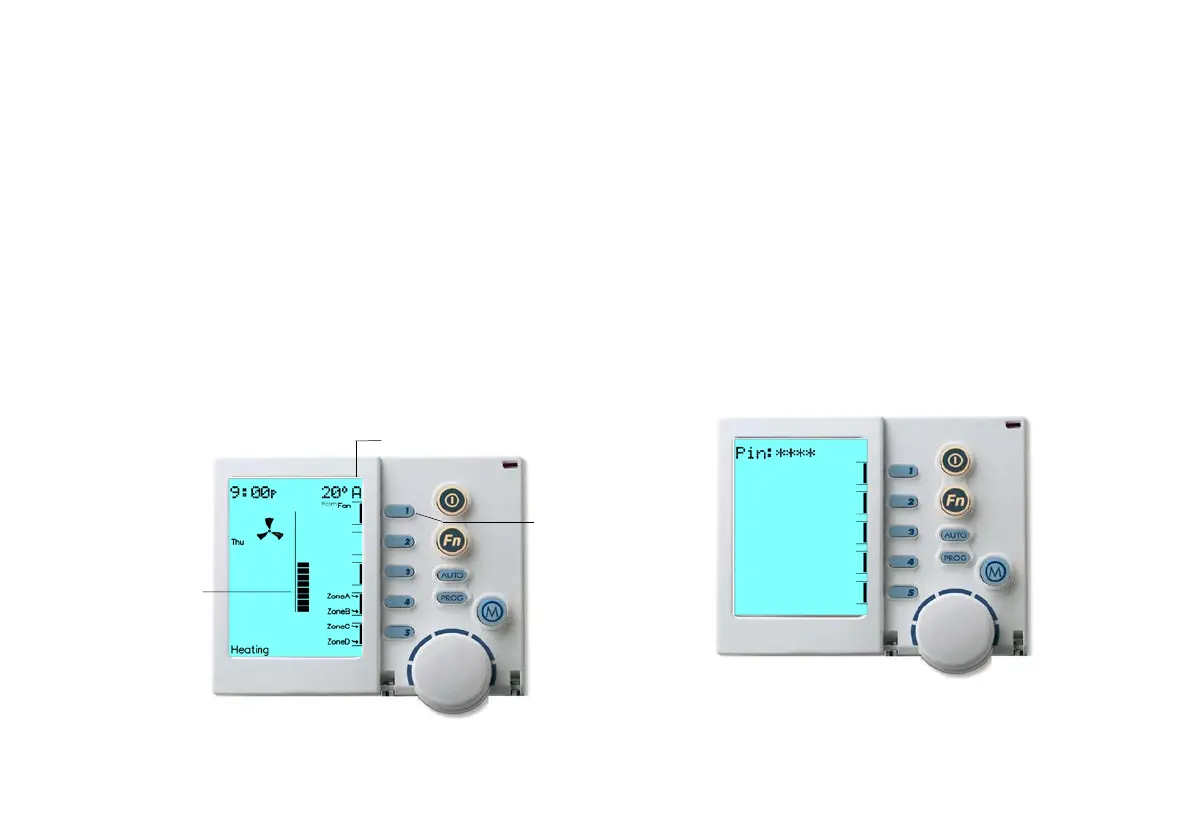
2. Press Key “1” (Fan). A small rotating Fan Symbol and a Column
Display, that indicates the fan's speed, will appear.
3. Now use the Rotary Dial to increase or decrease the fan speed
4. Open or close the zones by pressing Keys “4” & “5”
Diagram 17: NC-6 Display When Operating Fan Only
5.0 NETWORKER - SECURITY
To prevent any unwanted alterations being made to the Heating or
Cooling settings, the Networker can be locked using a 4-digit PIN.
In the case of multiple Networkers, if one is locked, all are locked.
If multiple Networkers are installed, the user PIN can only be set
from the NC-6 Master Controller. Other NC-6 Networkers can lock
and unlock the system but cannot access the PIN numbers.
5.1 Setting the PIN
Diagram 18: NC-6 Display When Setting PIN
To set the PIN:
(On/Off)
Display
(Fan Speed)


 To Next Page