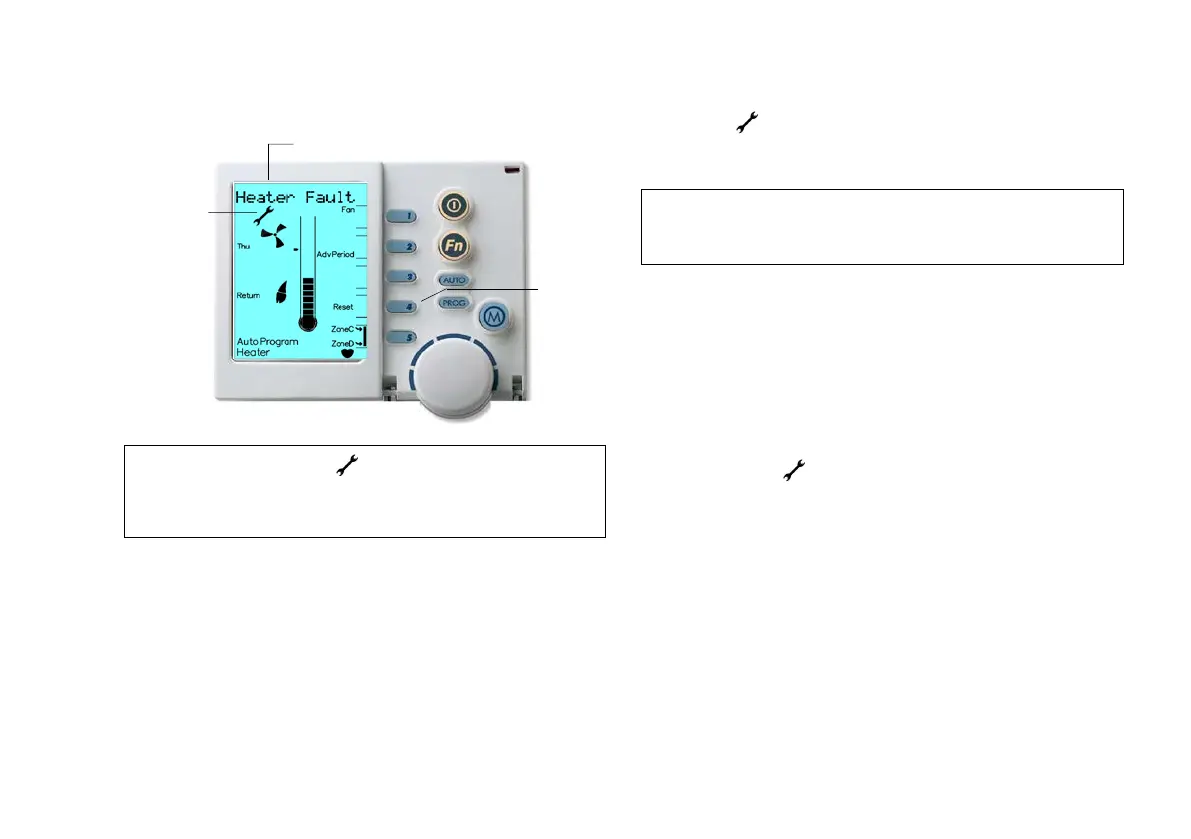
Diagram 19: NC-6 Fault Display
6.1 Fault Message Retrieval
When the only appears, to retrieve the last scrolling message,
press the Function “Fn” button then Key “1” quickly after to
repeat the message.
6.2 System Reset
After an unexpected interruption to system’s operation, the word
“Reset” could appear beside Key “4”, while a message scrolls
across the top of the screen.
Press Key “4” to re-start the system. If the system does not resume
normal operation or the error message re-appears, contact Service.
If the system operates but the Networker is showing an error
message with the symbol, press “Reset” Key “4” to clear the
fault. If the error is not cleared, use the On/Off button to turn the
Networker OFF, and then wait two minutes before turning the
Networker back ON. This should reset the system and restore it
back to normal operation.
If the fault still persists, turn OFF the power supply to the appliance
(heater or cooler) at the power point or electrical isolator located
adjacent to the appliance. Leave this OFF for approximately one
minute and then turn the power back ON. If normal operation still
does not resume, please call Service and inform them of the nature
of your problem, the error code, model and type of appliance.
7.0
Note: When a fault occurs, the may appear together with a scrolling
message – e.g. "Heater Fault - H01 Code #?? For assistance call
1300 BRIVIS". Please refer to the Appendix for a list of Error
Note: If no message appears it means the event has passed. The
message(s) that may have been displayed could be advising past
appliance operations or faults.


 To Next Page