2.0 MULTI TEMPERATURE SET POINT
SYSTEMS (MTSP)
A MTSP system provides you with ultimate conditioning
flexibility, allowing you to set the temperature of each zone
independently. MTSP does not apply to Evaporative Cooling
(if fitted).
2.1 MTSP Quick Start Guide
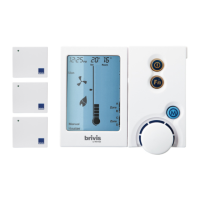
The following quick start procedure enables you to use your
ZonePlus before you learn all the details of the system’s operation.
Please ensure your dealer has provided you with details on zone
identification, the capabilities of your heating and cooling system, and
the maximum or minimum number of zones that can be operated
simultaneously for heating or cooling design conditions (see Table 2).
Quick Start Guide: Heating
1. Press the Mode Key “M” until “Heating” is displayed at the
bottom of the screen
2. Press Key “3” until “A” appears in the top right hand corner of
the screen, indicating Zone “A” access
3. Press the On/Off button to turn on and call for Heating
4. Increase the desired temperature set point to above the room
temperature by turning the rotary dial clockwise
5. Press Key “3” to gain access to Zone “B”
6. Increase the desired temperature set point to above the room
temperature by turning the rotary dial clockwise
7. Repeat steps 5 & 6 for Zone “C” and Zone “D” (if installed)
Quick Start Guide: Refrigerated Cooling
1. Press the Mode Key “M” until “Cooling” is displayed at the
bottom of the screen
2. Press Key “3” until “A” appears in the top right hand corner of
the screen, indicating Zone “A” access
3. Press the On/Off button to call for Cooling
4. Decrease the temperature set point to below room temperature by
turning the rotary dial anticlockwise
5. Press Key “3” to gain access to zone “B”.
6. Decrease the temperature set point to below room temperature by
turning the rotary dial
7. Repeat steps 5 & 6 for Zone “C” and Zone “D” (if installed)


 To Next Page