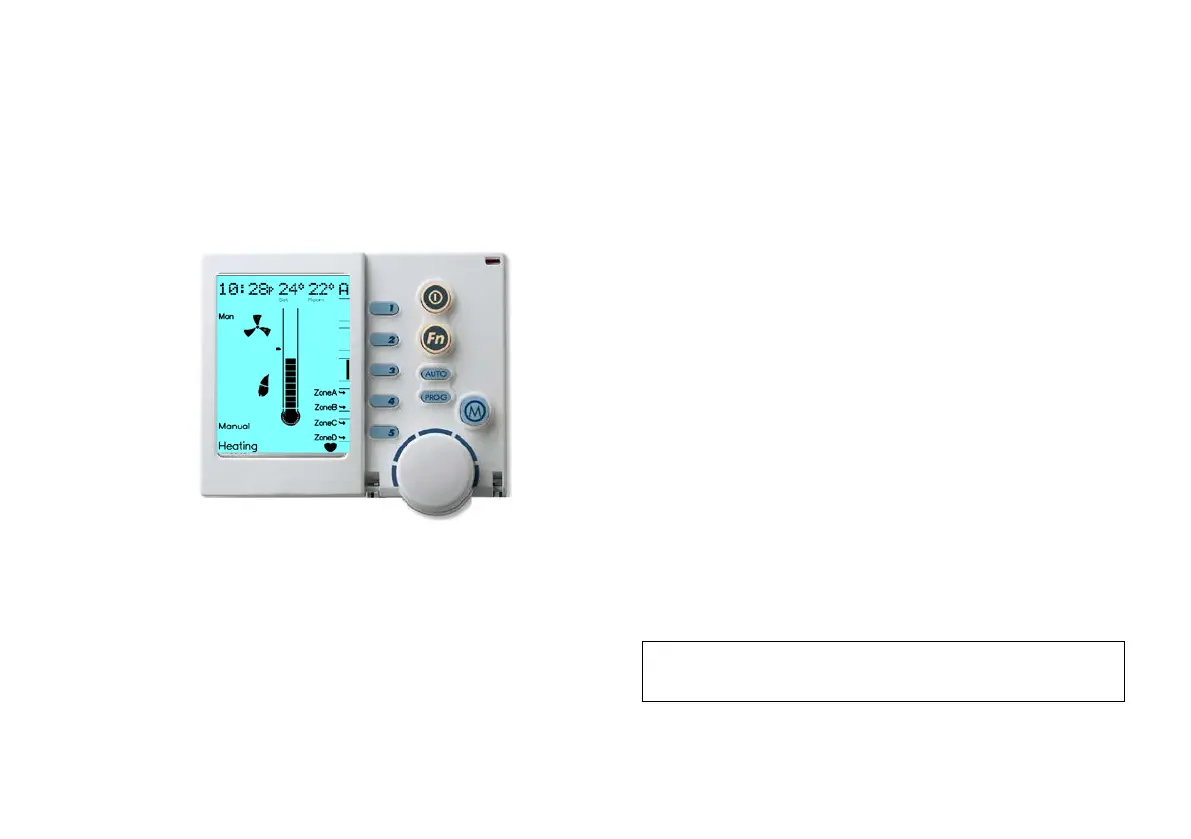
2.5 Manual Operation
Operating your system in “Manual” will require you to turn zones ON
and OFF as desired and adjust zone temperature set points
independently.
Diagram 7: NC-6 Manual Operation Display
To operate your system in “Manual”:
1. Use the On / Off button to turn the Networker OFF
2. If you have multiple appliances on the Network, press the Mode Key
“M” until the word “Heating” or “Cooling” appears (as required) at
the bottom of the screen. If you have the Networker ON while
switching between appliances you could start the wrong one
inadvertently
3. Turn the Networker ON and press the “AUTO” Key until “Manual”
appears in the bottom left-hand corner of the screen
4. The Zone (“A” in Diagram 7) Set Temperature (24°C in Diagram 7)
will now appear at the top of the screen. The current zone (Room)
temperature (22°C in Diagram 7) is still visible in the top right hand
corner of the screen beside the associated zone “A”
5. This Set Temperature is the temperature the system is required to
maintain for the nominated zone
• To increase the Set Temperature rotate the dial clockwise
• To decrease the Set Temperature rotate the dial anti-clockwise
6. To view and or adjust the set point of another zone in the system
press Key “3”. Review the associated zones temperature set point
and adjust if required by rotating the dial to the desired temperature –
the zone being accessed will flash in the top right hand corner of the
LCD display
7. To turn the zone OFF change the Set Temperature to “0°” ; the Set
Temperature will display “- - “
8. Repeat the above steps for other zones as required
9. To turn the entire system OFF, press the On / Off button
The system will operate until all zone set temperatures are
satisfied, at which time it will shut off.
Once the temperature set point for a zone is satisfied the zone
description (i.e. “Zone A”) and an Arrow, both adjacent to Key “4” &
“5”, will flash. If the zone set point is not satisfied the zone description
and Arrow will remain solid.
Note: The Networker remembers your last settings, and reverts
back to them the next time you select “Manual” operation.


 To Next Page