Programming the Comfort Schedule:
1. Turn the Networker OFF and confirm you are in your desired Mode,
either Heating or Cooling. If not, press the Mode Key “M” until the
word “Heating” or “Cooling” appears in the bottom of the screen
2. Please note Heating and Cooling program changes must be
completed independently for each zone. Also when changing Mode
from “Heating” to “Cooling” and vice-versa, this must be conducted
prior to entering the programming screen
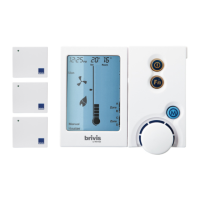
3. Press the “PROG” Key and you will notice the word “Auto
Program” appear at the bottom of the screen. The Digital Clock (e.g.
“10:28p”, Diagram 9) at the top of the screen will also begin to flash.
4. Select the Day Block (e.g. “Mon to Fri”)
Press Key “1” to select the Block you want to change settings to.
This selects either the Weekday Block or the Weekend Block. These
were previously set up in Section 1.3 User Settings
5. Select the Period (e.g. “Wake”)
Press Key “2” (Period) until the required Period is displayed.
6. Setting the Period Start Time
Press Key “3” until the time begins to flash. Rotate the dial to set the
desired Start Time for the selected “Period” and “Day” Block
7. Setting the Period Temperature
Press Key “3” to change from time to temperature. Rotate the dial to
set the desired Temperature for the selected “Period”, “Day” Block
and “Time”
8. Change Period
Press Key “2” (Period) until the next Period is displayed.
Repeat steps 6 and 7 until all Periods are complete for the selected
“Day” Block and zone
9. Change Day Block
If there is more that one Day Block (e.g. “Mon-Fri” & “Sat-Sun”)
Press Key “1” to select the next Block and repeat steps 5 to 8
10. Change Zone
When programming of the first zone is complete (typically “A”) you
will need to now program the remaining zones. To enter another
zone for programming, please refer to the below steps:
Press Key “PROG” to exit the programming screen
Press Key “3” and cycle to the next zone (typically “B”)
Press Key “PROG” to enter the programming screen of the
next zone. Repeat steps 4 to 9
11. Save and Exit
Press the “PROG” Key to Save and Exit
Note: To turn a zone OFF, change the set temperature to
“0°C”. The display will show “- -” in the “Set” temperature
location.


 To Next Page