Rinnai 11 HW_CF OIM
SMARTSTART PRE-HEAT SYSTEM
The “Preheat” function works in conjunction with various Rinnai water heater models when the separately installed
and optional Rinnai “Smartstart®” module is installed.
2
7
1
8
5
3
6
4
9
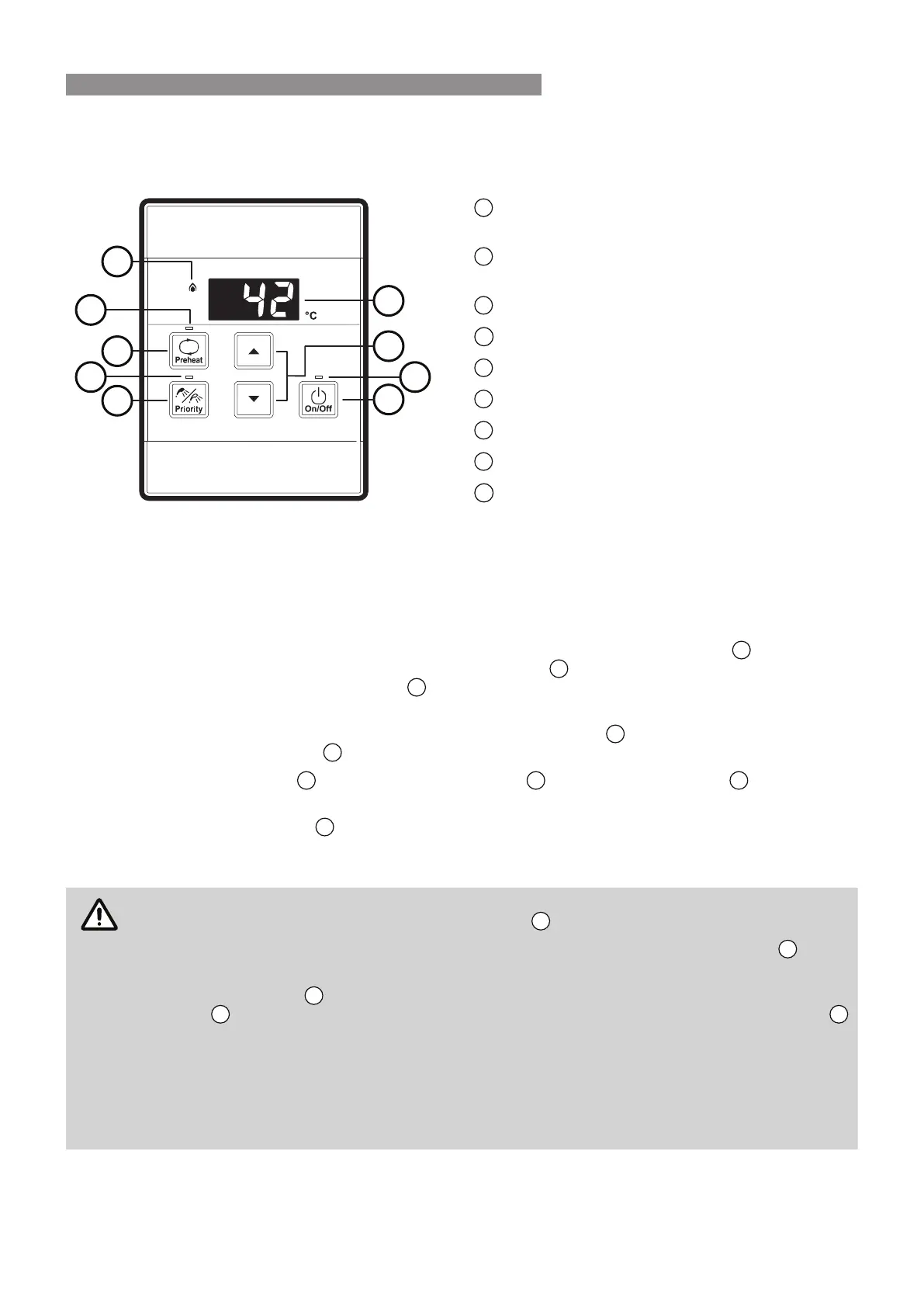
Preheat Button
Used to start and stop Smartstart preheater
Preheat Indicator
Indicates that Smartstart preheater is activated*
Digital Monitor
On/O Button
Controller Priority Indicator
Temperature Control Buttons
Water Heater "In Use" Indicator
Priority Transfer Button
Water Heater On Indicator
Preheat Function
When the "Preheat" function is activated and used in accordance with these instructions, water in the pipework
connected between the water heater and the hot water outlets in your house is warmed before any outlets are
opened. This results in water savings and added convenience.
Preheat Operation
1. Ensure that the hot water unit is on (temperature digits are displayed in the digital monitor
). If more than
one water controller is tted press the "Priority Transfer" button
to pass on priority to your desired water
controller. The "Controller Priority" indicator
will illuminate to conrm that priority has been assigned to this
water controller and that the hot water unit is ready to deliver hot water.
2. Select the desired temperature using the "Temperature Control" buttons
until the required temperature is
displayed in the digital monitor
.
3. Press the "Preheat" button
once. The "Preheat" indicator
and the "In Use" indicator
will illuminate,
signifying that the preheat system has been activated.
4. Wait for the "In Use" indicator
to go out (this may take 2 to 5 minutes). When this happens it signies that
the water in the pipework has now been pre-warmed and is ready for delivery, and that a hot water tap can
now be opened.
The waiting time may be longer or shorter depending on your particular installation conguration.
For best results always wait for the "In Use" indicator
to go out before opening a hot water tap.
The preheat function is cancelled 5 minutes after activation and the "Preheat" indicator
will go
out. This is to conserve energy. To reactivate, simply repeat steps 2-4 above.
If the "Preheat" button
is pressed and the 'Smartstart' preheat unit is not installed, the "Preheat"
indicator
will still light however there will be no preheat function. The "Preheat" indicator
will go out after a short time and will not aect the other functions of the water controller or water
heater.
When deluxe Bathroom water controllers are tted, after using the Shower Saver / Bath Fill
function wait 30 seconds before activating the 'Preheat' function. Attempting to use the 'Preheat'
function earlier will result in voice prompts being repeated until the system is reset. The system
can be reset by pressing the "On /O" button twice.
Water Controller Functions
Water controller functions such as temperature control and transfer of priority between multiple controllers are not
aected by the operation of the preheat. Such functions are described in the applicable sections of this manual.
WATER TEMPERATURE CONTROL




 To Next Page