- 17 -
DELUXE BATHFILL TEMPERATURE CONTROLLERS
Using the Infinity with 1 Deluxe Bathfill Temperature Controller
When one Temperature Controller is required, the kitchen model
must be used (MC-70-2A).
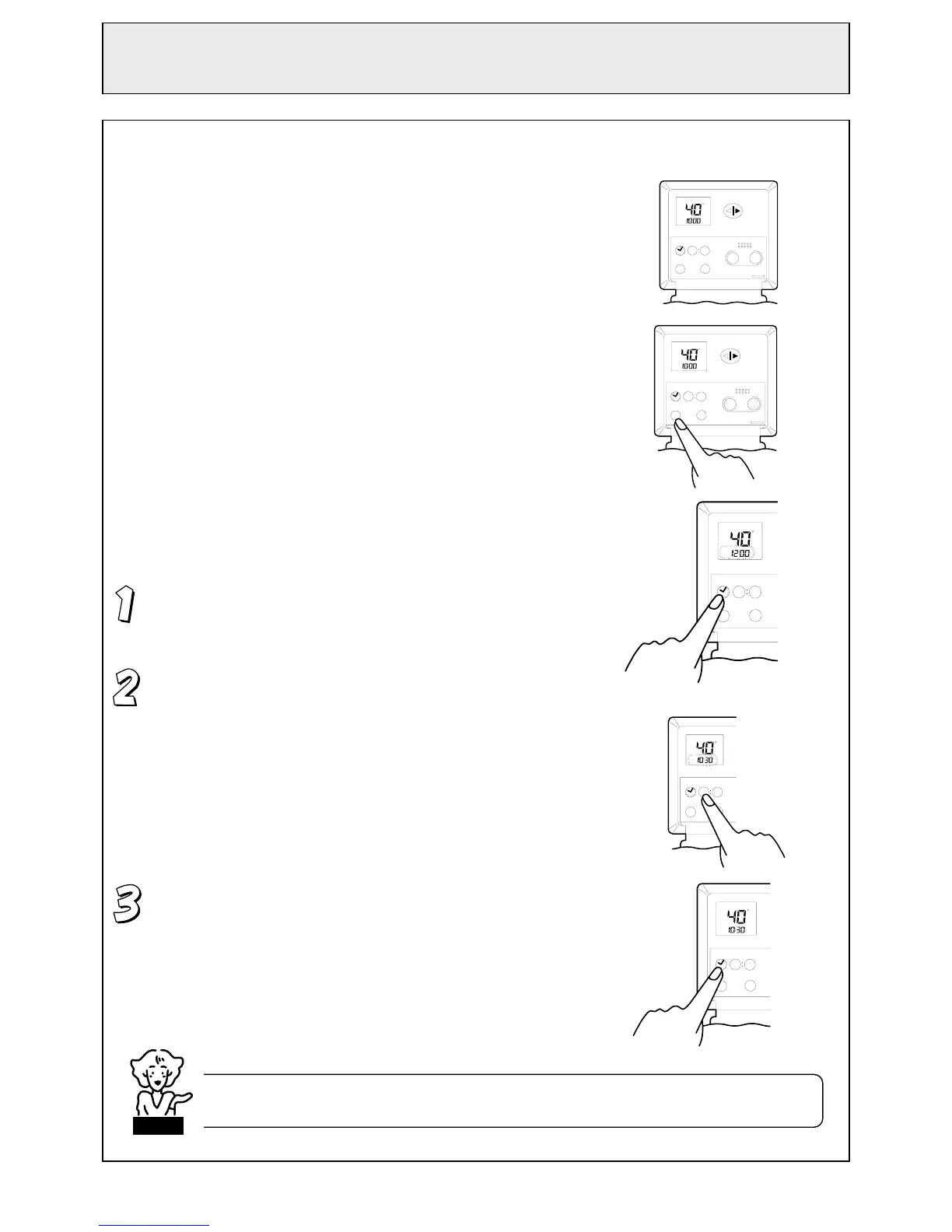
Switching the system ON
The hot water system and controller can be switched on and off
pressing the ‘ON/OFF’ button as shown.
When the system is turned on, the monitor will be lit. During
normal operation the system is left on.
Setting the Clock
The clock is of the 12 hour AM/PM type.
Press the ‘Clock’ button. The digital monitor will flash AM 12:00.
Set the time using the ‘Hour’ and ‘Min.’ buttons.
The time is displayed on the monitor as the buttons are pressed.
The numbers on the monitor will continuously
change if you keep the buttons depressed.
When you get close to the desired time, press
the button intermittently.
Press the ‘Clock’ button again to activate the
clock.
Clock Hour Min.
Vol.
C
AM
Hot water
temp.
00 00
ON/OFF
MC -70 -1A
Trans fer
Sound
Cooler Hotter
Clock Hour
Min.
Vol.
C
AM
Hot water
temp.
00 00
ON/OFF
MC -70 -1A
Transfer
Sound
Cooler Hotter
Clock Hour
Min.
Vol.
C
AM
00 00
ON/OFF
Sound
Clock Hour
Min.
Vol.
C
AM
00 00
ON/OFF
Sound
The time is always displayed regardless of whether the Temperature Controller is turned ON or OFF.
The clock may need to be reset after a power failure.
NOTE
Clock Hour
Min.
Vol.
C
AM
00 00
ON/OFF
Sound



 To Next Page