- 21 -
OPERATION WITH DELUXE BATHFILL TEMPERATURE
CONTROLLERS
Deluxe Bathfill Bathroom Controller
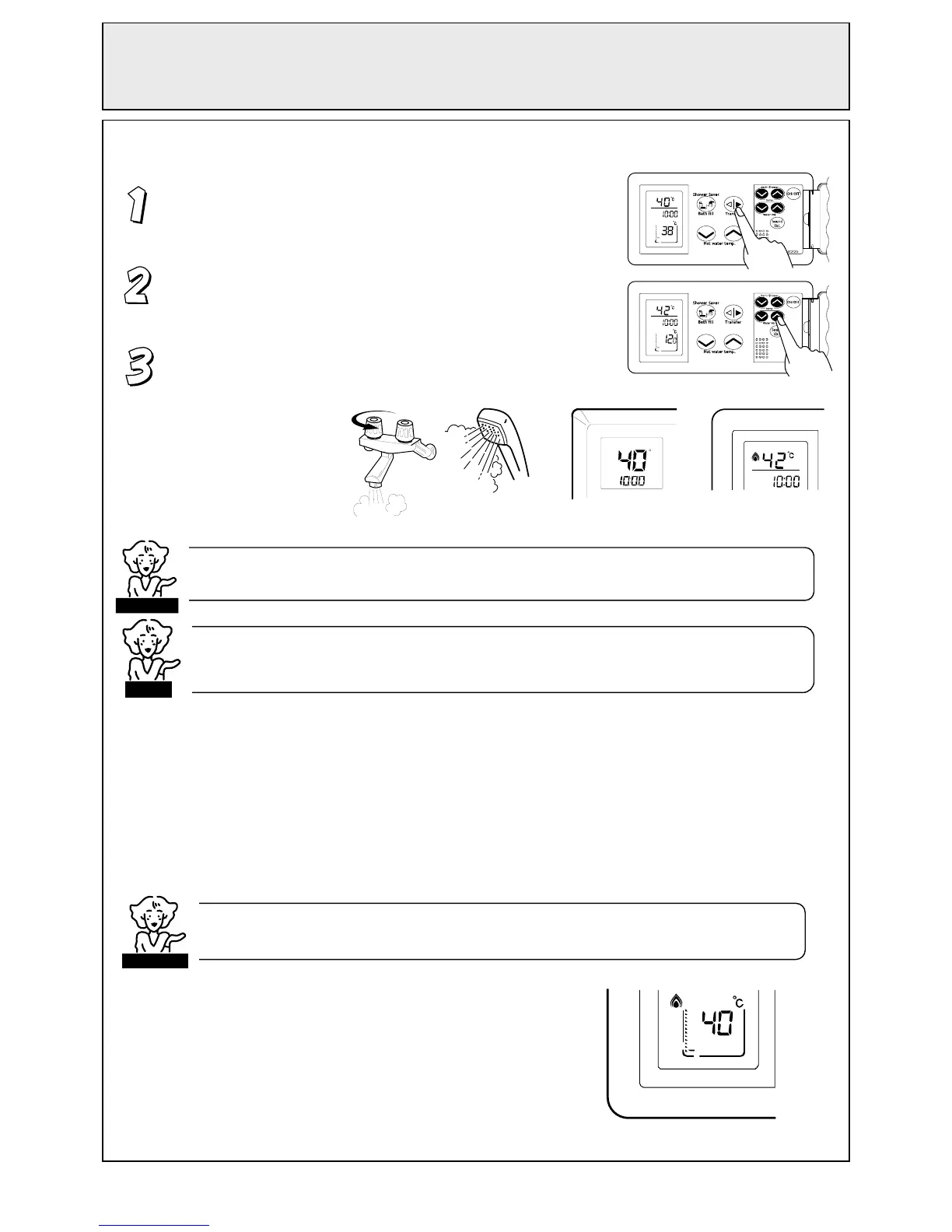
Ensure the system is switched ON. When the system is ON,
the monitors will be lit. Ensure the ‘Transfer’ button is lit. If
not, press the ‘Transfer’ button once.
Select the desired temperature using the ‘Hot water temp.’
buttons. The selected temperature will be displayed at the top
of all controller monitors.
Open the hot water tap. The hot water unit will activate and
the red combustion symbol will light on both bathroom and
kitchen monitors.
The ‘Shower Saver / Bath fill’ function enables a shower to be run for desired period or a bath to be
filled to the desired level at the desired temperature automatically.
There are 2 steps to perform :
Step 1. Program the shower / bath volume and temperature into the Bathroom
Controller(s) (BC-70-2A).
Step 2. Activate the automatic ‘Shower Saver / Bath fill’ function and follow the voice prompts.
Step 1 - Programming the bath volume and temperature
When the controllers are first turned on, the default shower / bath
fill temperature is 40
o
C and the shower / bath volume is 30 litres
(indicated by the first level marker at the bottom of the monitor).
The shower / bath volume can then be changed up to a maximum
of 400. These settings are displayed at the bottom of the
Bathroom Controller monitor and can be changed by the user as
described as follows.
C
AM
When using the ‘Shower Saver / Bath fill’ function to fill a bath for the first
few times, it is recommended that
ou are
resent durin
the fillin
rocess.
CAUTION
HOT
COLD
CHECK WATER TEMPERATURE BEFORE USE.
A parent should always check the temperature before a child is placed in contact with hot water.
When any hot water tap is open, temperature cannot be adjusted except between 37°C and 43°C. For
safety reasons, temperature ‘priority’ cannot be transferred between controllers when a hot water tap is
o
en
CAUTION
NOTE



 To Next Page