Replacing the Ink Cartridge
50
Replacing and Disposing
Consumables
Replacing the Ink Cartridge
When the Ink Cartridge becomes empty, the Replace Ink Cartridge Indicator lights. Replace with a new Ink Cartridge.
BCaution:
• Because ink may have adhered to the outlet surface of the Print Drum (Cylinder), be careful not to get your hands
and clothes dirty.
Rinse your hand using a detergent immediately if stained with ink.
Important!:
• For the Ink Cartridge, it is recommended to use the products specified by RISO.
• Before replacing the Ink Cartridge, turn the machine on.
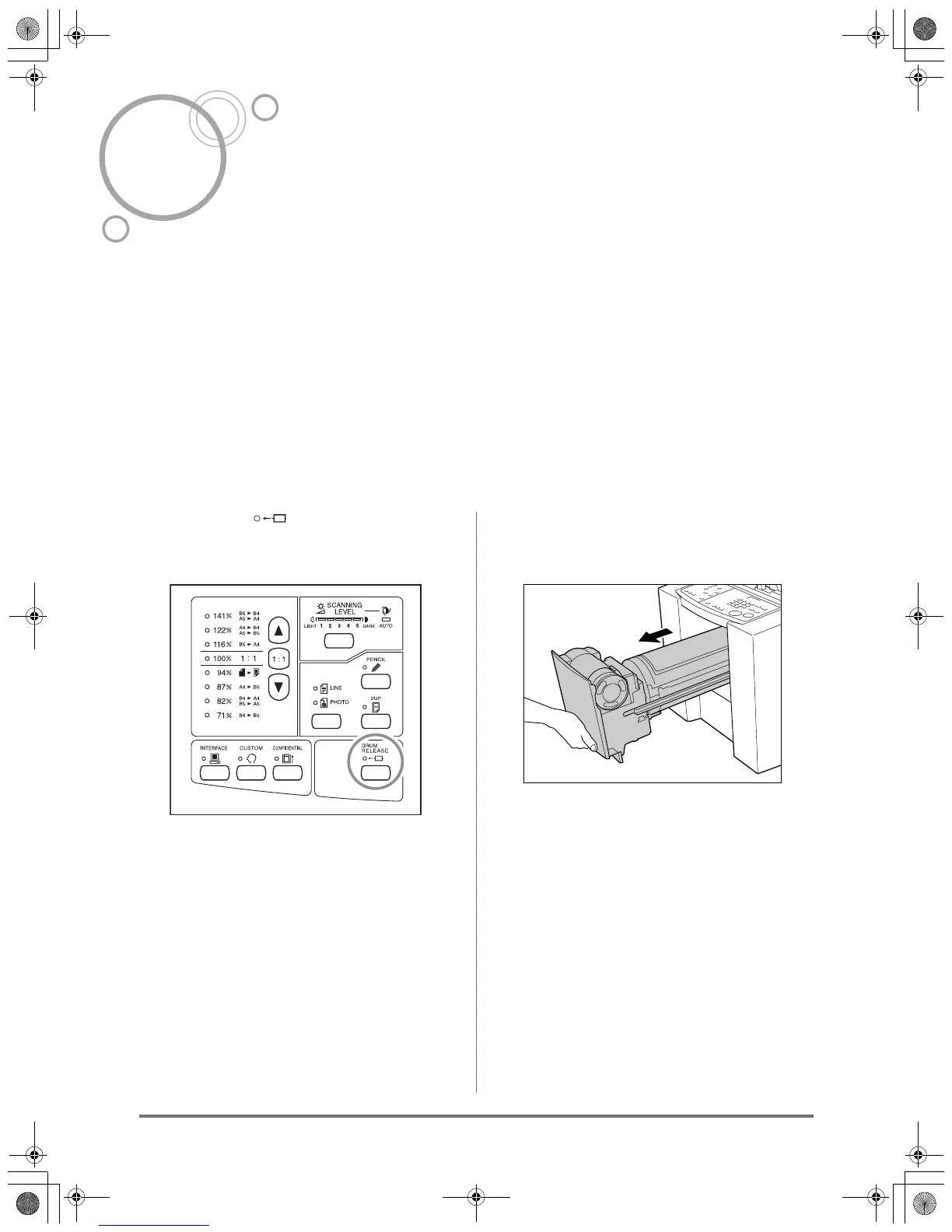
1
Press the key.
Make sure that the Print Drum (Cylinder) Release
indicator is tuned on.
Important!:
• If you forcibly pull out the Print Drum (Cylinder)
when its release indicator is turned off, the Print
Drum (Cylinder) may be damaged.
2
Pull out the Print Drum (Cylinder).
Grasp the Print Drum (Cylinder) Handle and pull
out the Print Drum (Cylinder) until it stops.
KZ30_UG.book Page 50 Monday, December 21, 2009 11:11 AM









 To Next Page