Utility Software Guides
<Column> About RISO-PRINT
42
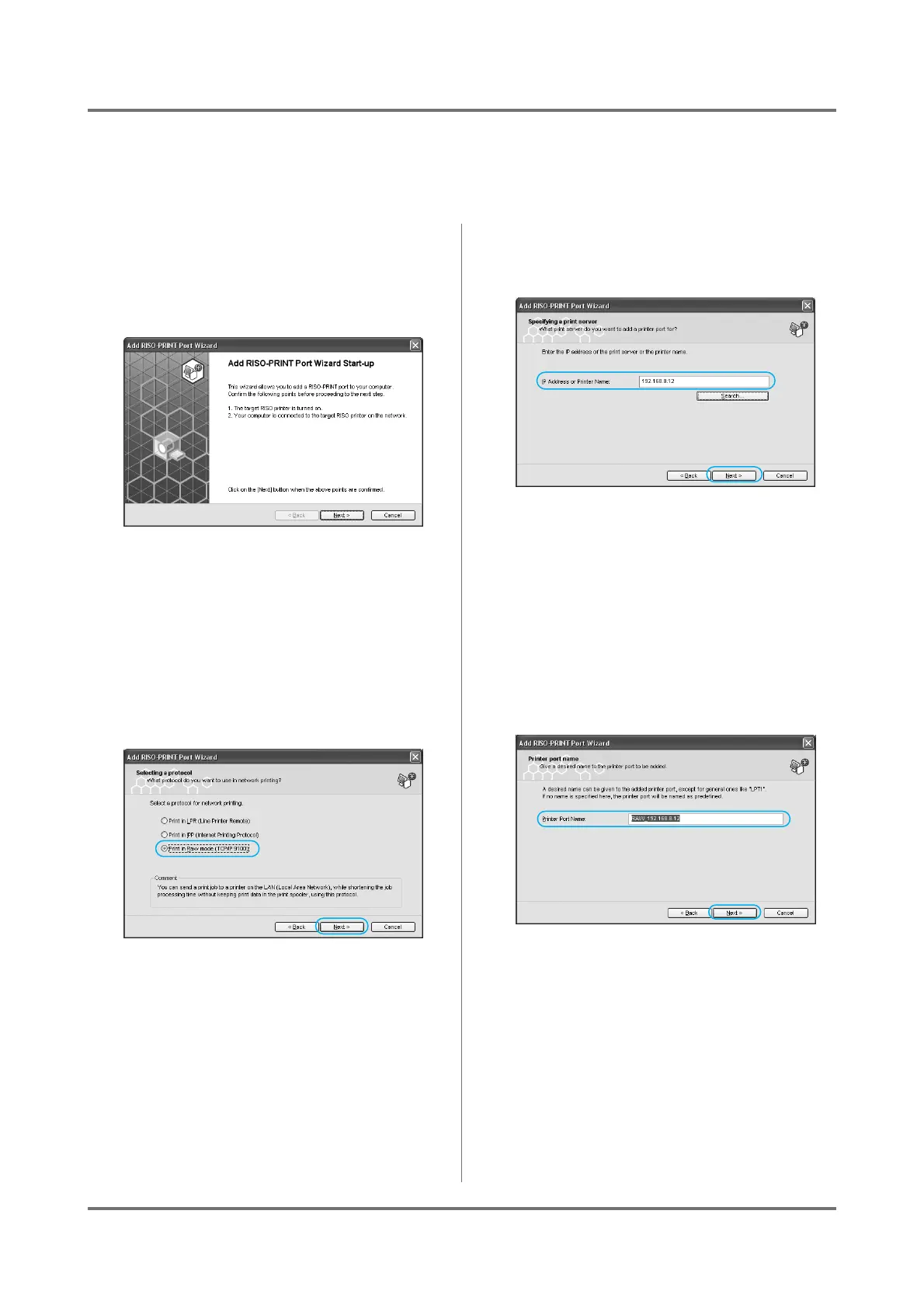
When using Raw mode (TCP/IP 9100)
You can send a print job to a printer on the LAN(Local Area Network), while shortening the job processing time with-
out keeping print data in the print spooler, using this protocol.
1
Select [RISO] - [RISO Network Card]
from the [Program] list in the [Start]
menu and click on [RISO-PRINT].
The [Add RISO-PRINT Port] Wizard will begin.
2
Check that your RISO printer is on
and connected to the network, then
click on the [Next] button.
3
Select [Print in Raw mode (TCP/IP
9100)], and click on the [Next] but-
ton.
4
Type in an "IP Address or Printer
Name", and click [Next].
You can also click on the [Search] button and
browse the network for RISO printers.
The [Search for Print Server] dialog box:
Clicking on the [Configure] button allows you to
set up a broadcast address.
Clicking on the [Search Again] button will search
again.
5
Confirm the [Printer Port Name], and
click on the [Next] button.



 To Next Page