E-mail sending functions using RISO Network Card
E-mail Sending Setup
47
• SMTP Server Name
Input the SMTP server name.
Note:
• Consult with your network administrator for
help configuring the SMTP server name.
• Sender Address
Input the e-mail address of the printer adminis-
trator or other desired sender.
Note:
• Consult with your network administrator for
help configuring the sender address.
• Receiver Address 1
This is set to RISO’s support department’s rep-
resentative e-mail address and cannot be
changed.
• Receiver Address 2 (Option)
An address can be set for sending maintenance
information if desired.
•Port No.
Enter the port number.
Note:
• Consult with your network administrator for
the port number.
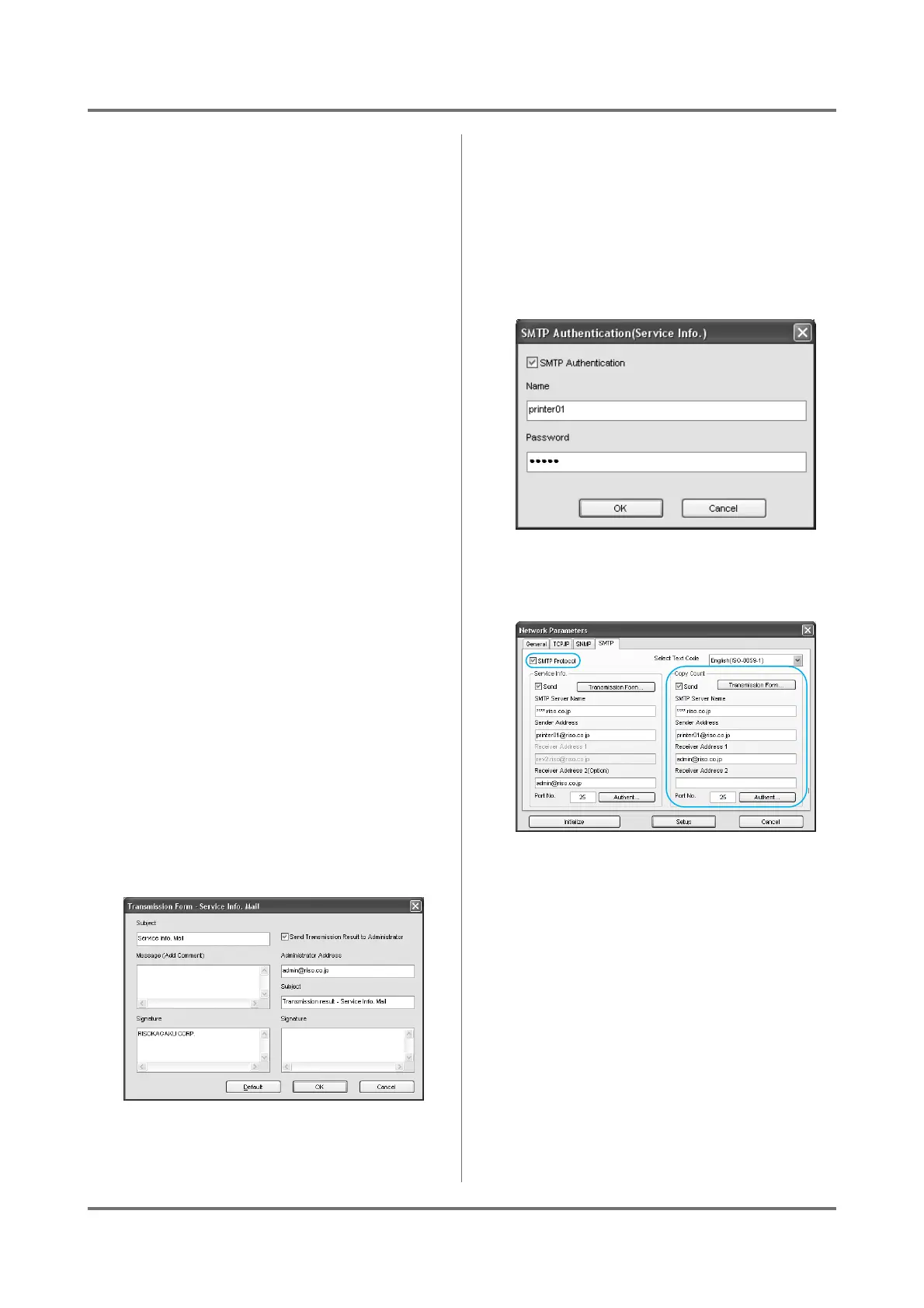
• [Transmission Form] button
Click the [Transmission Form] button to dis-
play the [Transmission Form] dialog box.
When [Subject], [Message] and [Signature]
are inputted, they are sent with the Service Info.
It is recommend to imput the consumable name
currently in use.
Click the [Default] to enter the default subject in
the [Subject] box.
Check the [Send Transmission Result to
Administrator] box to have the transmission
results of the Service Info. sent to the [Admin-
istrator Address]. The [Signature] can also
be set.
• [Authent...] button
Click the [Authent...] button to display the
[SMTP Authentication] dialog box.
If SMTP authorization is required, check [SMTP
Authentication] and input your [Name] and
[Password].
Continue on to set the “Copy Count”.
If you do not set the “Copy Count”, skip to step
9 on )p.48.
8
Set the [Copy Count].
• SMTP Protocol
Check “SMTP Protocol” in order to specify the
“Service Info.” and “Copy Count” settings.
• Send
Check the Copy Count Mail function.
Note:
• The [Admin.] - [System] - [ID Counter
Report] on your RISO printer are configured
all together.
• SMTP Server Name
Input the SMTP server name.
Note:
• Consult with your network administrator for
help configuring the SMTP server name.



 To Next Page