10
3.4 Ethernet connection
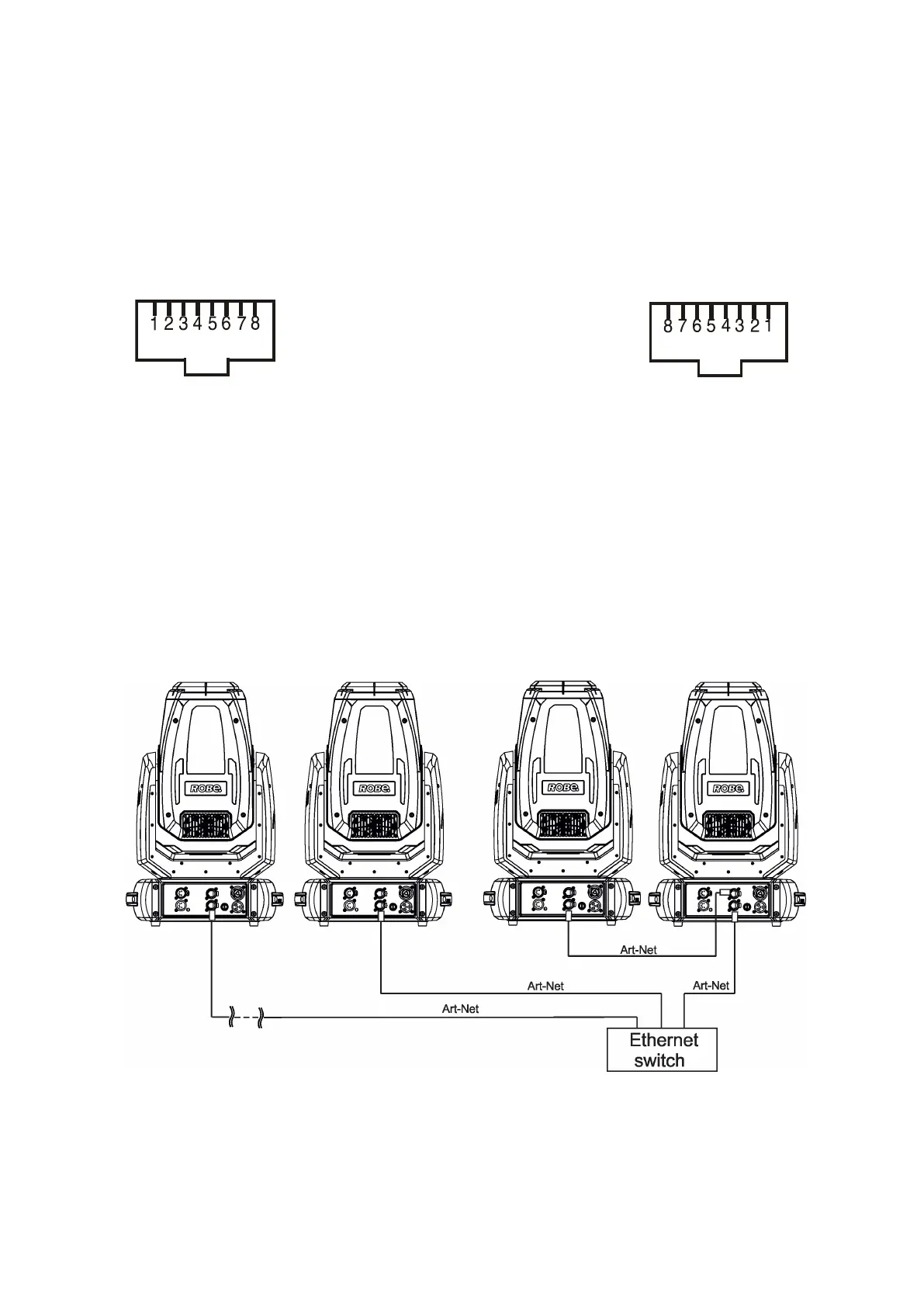
The xtures on a data link are connected to the Ethernet with appropriate communication protocol (e.g. Art-Net).
The control software running on your PC (or light console) has to support this communication protocol.
Art-Net communication protocol is a 10 Base T Ethernet protocol based on the TCP/IP.I ts purpose is to allow
transfer of large amounts of DMX 512 data over a wide area using standard network technology.
The IP address is the Internet protocol address.The IP uniquely identies any node (xture) on a network.
The Universe is a single DMX 512 frame of 512 channels.
The Robin Painte is equipped with 8-pin RJ- 45 sockets for Ethernet connection. Use a network cable category
5 (with four “twisted” wire pairs) and standard RJ-45 plugs in order to connect the xture to the network.
RJ-45 socket (front view): RJ-45 plug (front view):
1- TD+ 5- Not connected
2- TD- 6- RX-
3- RX+ 7- Not connected
4- Not connected 8- Not connected
Patch cables that connect xtures to the hubs or LAN sockets are wired 1:1,that is,pins with the same numbers
are connected together:
1-1 2-2 3-3 4-4 5-5 6-6 7-7 8-8
If only the xture and the computer are to be interconnected,no hubs or other active components are needed.A
cross-cable has to be used:
1-3 2-6 3-1 4-8 5-7 6-2 7-5 8-4
Connect the Ethernet inputs of all xtures to the Ethernet network. Set their IP addresses and Net Masks
Correct communication protocol (e.g. “ArtNet") has to be selected from the menu “Ethernet Mode” in the xtures
(Addressing-->Ethernet -->Ethernet Mode). Set Universe(s) according to communication protocol.
Example of connection:
(DMX address=1)
IP addres=002.168.002.002
Universe=1
(DMX address=45)
IP addres=002.168.002.003
Universe=1
(DMX address=88)
IP addres=002.168.002.004
Universe=1
(DMX address=174)
IP addres=002.168.002.008
Universe=1
An advised PC setting: IP address: 002.xxx.xxx.xxx (Dierent from xtures IP addresses)
NET mask: 255.0.0.0
The EP version of the xture is equipped with Ethernet Pass Through Switch which sustains Ethernet integrity,
when the xture has no power, it automatically maintains network connectivity.
If you use the Ethernet IN-OUT way for the Ethernet connection, max. 8 xtures can be connected in
the IN-OUT line.



 To Next Page