9
3.3 DMX-512 connection
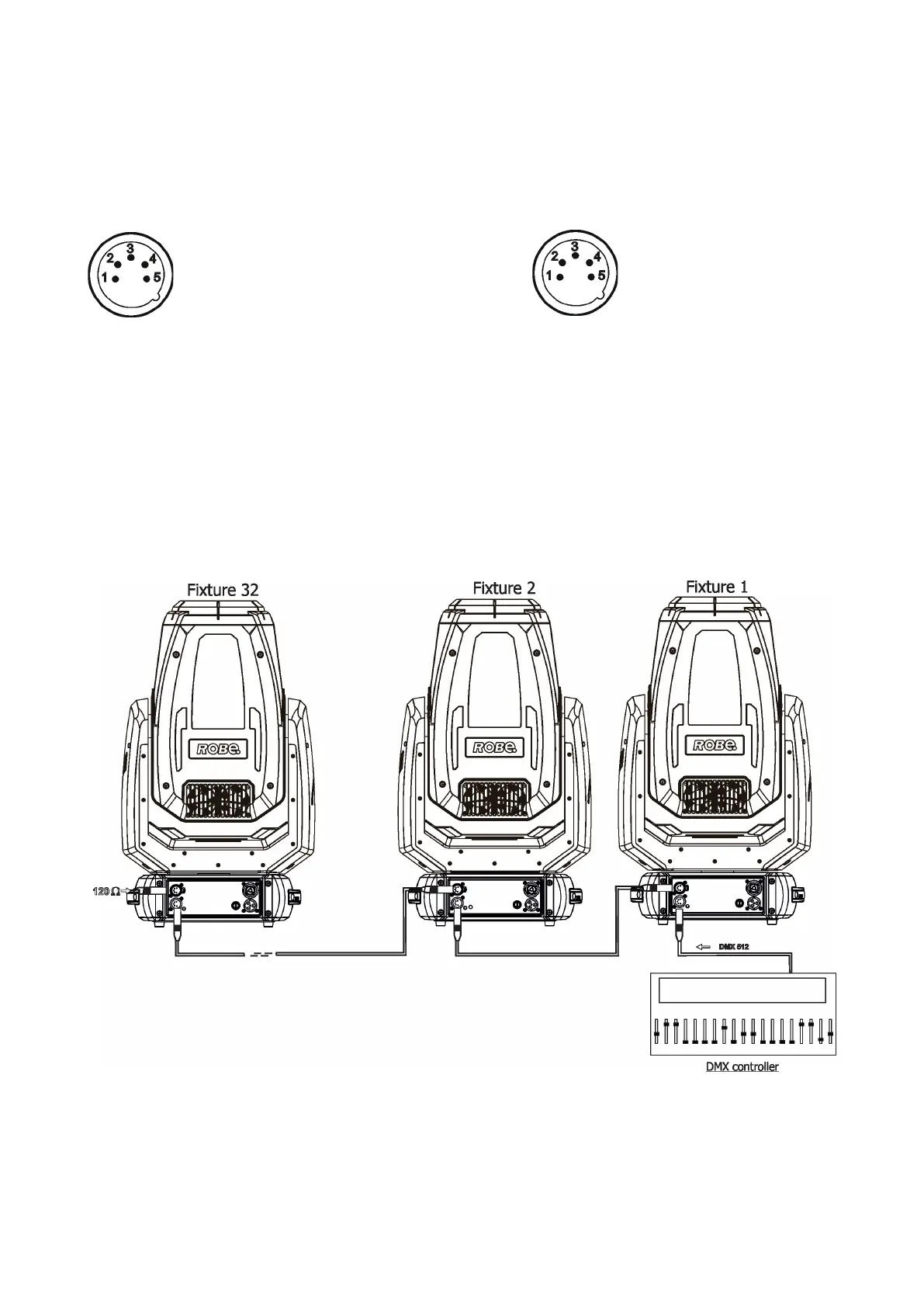
The xture is equipped with 5-pin XLR sockets for DMX input and output. Only use a shielded twisted-pair
cable designed for RS-485 and 5-pin XLR-plugs and connectors in order to connect the controller with the
xture or one xture with another.
DMX output DMX input
XLR socket: XLR plug:
If you are using the standard DMX controller, you can connect the DMX output of the controller directly with the
DMX input of the rst xture in the DMX chain. If you wish to connect DMX controllers with other XLR output,
you need to use adaptor cables.
Building a serial DMX-chain.
Connect the DMX output of the rst xture in the DMX chain with the DMX input of the next xture. Always
connect one output with the input of the next xture until all xtures are connected. Up to 32 xtures can be
interconnected.
Caution: At the last xture, the DMX cable has to be terminated with a terminator. Solder a 120 Ω resistor
between Signal (–) and Signal (+) into a (5-pin) XLR plug and plug it in the DMX output of the last xture
1 - Shield
2 - Signal (-)
3 - Signal (+)
4 - Not connected
5 - Not connected
1 - Shield
2 - Signal (-)
3 - Signal (+)
4 - Not connected
5 - Not connected



 To Next Page