41
Software version
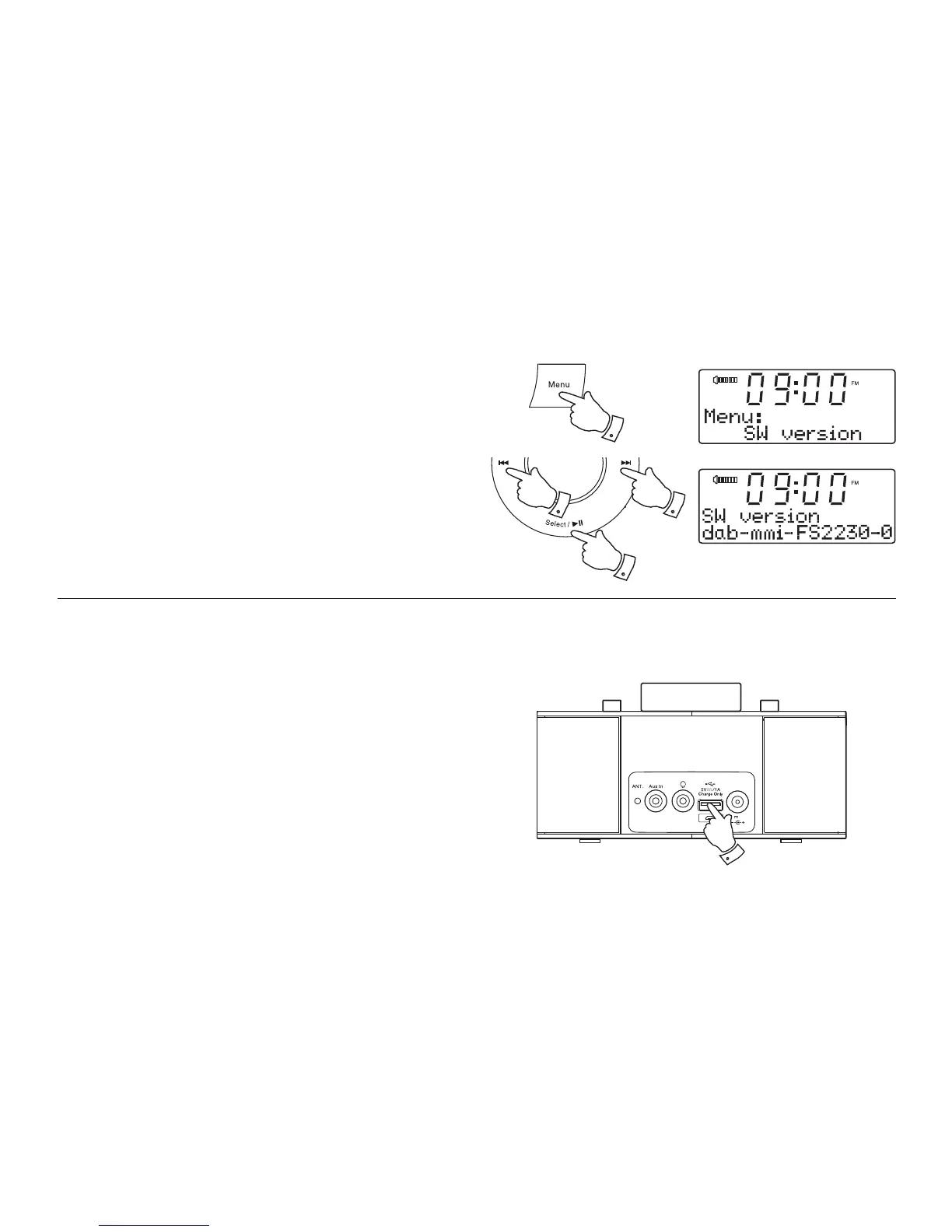
The software display cannot be altered and is just for your reference.
1. Press and release the Menu button.
2. Press the Tuning Up or Down buttons until 'SW version' appears on
the display.
3. Press and release the Select button to view the software information.
4. Press and release the Menu buttont to exit the menu.
1,4
22
3
USB socket for iPhone or smartphone charging
Your clock radio has a USB socket which can be used for charging an
iPhone or smart phone and similar devices. This may be used to charge
devices which are not compatible with the lightning connector.
Charge time may vary and in some cases may take longer to charge than
when using the manufacturers charging unit supplied with the smart phone.
1. Ensure your clock radio is plugged in.
2. Connect your smart phone to the USB charging socket at the rear of
your clock radio.
3. Your iPhone or smart phone will begin to charge.
4. Once your iPhone or smart phone has charged remove the USB lead.
Upgrade
DC In
12V /2.5A
2












 To Next Page