5.1.1.2 UI COMPOSITION
-
ZERO SETTING TOOL
111
com
0
't
090109
0nIoodTool
I
Diogno09T00l
2 ornont0001j
'oro
P091 09th
—
S 1
2 3 4
5 6 7 0 9 10
11 12 13
14 15
rfl
-
A]
--
16
20 21 27
: 24 25 25
2
7 28 29 M
-
1
1
1
T I L
J.._JoJrJ
JJ0J
rJJ
U e the
..H
.1
oororrrooi0ort
cobb and cortne I Rob,Scrbder
oilS
the PC Select Comport and click [0
oPerti etittot
clot. [ScoPort[
bctloo
'let
IS
C
I
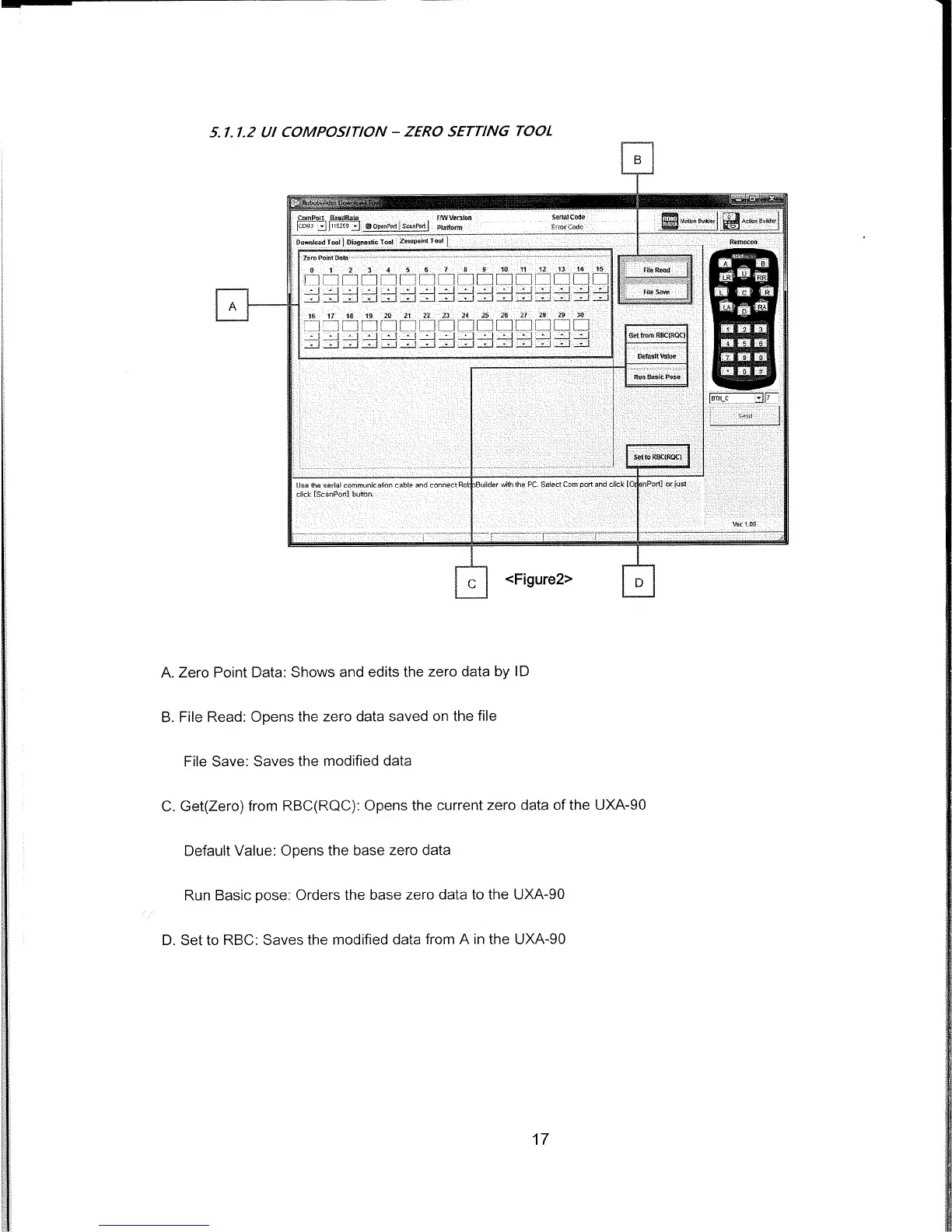
<Figure2>
I
D
A.
Zero Point Data: Shows and edits the zero data by ID
B.
File Read: Opens the zero data saved on the file
File Save: Saves the modified data
C.
Get(Zero) from RBC(RQC): Opens the current zero data of the UXA-90
Default Value: Opens the base zero data
Run Basic pose: Orders the base zero data to the UXA-90
D.
Set to RBC: Saves the modified data from A in the UXA-90
17



 To Next Page