5. SOFTWARE
5.1 SOFTWARE DIRECTION
5.1.1 ROBOBUILDER DOWNLOAD TOOL
5.1.1.1 UI COMPOSITION
-
DOWNLOAD
CI
ID
lype
MoaonFdeC,nm)
r
on fanp
rbaj
RR
Thraoto,y
000raoad ran
Lat
-
Monnry
Space
amp 006
I
FR 00an
4_
(F
1
LA
FR
I
A
BID-ROM
G
:
:
Fan
anon
1
01
U
he en communF Ioncable and conne
ct
Robn8uIder with thePC) Select Corn port and
click
tScan nih FReon
O
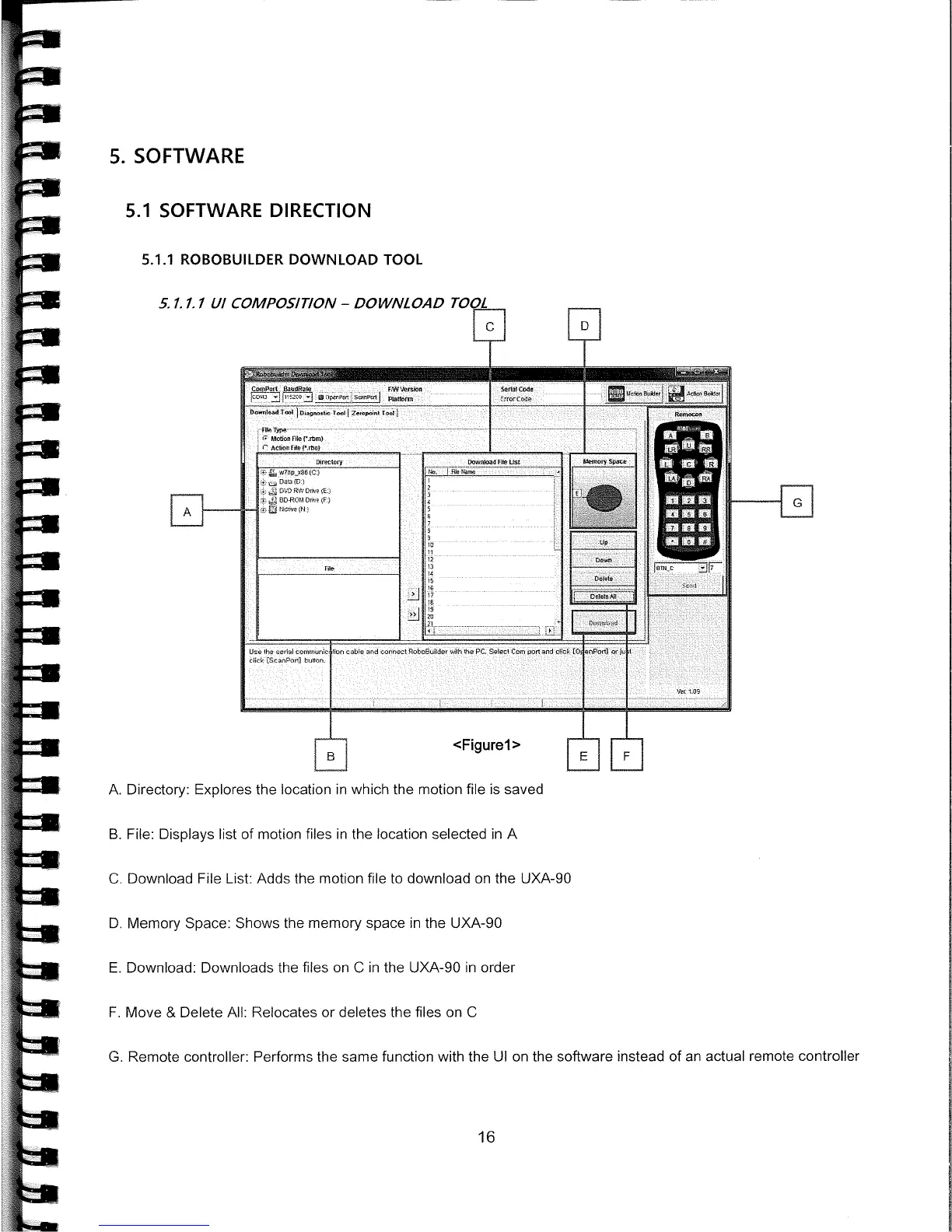
<Figure 1>
L EEl]
A.
Directory: Explores the location in which the motion file is saved
B.
File: Displays list of motion files in the location selected in
A
C.
Download File List: Adds the motion file to download on the UXA-90
D.
Memory Space: Shows the memory space in the UXA-90
E.
Download: Downloads the files on C in the UXA-90 in order
F.
Move & Delete All: Relocates or deletes the files on C
G.
Remote controller: Performs the same function with the UI on the software instead of an actual remote controller
IN



 To Next Page