2. USB DRIVER
Use the Micro-USB cable to connect the PC and UXA-90. Here, the connecting part on the UXA-90 is
the micro socket on the switch board (Refer to Chapter 3.2 Switch Board.). See below for driver
installation guideline and a few setting methods.
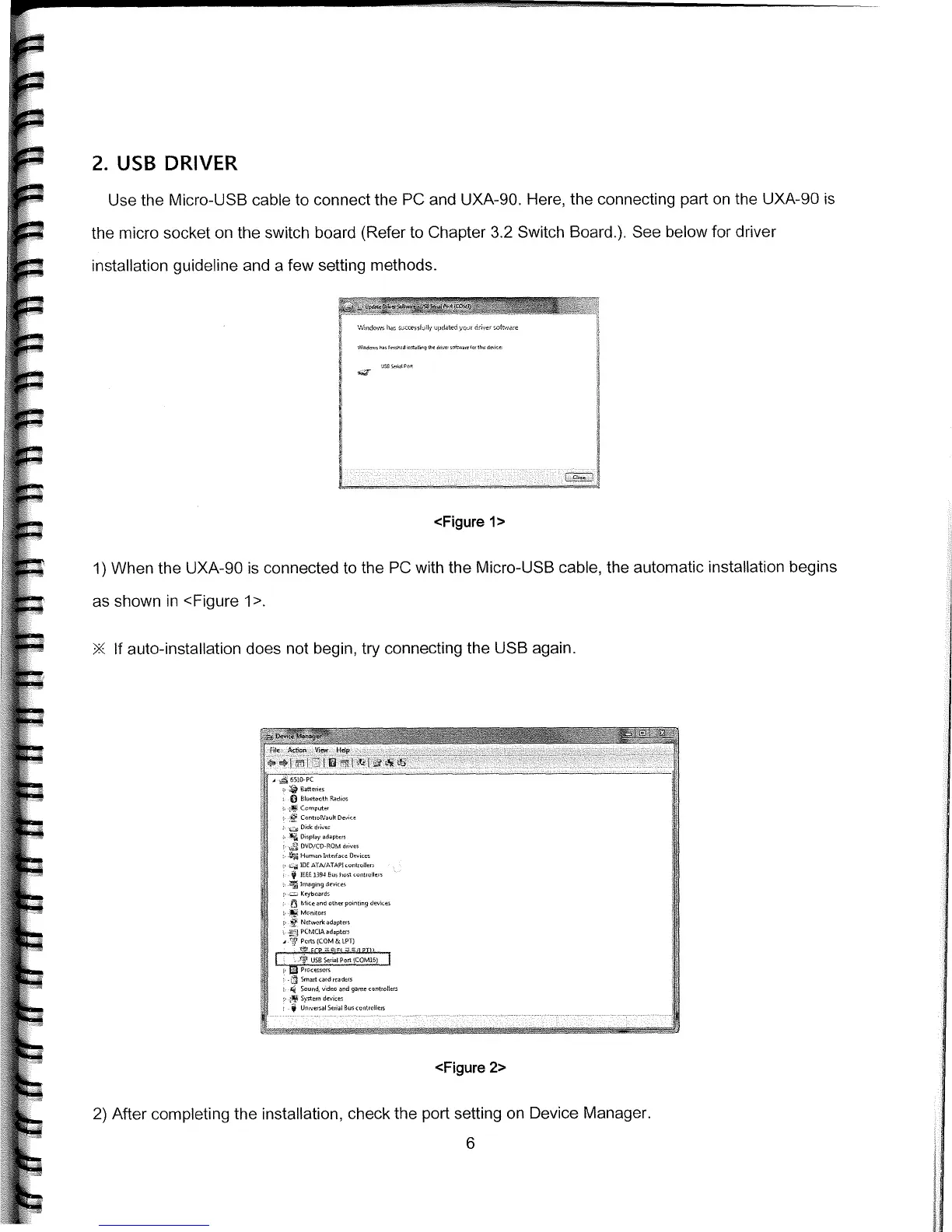
<Figure 1>
1)
When the UXA-90 is connected to the PC with the Micro-USB cable, the automatic installation begins
as shown in <Figure 1>
If auto-installation does not begin, try connecting the USB again.
Bluethoth
Cu,,,p
u
ter
Cothrftlthuu,
DuB thuer
-
Diepley edeptthe
ODD/CD-ROM duu,,
H
n]nthDeue
IDE ATWATAPI —4
,
11—
IEEE
1394
Ru, Duet
uunt,ull,,e
-
Irnegieg 1ev,,,
Keybneedu
'j Mice
end 0th,,
pnnting
dew,,
>-ttMc.n,tu,n
Nc-nn.nrle
edeyten
PCMCIA
edeptern
' POOnCOM&IPTI
cOM16
Li
9meDuundneednnn
u
Seondudeu,ndge,nnenuntnotene
-
Syetnnn den,,,
-
Unve,cellnnnllunntnclene
<Figure 2>
2)
After completing the installation, check the port setting on Device Manager.



 To Next Page