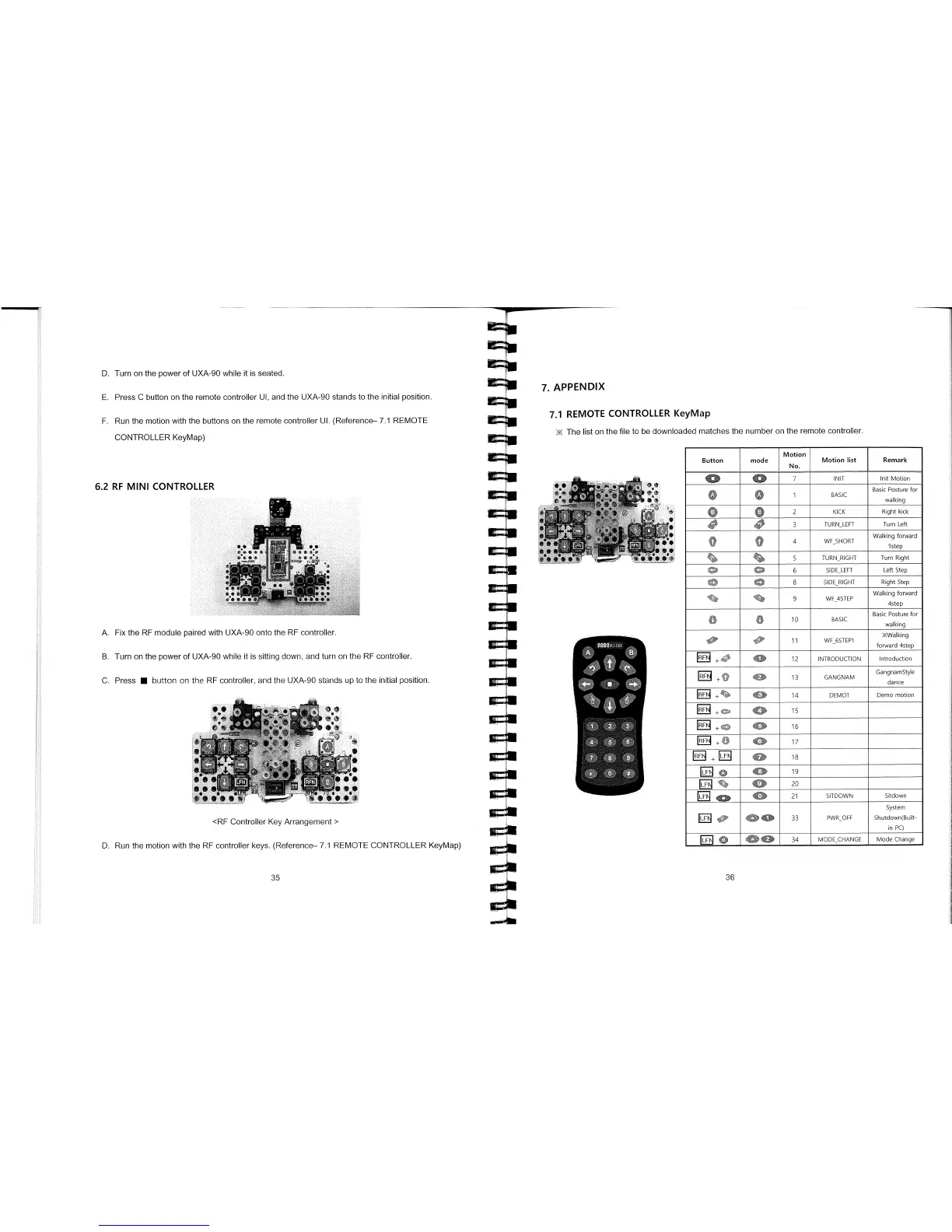
6.2 RF MINI CONTROLLER
A.
Fix the RE module paired with UXA90 onto the RE controller.
B.
Turn on the power of UXA-90 while it is sitting down, and turn on the RE controller.
C.
Press
•
button on the RE controller, and the UXA-90 stands up to the initial position.
<RE Controller Key Arrangement>
D.
Run the motion with the RE controller keys. (Reference— 7.1 REMOTE CONTROLLER KeyMap)
D.
Turn on the power of UXA-90 while it is seated.
7. APPENDIX
E.
Press C button on the remote controller UI, and the UXA-90 stands to the initial position.
F.
Run the motion with the buttons on the remote controller UI. (Reference— 7.1 REMOTE
7.1 REMOTE CONTROLLER KeyMap
CONTROLLER KeyMap)
The list on the file to be downloaded matches the number on the remote controller.
Button
mode
Motion
No.
Motion list
Remark
0
0
7
INIT
Init Motion
U
U
1
BASIC
Basic Posture for
walking
0
0
2
KICK
Right kick
40
3
TURN
-
LEFT
Turn Left
II
-
4
WF SHORT
Walking forward
istep
5
TURN
-
RIGHT
Turn Right
O
0
6
SIDE
-
LEFT
Left Step
O
0
8
SIDE
-
RIGHT
Right Step
9
WF_4STEP
Walking forward
4step
O
10
BASIC
Basic Posture for
walking
10
1
0
11
WF_6STEP1
KWaIking
forward 4step
+
400
12
INTRODUCTION
Introduction
RF
13
GANGNAM
GangnamStyle
dance
+
4
14
DEMO1
Demo motion
EE
+
tf
15
+0
400'
16
17
0
18
40
19
ED
'
4
~p
4
0
20
0
21
SITDOWN
Sitdown
rLF
dO'
404b
33
PWR_OFF
System
Shutdown(Built-
in PC)
IJ
0
40
34
MODE
-
CHANGE
ModeChange
35
1
1
36



 To Next Page