RBTNKDOC160609A
SystemElementsandMaintenanceManual
SUMMITXLmobileplatform
2.3ControlPanel
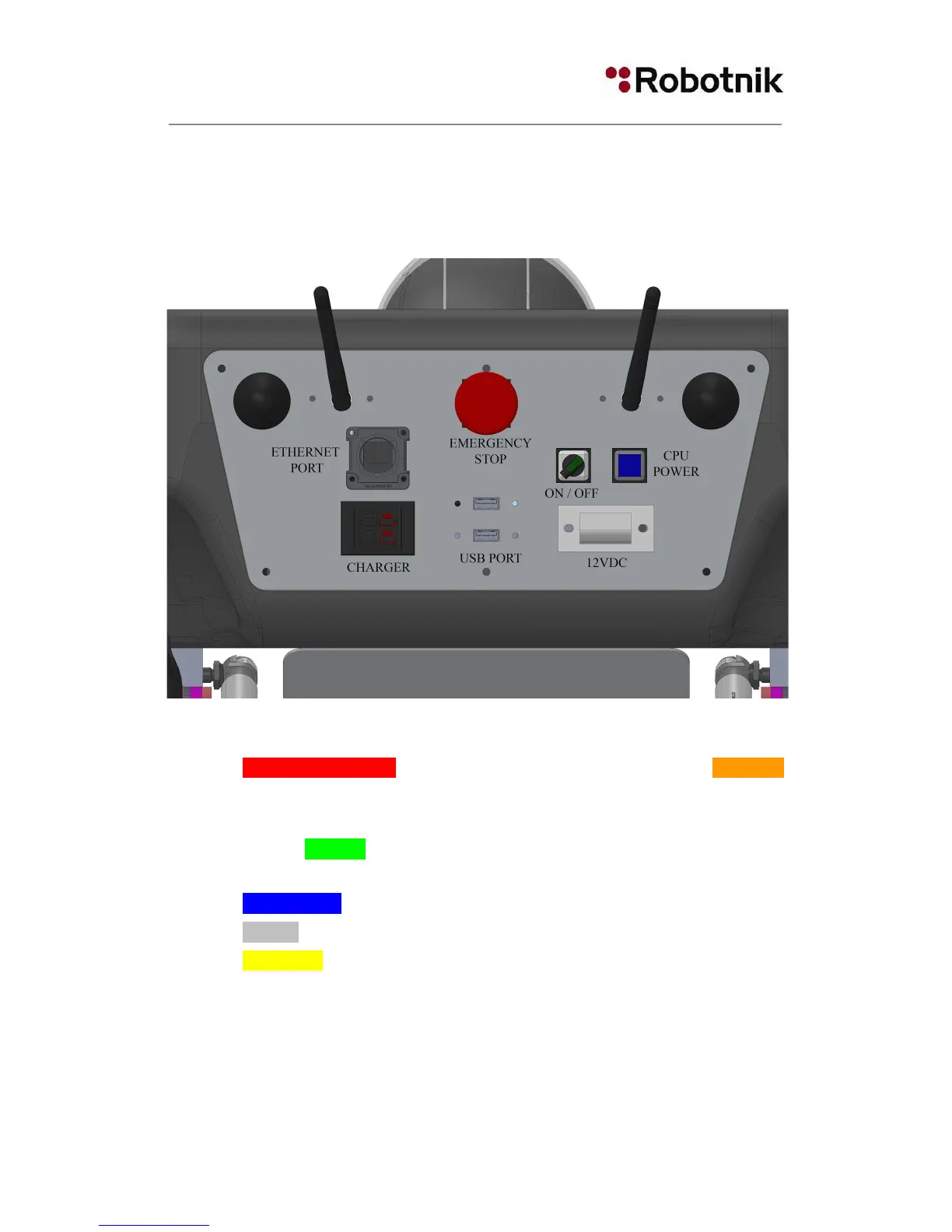
Therobotpresentsinitsbackcoverseveralbuttons,indicatorsandconnectors:
Figure5Controlpanel
EMERGENCY STOP will disable the drivers and stop the robot. CAUTION
there is no rearm button, so the robot will keep moving when the Emergency
Stopisreleased.
General ON/OFF key (S1): cuts the power of the whole robot. It has a green
lightindicator.
CPUPOWERblueindicator/switch:turnsonandoffthecomputer
12VDC:intendedtopowerexternaldevicesandprotectedwithfuse
CHARGER:toconnecttheprovidedbatterycharger
TwofreeUSB2.0ports
Ethernetport(bydefaultaWANport)
WiFiantennas
7


 To Next Page