Electrical installer
38
4
4.4.4 OCDS008 digital chronothermostat
How to connect the OCDS008 digital chrono-
thermostat
The chronothermostat must be installed on the
wall in a suitable position, using expansion screws.
Connection of OCDS008 chronothermostat is
made on OTRG005 thermoregulator, which is nec-
essary for the use of the chronothermostat.
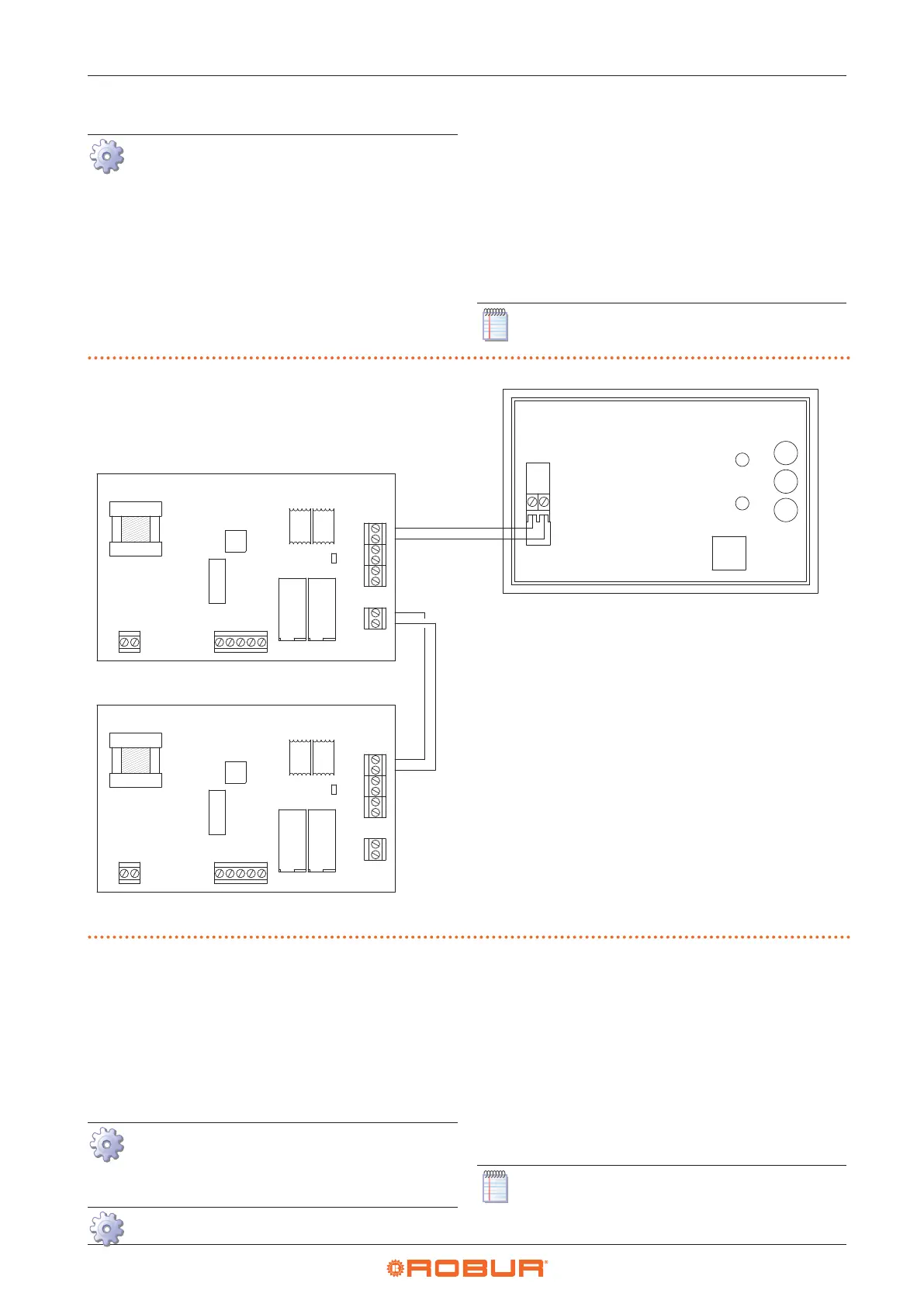
Make electrical connections as described in Figure
4.5
p.38
.
OTRG005 thermoregulator is connected as de-
scribed in Paragraph 4.4.3
p.37
.
To connect OCDS008 chronothermostat to
OTRG005 thermoregulator, use a two-pole cable
(e.g. H03RR-F or H03VV-F) with a section between
0,5 mm
2
and 2,5 mm
2
.
In rooms with high electromagnetic noise, it is rec-
ommended to use shielded cable.
For further information refer to the instruction
sheet supplied with the OCDS008 optional.
The cable may not be longer than 50 metres.
Figure4.5 OCDS008 digital chronothermostat connection
A OTRG005 thermoregulator B OCDS008 digital chronothermostat
1
2
J1
1
J2
1
2
J3
J4
J5
J6
1
2
1
2
1
2
2
3
4
5
1
2
J1
1
J2
1
2
J3
J4
J5
J6
1
2
1
2
1
2
2
3
4
5
JP
JP
A
4.4.5 OSWR000 Genius software for remote
management of gas unit heaters
OSWR000 Genius software for remote management of
gas unit heaters comes with a PC Windows setup package
and installation instructions.
The Modbus connection between the PC and OTRG005
thermoregulators must then be made, using the specic
USB/RS485 converter, supplied.
How to connect OTRG005 thermoregulator
OTRG005 thermoregulator is connected as de-
scribed in Paragraph 4.4.3
p.37
.
How to make Modbus connection
1. Access the J4 connection terminal block on OTRG005
thermoregulator.
2. Use unshielded 2x0,5 mm² twisted cable.
3. Connect the wires to the USB/RS485 converter termi-
nal block as shown in Figure 4.6
p.39
.
4. Insert the USB converter into the PC. The device driv-
ers will be downloaded and installed automatically if
the PC is online.
5. For further information refer to the instruction sheet
supplied with the OSWR000 Genius software.
The cable may not be longer than 1100 metres.


 To Next Page