Robustel M1200 User Guide
RT_UG_M1200_v.1.0.2 9 Apr., 2018 37/78
3.6 Interface > Link Manager
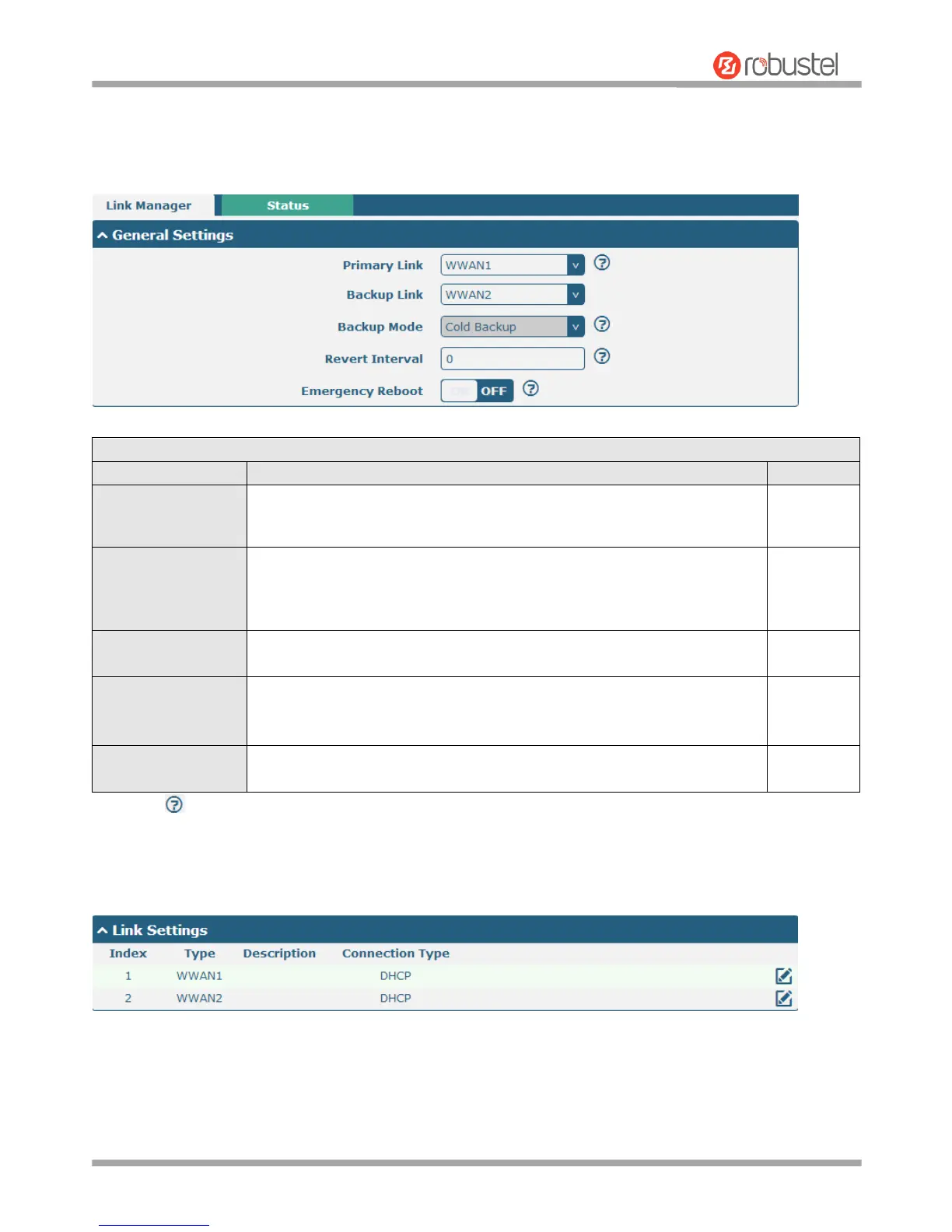
This section allows you to setup the link connection.
General Settings @ Link Manager
Select from “WWAN1” or “WWAN2”.
WWAN1: Select to make SIM1 as the primary wireless link
WWAN2: Select to make SIM2 as the primary wireless link
Select from “WWAN1”, “WWAN2”, or “None”.
WWAN1: Select to make SIM1 as backup wireless link
WWAN2: Select to make SIM2 as backup wireless link
None: Do not select any backup link
Can only select from “Cold Backup”.
Cold Backup: The inactive link is offline on standby
Specify the number of minutes that elapses before the primary link is
checked if a backup link is being used in cold backup mode. 0 means disable
checking.
Click the toggle button to enable/disable this option. Enable to reboot the
whole system if no links available.
Note: Click for help.
Link Settings allows you to configure the parameters of link connection, including WWAN1/WWAN2, WAN and WLAN.
It is recommended to enable Ping detection to keep the gateway always online. The Ping detection increases the
reliability and also costs the data traffic.


 To Next Page