Robustel M1200 User Guide
RT_UG_M1200_v.1.0.2 9 Apr., 2018 73/78
3.25 System > User Management
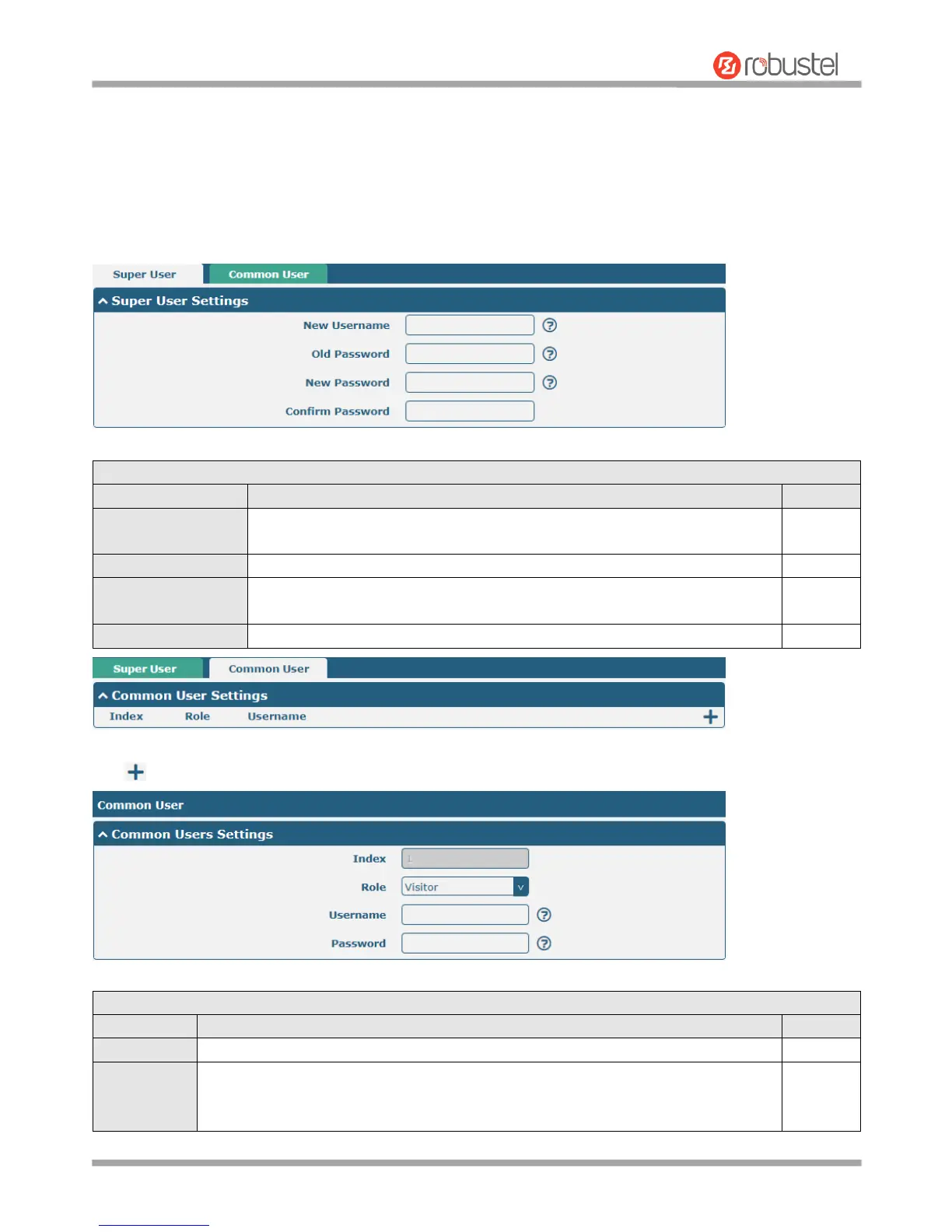
This section allows you to change your username and password, and create or manage user accounts. One gateway
has only one super user who has the highest authority to modify, add and manage other common users.
Note: Your new password must be more than 5 character and less than 32 characters and may contain numbers,
upper and lowercase letters, and standard symbols.
Enter a new username you want to create; valid characters are a-z, A-Z, 0-9,
@, ., -, #, $, and *. If you do not want to modify the username, leave it blank.
Enter the old password of your gateway. The default is “admin”.
Enter a new password you want to create; valid characters are a-z, A-Z, 0-9,
@, ., -, #, $, and *.
Enter the new password again to confirm.
Click button to add a new common user. The maximum rule count is 5.
Indicate the ordinal of the list.
Select from “Visitor” and “Editor”.
Visitor: Users only can view the configuration of gateway under this level
Editor: Users can view and set the configuration of gateway under this level


 To Next Page