Robustel M1200 User Guide
RT_UG_M1200_v.1.0.2 9 Apr., 2018 39/78
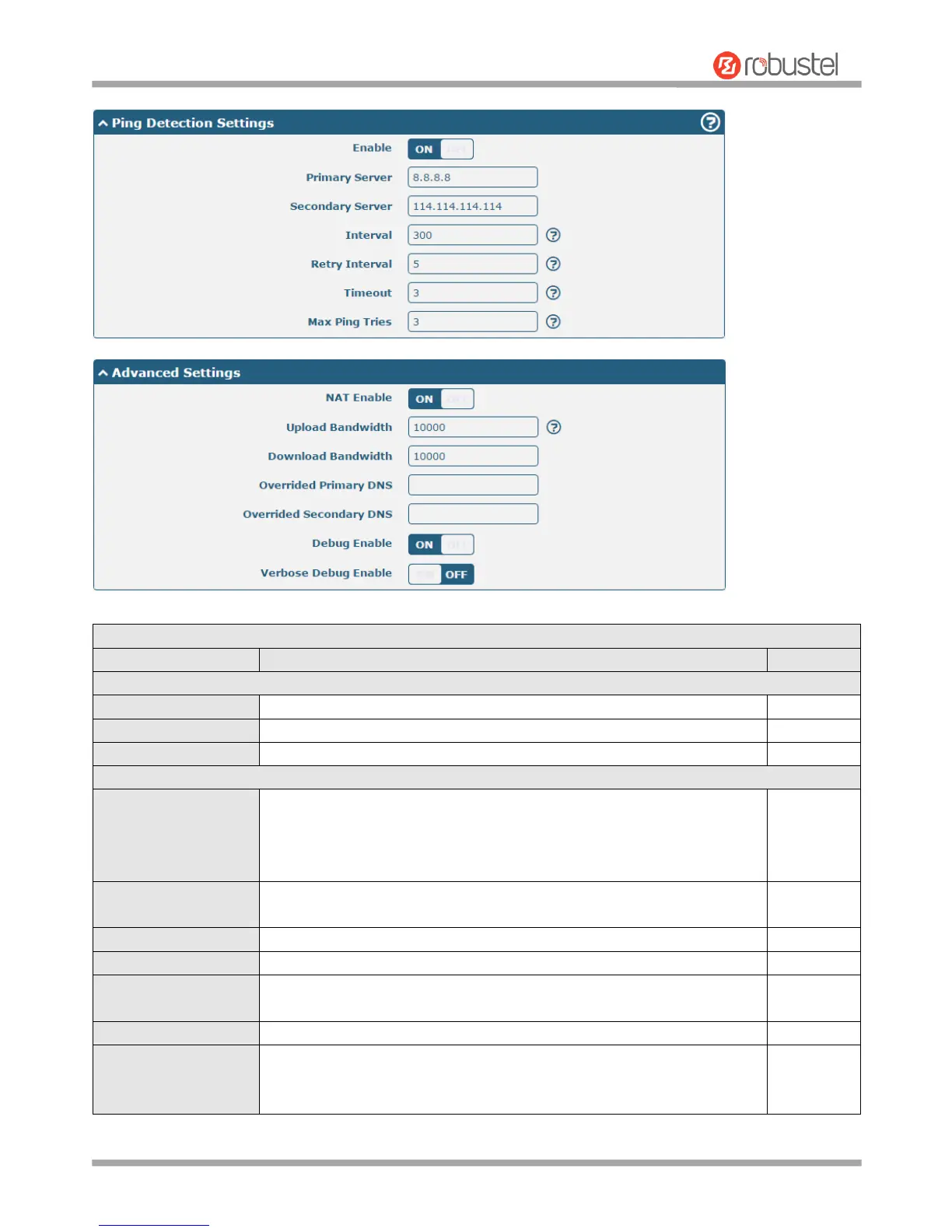
Indicate the ordinal of the list.
Show the type of the link.
Enter a description for this link.
Click the toggle button to enable/disable the “Automatic APN Selection”
option. After enabling, the device will recognize the access point name
automatically. Alternatively, you can disable this option and manually add
the access point name.
Enter the Access Point Name for cellular dial-up connection, provided by
local ISP.
Enter the username for cellular dial-up connection, provided by local ISP.
Enter the password for cellular dial-up connection, provided by local ISP.
Enter the dialup number for cellular dial-up connection, provided by local
ISP.
Select from “Auto”, “PAP” or “CHAP” as the local ISP required.
Switch SIM By Data
Allowance
Click the toggle button to enable/disable this option. After enabling, it will
switch to another SIM when the data limit reached.
Note: Only used for dual-SIM backup.


 To Next Page