EasyManua.ls Logo

Roland SUPER JX - Page 34

Roland SUPER JX
88 pages
Print Icon
To Next Page IconTo Next Page
To Previous Page IconTo Previous Page
Loading...
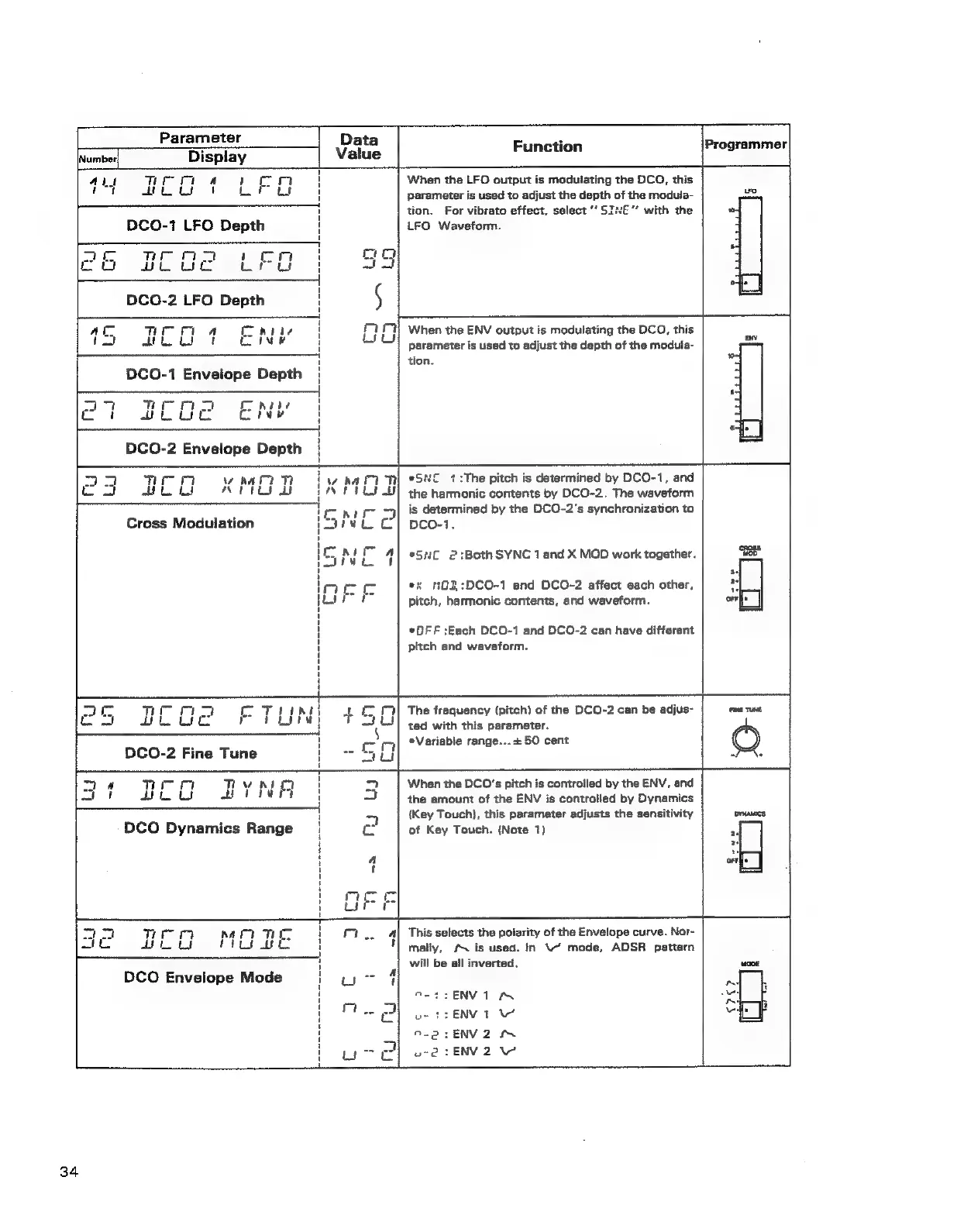
Parameter
Function
Programmer
Number
Display
Aus
Tei
Tt
a
rom
When
the
LFO
output
is
modulating
the
DCO,
this
ry
Aho
eb
FL
DCO-1
LFO
Depth
LFO
Waveform.
parameter
is
used
to
adjust
the
depth
of
the
modula-
ue.
tion.
For
vibrato
effect,
select
“’
SINE’
with
the
l
am
Teo
1
on
mo
Z
coo
blue
uwru
}
nas
ee
6
1
DCO-2
LFO
Depth
1
§
|
ee
ee
ee
La
ac
TIT
aA
pile
'
i
Hi
When
the
ENV
output
is
modulating
the
DCO,
this
pa
-
hu
|
ad
H
parameter
is
used
to
adjust
the
depth
of
the
modula-
H
tion.
2,
DCO-1
Envelope
Depth
|
|
*
77
TH
a
nae
I
Or
wooc
cre
|
ec
annae
°.
i
DCO-2
Envelope
Depth
boar
ace
THT
ww
hat?
TH
i
wo
haA
TT
eSNC
4
:The
pitch
is
determined
by
DCO-1,
and
co
oh
werts
dt
tN
FTL)
the
harmonic
contents
by
DCO-2.
The
waveform
craic
nls
determined
by
the
DCO-2’s
synchronization
to
Cross
Modulation
2jie¥t
CC}
pco-1.
SMD
|
esac
2:Both
SYNC
1
and
X
MOD
work
together.
ies
.|
on
ex
Q3,:DCO-1
and
DCO-2
affect
each
other,
7]
me
pitch,
harmonic
contents,
and
waveform.
OFF
*OFF
:;Each
DCO-1
and
DCO-2
can
have
different
pitch
and
waveform.
po
Ee
a
The
frequency
(pitch)
of
the
DCO-2
can
be
adjus-
ted
with
this
parameter.
*Variable
range...
+
50
cent
When
the
DCO's
pitch
is
controlled
by
the
ENV,
and
the
amount
of
the
ENV
is
controlled
by
Dynamics
{Key
Touch},
this
parameter
adjusts
the
sensitivity
DrHaMics,
of
Key
Touch.
{Note
1)
DCO-2
Fine
Tune
tigen
m4
nim
HM
Thy
wit
Sor
kek
ae
DCO
Dynamics
Range
This
selects
the
poiarity
of
the
Envelope
curve.
Nor-
mally,
#
is
used.
In
\“
mode,
ADSR
pattern
will
be
all
inverted,
ew.
DENVION
us
S$:
ENV
T
e-2:ENV2
&
wre@
1ENVZ
eae,
34