50
部件更换
Replacement of the filter components
Attention
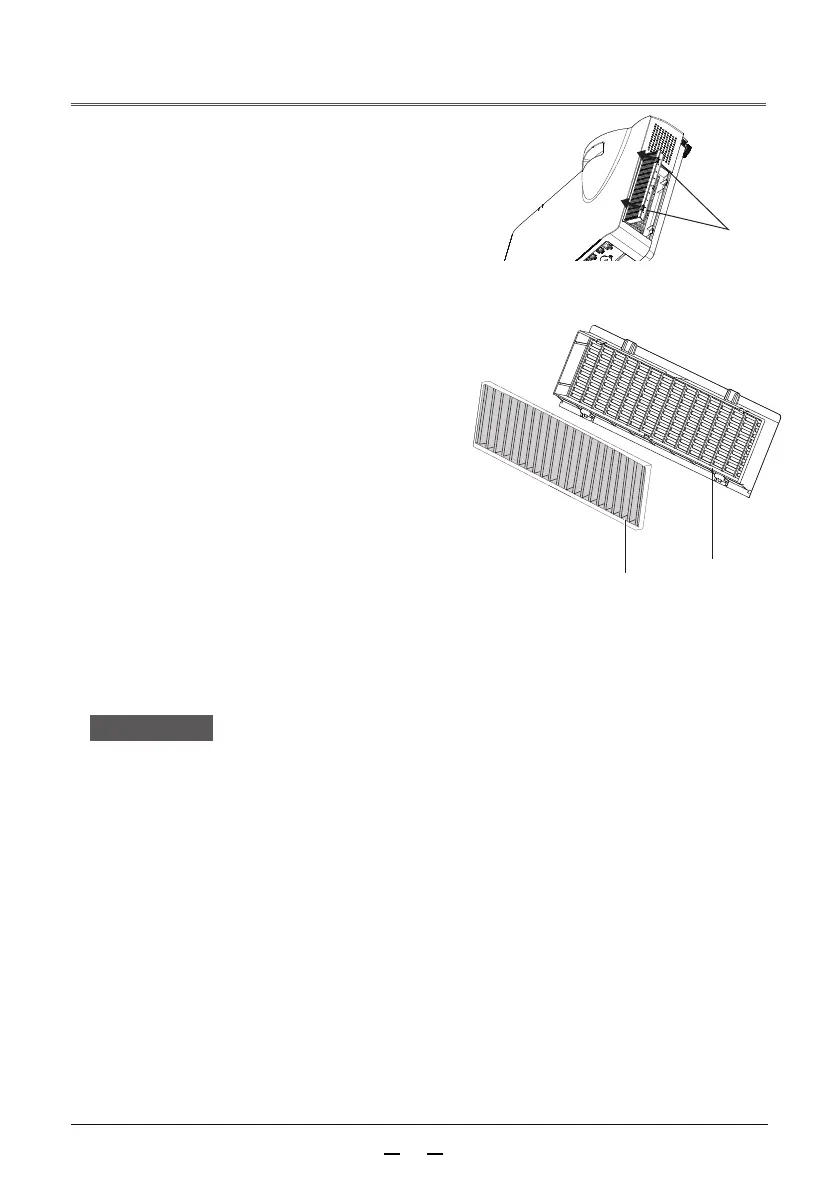
Filter screen
Turn off the power before replacing the filter
After replacing the filter, you should reset the filter timer. Otherwise,
the power of projector may be turn off to ensure the safety
Please contact an authorized dealer to purchase the filter components
for replacement.
Please use customized filter components to replace
Do not put small object to the air intake vent, Otherwise, it may
cause the projector to malfunction.
After removing the filter components, please do not operate the
projector. Otherwise, the dust will adhere to the lens components
to damage the image quality
When installing the filter, please make sure that the projector is
stable and in a safe working environment to prevent the filter
from falling
Screen cover
(projector air inlet)
Handle
1 )
2 )
3 )
4 )
5 )
6 )
Turn off the projector and unplug the AC
power cord from the power socket
Removing the dust from the projector surface
and around the suction hole
Removing the filter components
Pull the Electrostatic dustproof net
upwards in the direction of the arrow,
and take out the filter components.
Removing the filter
Removing the filter from the filter cover
After removing the filter, please
eliminate the garbage and dust from
the filter storage room and projector
air intake vent
Reinstall a new filter
Make sure that the filter components are
fully loaded into the projector
Reset the filter count
Turn on the power, in the Execute of the
(Filter Counter Reset) in (Advanced Settings)
menu



 To Next Page