Controller functions
UPT-640 (as of SW 100) 23
9 Controller functions
See also Kap. 7.6 „Wiring diagram (standard)“ auf
Seite 15.
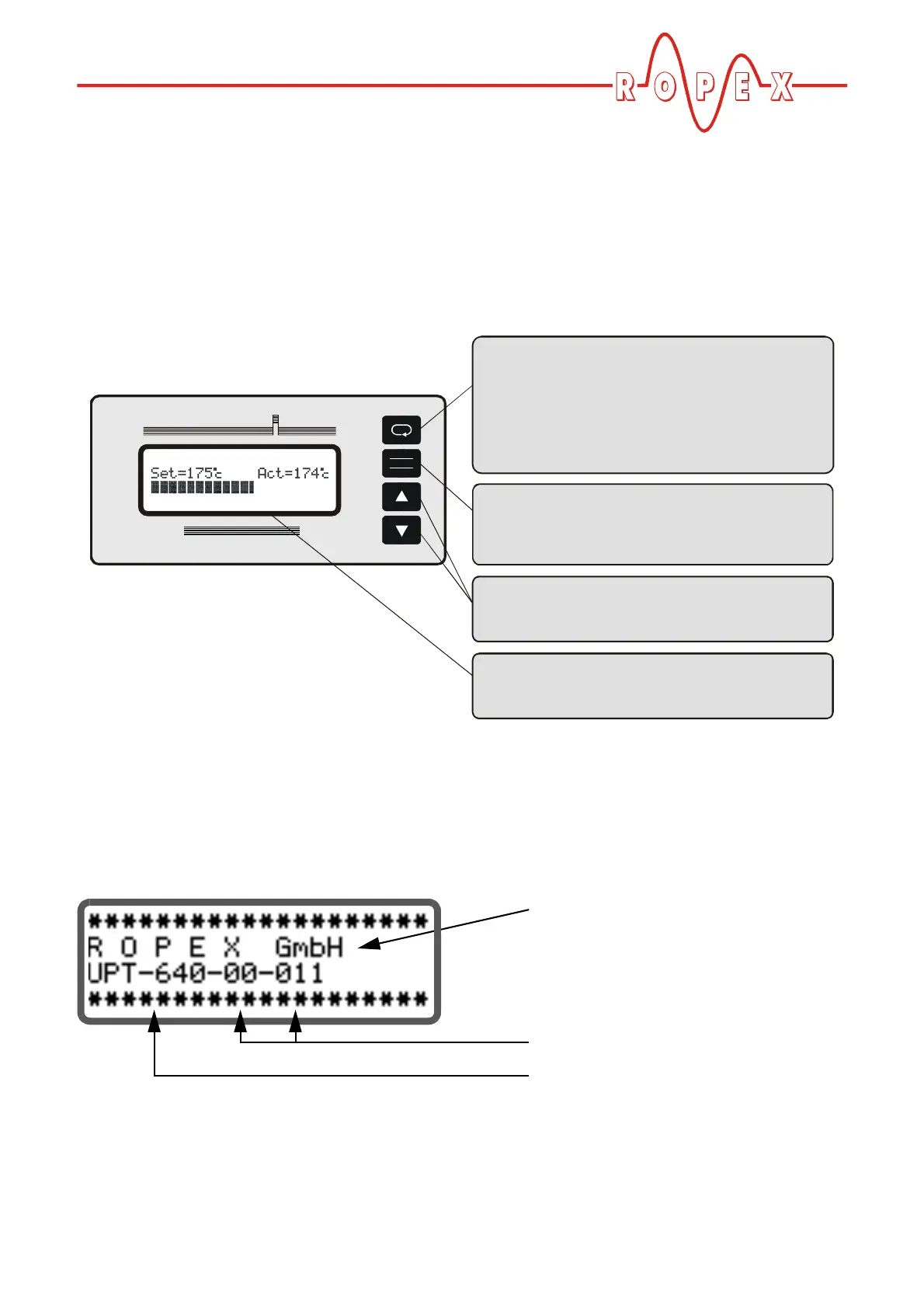
9.1 Indicators and controls
9.2 Display
9.2.1 Power-up message
A power-up message appears on the display for appro-
ximately 2 seconds when the controller is switched on.
This message also includes details of the software ver-
sion.
ENTER
HAND
RESET
Ultra Pulse
UPT-640
ROPEX
CIRUS Heater System
"MENU" key for advancing to next menu step
or switching menu
< 1 sec. Press: Next menu step
1-2 sec. Press: Return to previous
position
> 2 sec. Press (Hold):
Return to home position
"ENTER" key
ENTER function:
HAND function:
RESET function:
Save values
Manual mode
Reset after alarm
"UP" and "DOWN" keys for setting values
Press (< 2 sec.): Slow change
Hold (> 2 sec.): Fast change
LC display, 4 lines, multilingual
isplay, 4 lines, multilingual
optional:
VF d
Company name
(optional: customer-specific)
Software ID number
Controller type (UPT-640)





 To Next Page