C o ntro lle r Func tio na lity
AYC-Fx4 a nd AYC-G x4 fa mily ma nua l Pa g e 47
Enrolling Primary and Secondary Codes
The re a re two m e tho d s to e nro ll Prima ry a nd Se c o nd a ry c o d e s,
the Sta nd a rd Me tho d a nd the C o d e Se a rc h Me tho d .
• The Sta nd a rd Me tho d is ma inly use d whe n the Use r Slo t
num b e r fo r the use r yo u wish to p ro g ra m is kno wn. Yo u c a n
p ro g ra m b o th Prima ry a nd Se c o nd a ry C o d e s using the
Sta nd a rd m e tho d . (Se e Enro lling Prima ry a nd Se c o nd a ry
C o d e s using the Sta nd a rd Me tho d o n p a g e 47.)
• The C o d e Se a rc h Me tho d is m a inly use d w he n e nro lling a
use r’ s Se c o nd a ry C o d e a nd the Use r Slo t C o d e is unkno wn.
The C o d e Se a rc h me tho d o nly wo rks if a use r’ s Prim a ry C o d e is
a lre a d y e nro lle d b ut the Se c o nd a ry C o d e is no t. (Se e Enro lling
Se c o nd a ry C o d e s using the C o d e Se a rc h Me tho d o n p a g e 48.)
Enrolling Primary and Secondary Codes using the Standard Method
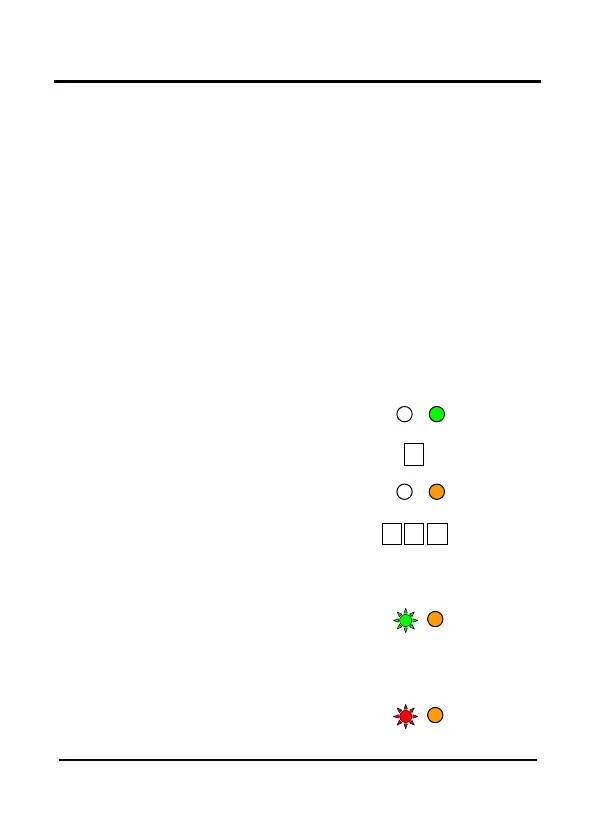
1) Ente r the Pro g ra mming
Mo d e .
2) Pre ss 7 to e nte r Me nu 7.
• The Do o r LED will turn
o ra ng e
3) Ente r the 3-d ig it Use r Slo t num b e r
b e twe e n 001a nd 500 tha t yo u wish to
e nro ll a Prim a ry o r Se c o nd a ry c o d e to . Fo r e xa m p le , Use r Slo t
003 re p re se nts Use r # 3.
• If the se le c te d slo t ha s no Prima ry C o d e , the Mo d e LED will
fla sh g re e n, ind ic a ting
tha t the c o ntro lle r is re a d y
to a c c e p t a Prim a ry C o d e .
• If the se le c te d slo t a lre a d y ha s a Prim a ry C o d e b ut no
Se c o nd a ry C o d e , the Mo d e LED will fla sh re d , ind ic a ting
tha t the c o ntro lle r is re a d y
to a c c e p t a Se c o nd a ry
C o d e .


 To Next Page
 Loading...