ADVANCED
PROGRAMMING
USE
"PRG"
MODE
FOR
ALL
PROGRAMMING
B. Settlng a tax
IInl<lslngle
Item sale.
(Single
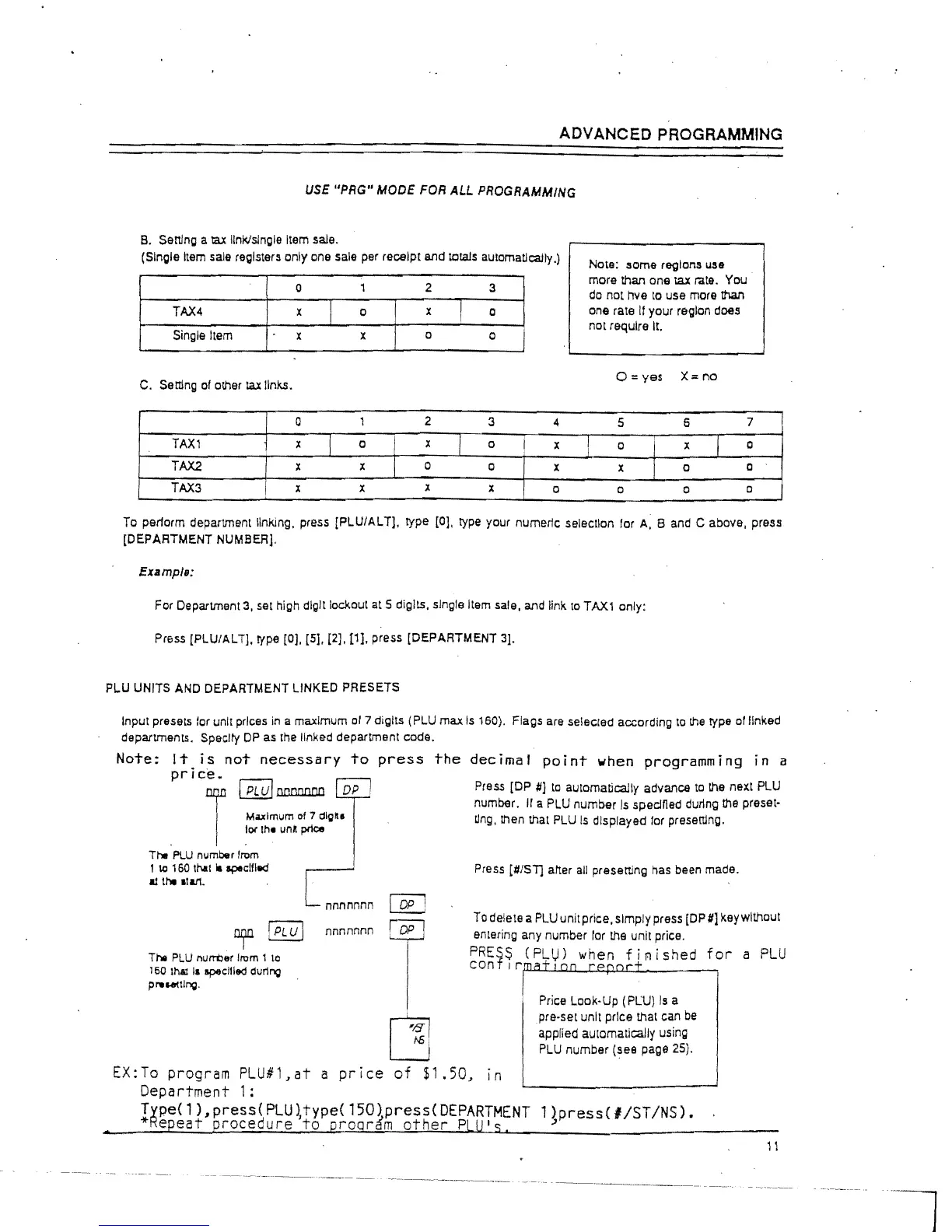
Item sale registers only one sale per receipt and totals automatically.)
0
1
2 3
TAX4
x
I
a
x
I
a
Single Item x
x
a
a
C.
Ser:I1ng
of other tax links.
a
1
2
3
4
TAX1
x
I
a
I
x
I
0
I x
TAX2
x x
1
0
a
x
TAX3
x
x
x
x
a
j
Note: lIome regions use
more than one taX rate. You
do
not hve
to
use more
that'I
one rate
If
your region does
not require It.
0=
yes X=
no
5 6
7
a x
1
0
x
a
0
a 0
a
To pet10rm department linking. press [PLUIAL
Tj,
type
[OJ,
type your numeric selection for
A,
Band
C above, press
[DEPARTMENT
NUMBERj.
Example:
For Department
3,
set high digit lockout at 5 digits, single Item sale, and link
to
TAX1
only:
Press [PLUlALT]. type
[OJ.
[5]. [2].11]. press [DEPARTMENT 3].
PLU UNITS AND DEPARTMENT LINKED PRESETS
Input
presets for unit prices
in
a maxImum
of
7 digits (PLU max
Is
160). Flags are selected according
to
the
type
01
linked
departments. Speclty
OP
as
the
linked department code.
Note:
It
is
not
necessary
to
press
the
decimal
point
when
programming in a
price.
r
I
PLUI
oonnnnn
DP
Maximum of 7 dig
••
10(
the
\InA
price
. .
The
FlU
number from
1
\0
160
thaI
II
specilled
1Il
the
11&11.
rnr
!
PLU
I
The
PLU
l'Iurrt)er from 1 10
160 IhAl
1&
specified during
preWlllng.
nnnnnnn
nnnnnnn
Press [DP
#jto
automatically advance
to
the
next PLU
number.
Ir
a PLU number
Is
specJned durlng
the
preset-
tlng. then that PLU
Is
displayed for
presertJng.
Press [#/ST] alter
all
presertJng
has
been made.
To
delete a
PLU
unit price, simply press [OP#] key without
entering any number lor the unit price.
PRESS
(PL~)
when
fj~jshed
for
a
PLU
conflr~~~~~~~~
______ ,
Price Look-Up
(PL:U)
Is
a
pre-set unit price that can
be
applied automatically using
PLU
number (see page 25).
EX:To
program PLU#1,at a
price
of
$1.50,
In
Department 1:
Type(1),press(PLU~type(150)press(DEPARTMENT
l)press(IIST/NS).
*Repeat
procedure
to
proqr~m
other
PLU's,
~
11



 To Next Page