ADVANC~D
PROGRAMMING
USE
"PRG"
MODE
FOR
ALL PROGRAMMING
Adal~onally.
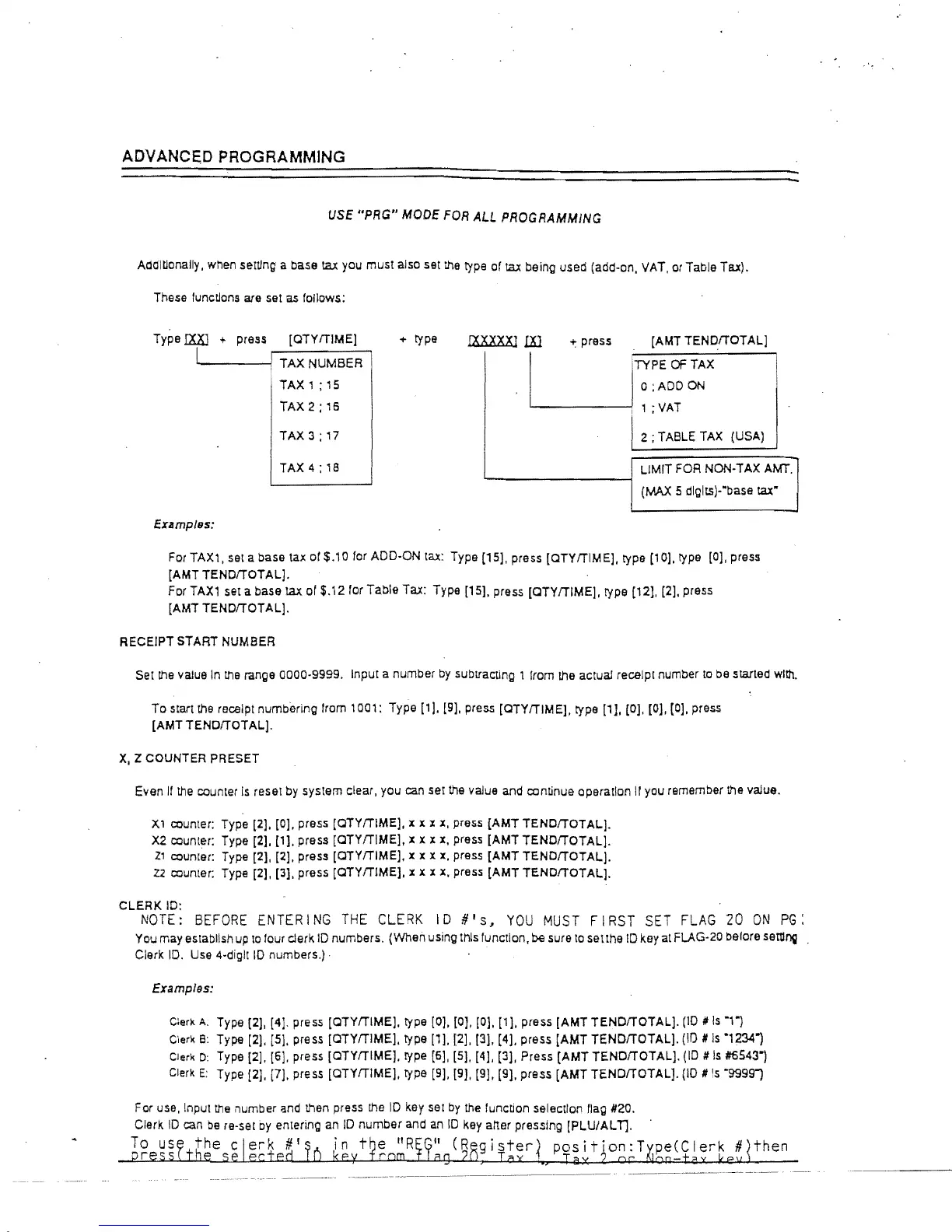
when setting a base tax you must also set
the
type of tax being used (add-on. VAT.
or
Table Tax).
These
functions are set as follows:
Type
IXXl
+ press
[QTYfTlME]
"-----{:
TAX
NUMBER
.
TAX
1 :
15
TAX
2;
16
+ type
(Ox
XXX]
W
+ press
[AMT
TENDfTOTAL]
UTYPEOFTAX·
o
;ADD
ON
I
1;
VAT
TAX3;17
12;
TABLE TAX (USA)
TAX
4;
18
LIMIT
FOR
NON-TAX AMT.
(MAX 5 dlglts)-"base tax"
Examples:
For TAX1. set a base tax
or
$.10 for ADD-ON tax: Type [15]. press [QTYfTlME]. type [10]. type [0], press
[AMT
TENDfTOTAL].
For TAX1 sel a base tax of $.12 for Table Tax: Type [15]. press
[QTYfTlME].
type [12J,
[2].
press
[AMT
TENDITOTAL].
RECEIPT
START NUMBER
Set
the
value
In
Ille range 0000-9999. Input a number
by
subtracting 1 from the actual receipt number
to
be started with.
To
start
the
receipt numbering from 1001: Type [1]. [9]. press [QTYfTlMEJ, type
[11.
[0]. [0].
[0].
press
[AMT
TENDITOT
AL].
x,
Z COUNTER PRESET
Even
If
the
counter
Is
reset by system clear. you can set
the
value and continue operation
II
you remember the value.
Xl
counter: Type [2]. [0]. press
[QTYfTlME].
x x x
x.
press
[AMT
TENOfTOTAL].
X2
counter: Type [2], [1]. press
[QTYfTlME].
x x x
x.
press
[AMT
TENDfTOTAL].
Zl
counter: Type [2]. [2]. press [QTYfTlME]. x x x
x.
press
[AMT
TENDITOTAL].
Z2
counter: Type [2], [3]. press
[QTYfTlME].
x x x x. press
[AMT
TENOfTOTALj.
CLERK
10:
NOTE:
BEFORE
ENTERING
THE
CLERK
ID
U's,
YOU
MUST
FIRST
SET
FLAG
20
ON
PG:
You may establish up
to
four clerk
10
numbers. (When using this function. be sure
to
se!the
ID key at FLAG-20 before settll'lij
Clerk
ID.
Use 4-digll
10
numbers.) .
Examplss:
Cler~
A. Type [2],
[41.
press [QTYfTlME]. type [0].
[OJ.
[0]. [1]. press
[AMT
TENDITOTALJ.
(10
#
Is
T)
C',er\(
8:
Type [2].
[51.
press [QTYITIME]. type [1l. [2]. [3]. [4]. press
{AMT
TENDITOTAL].
(10
#
Is
·1234)
Cieri< D Type [2]. [6]. press [QTYfTlMEJ. type [6]. [5]. [4). [3]. Press
[AMTTENDITOTAL].
(ID
#
Is
#5543")
Clerk
E:
Type {2]. [7]. press [QTYITIME). type [9].
[9J.
[9]. [9J. press
[AMT
TENDfTOTALj.
(10
#
is
"99991
then



 To Next Page