GETIING
TO KNOW YOUR CASH REGISTER
FEED
5
DEPT
SHIFT
14
mm
PLU
PLU
4
9
CHG
-%
ALT
7
8
9
13
18
OrYl
TAX 2
PO
RA
TIME
4
5
5
3
8
12
17
VOID
TAX
I
ST
liST
2
3
2
7
WITAX
NS
11
16
C
NON
AMT
TEND
I
TAX
0
00
6
TOTAL
10
15
d5
8cbcb
KEYBOARD
AND KEY FUNCTIONS
1.
2.
3.
4.
5.
6.
7.
B.
[PLU]
[PLU/AL
T]
[QTYfTlME]
[VOID]
[C]
[NON TAX]
rrAX1] rrAX2]
[0]-
[9];
[00]
[.]
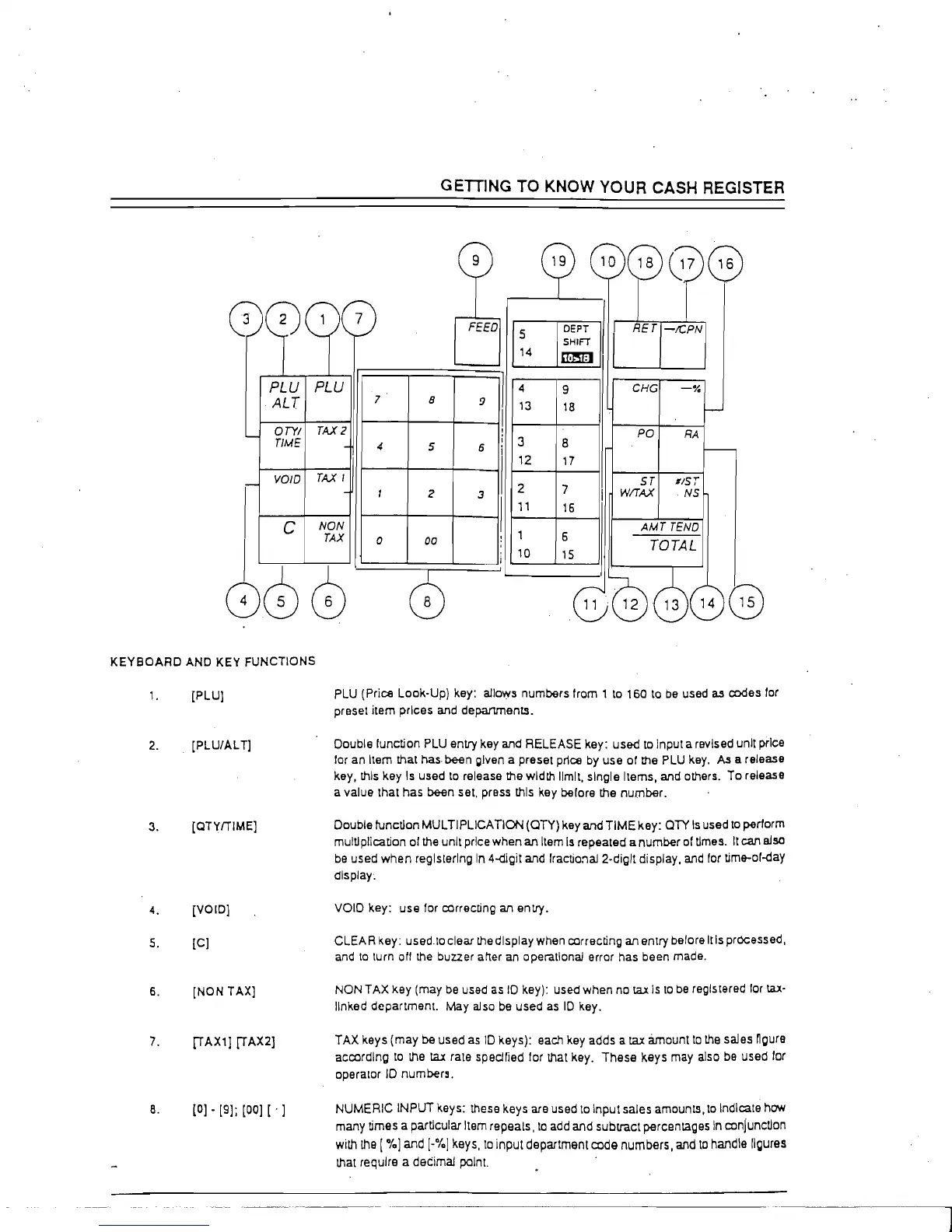
PLU (Price Look-Up) key: allows numbers from 1
to
160 to
be
used as codes for
preset item prices
and departments_
Double function PLU entry key and RELEASE key: used
to
Input a revised unit price
for
an Item that has· been gfven a preset price by use of the PLU key. As a release
key, this key
Is
used
to
release the width limit, single Items, and others. To release
a value that has
been set. press this key belore the number.
Double
function MULTIPLICATION (OTY) key and
TIME
key: OTY
Is
used
to
perform
multiplication of the unit price when
an Item
Is
repeated a number of times.
It
can also
be
used
when
reglslerlng
In
4-oigit and fractio!'1al 2-diglt display, and for tim&-of-day
dlsplay~
VOID key: use for correcting an entry.
CLEAR Key: used.to clear
the
display when correcting an entry before Itls processed,
and
to
turn ott the buzzer after an operational error has been made.
NON TAX key (may be used as
10
key): used when no
tax
Is
to
be
regiS
tered lor tax-
linked department.
May
also
be
used
as
10
key.
TAX keys (may be used
as
10
keys): each key adds a
t.ax
amount
to
the
saJes
ngure
according
to
the tal: rate spedried for that key.
These
keys may also
be
used
for
operator
10
number9.
NUMERIC INPUT keys: these keys are used
to
Input sales amounts,
to
Indicate how
many times a particular
Item repeals,
to
add and subtract percentages
In
conjunction
with
the
["!oJ
and
[-"!oj
keys,
to
input department code numbers, and
to
handle figures
that require a decimaJ point.
..
~-------



 To Next Page