I
ADVANCED PROGRAMMING
=
==============~==============~~
...,
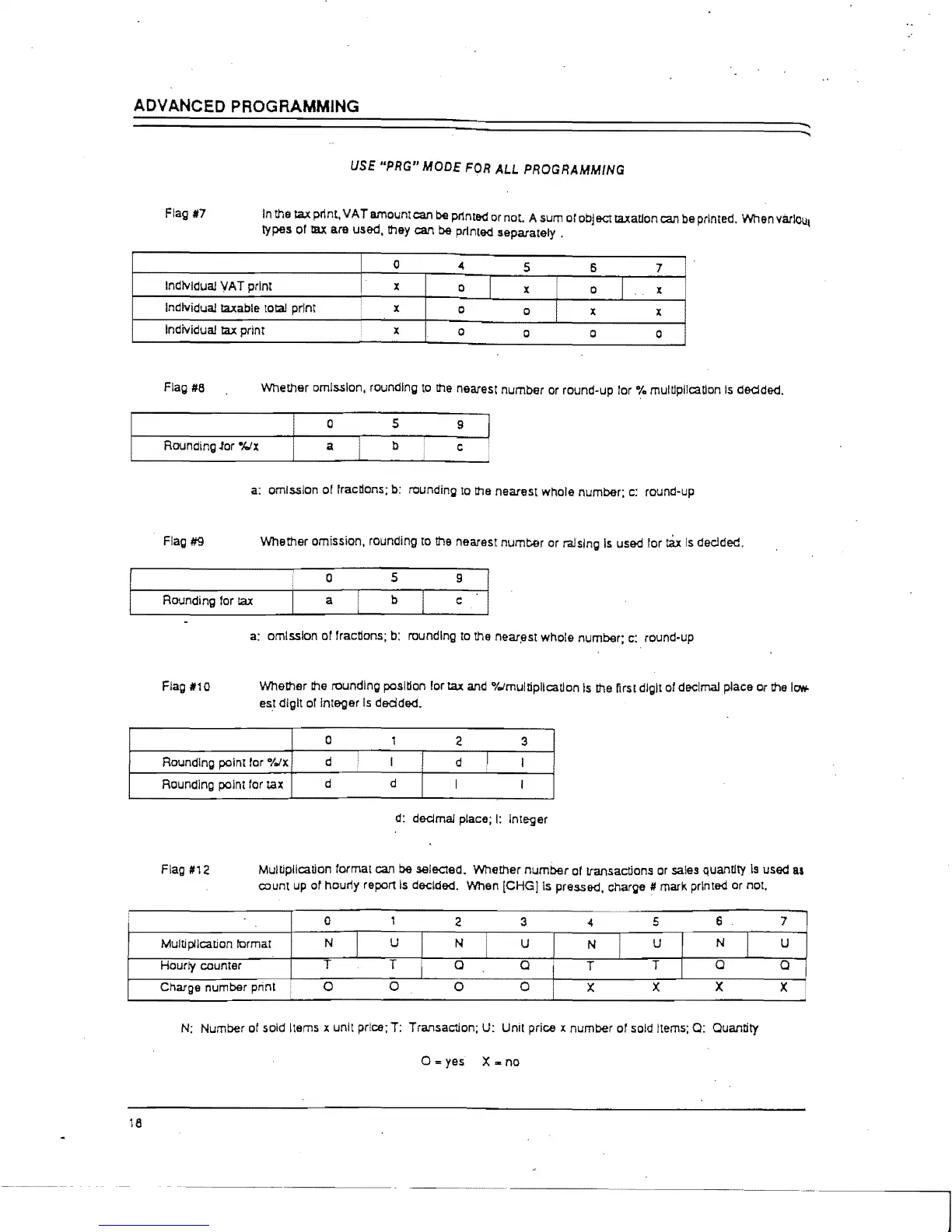
Flag #7
USE
"PRG"
MODE
FOR
ALL
PROGRAMMING
In
the tax plint.
VAT
amount can be plinted
or
not. A sum
01
obj
&C!
taxatlon can be printed. When varlou,
types
01
tax are used, they can be printed
separately.
7
Individual
VAT
print
x
Individual taxable total
Individual
tax
print
x
o
Flag #8
Whether
omission. rounding
to
the nearest
number
or round-up lor % multiplication
Is
dedded.
o 5
9
Rounding .tor
-klx
a
b
c
a: omission
of
fractions;
b:
rounding to the nearest
whole
number;
c:
round-up
Flag #9
Whether
omission. rounding to !he nearest
number
or ra.!slngls used
lor
tax
Is
declded.
o
5
Rounding for
laX
a
b
a; omission
or
fractions;
b:
rounding to the neari:lst
whole
number; c: round-up
Flag
#10
Whether the rounding position
lor
tax and "to/multiplication
Is
!he nrs! digit
01
decimal place
or
!he
It'T1\Io
esl digit of Integer
Is
dOOded.
0
1
<!
3
I Rounding point lor
"to/x
d I
d
I
I
I
18
Rounding point lor tax
d
d
I I
d:
dedmal
place;
I:
Integer
Flag
#1<!
MuWplication format can be sei&C!ed. Whether
number
01
transactions
or
sales quantity
Is
used
II
count up or hour1y report
Is
decided. When
[CHG]Is
pressed. charge # mark printed or not.
5
6 7
U
N
U
T
Q
Q
x x
x
N: Number of sold Items x unit price; T: Transaction; U: Unit price x
number
or sold Items; Q: Quantity
0=
yes X m
no



 To Next Page