Version 1.4 Page | 15
4.4 The Keypad
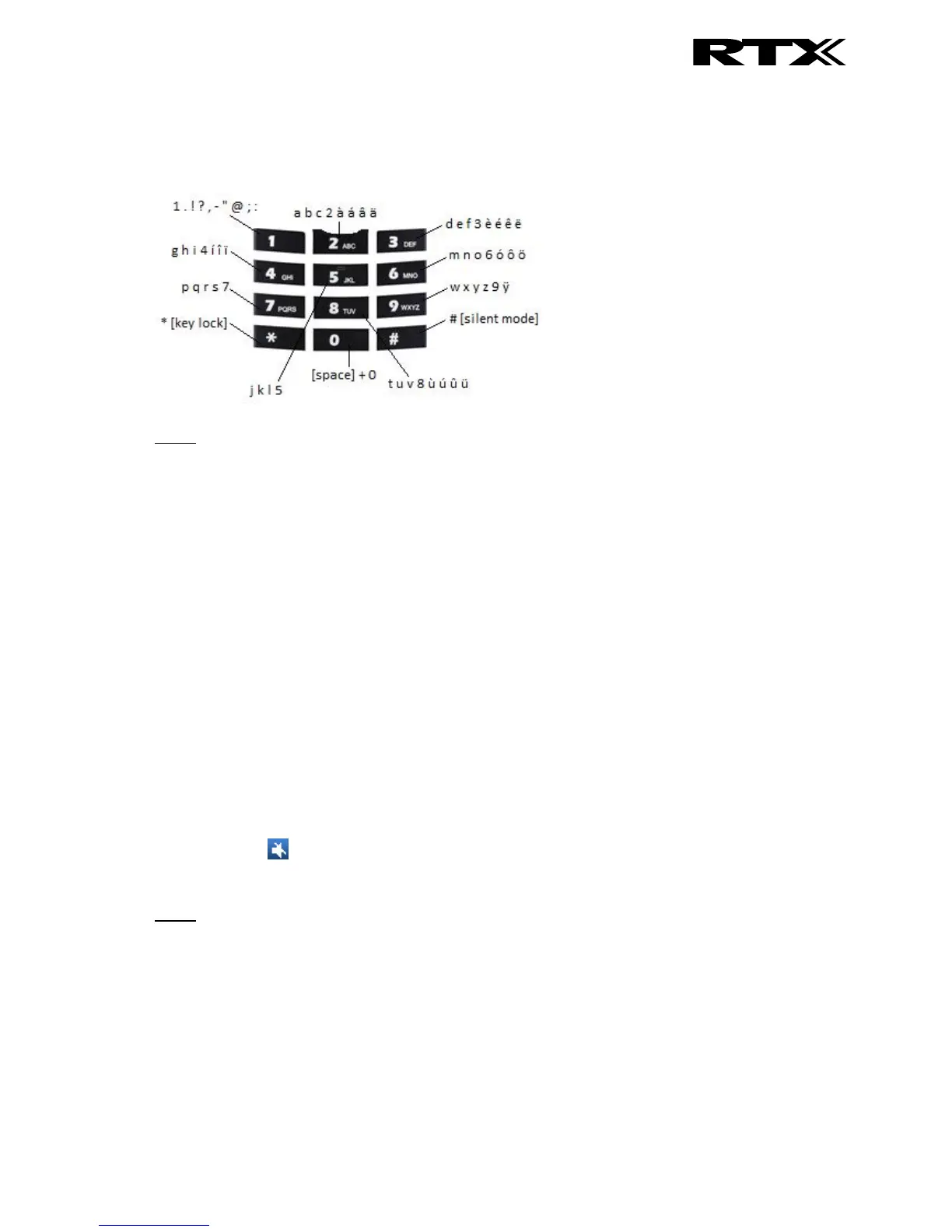
The keypad is used when entering a name or number, and the sketch below shows the available
characters on the handset.
NOTE: Depended on the selected menu language, other characters can be available. Therefore the
character order can differ from the table above.
4.4.1 Idle Mode, and Number Input Mode
When in idle a short press on a key enters the digits “0” – “9” and the characters * and #.
In number input mode, a long press on “0” generates a +.
4.4.2 In Text Input Mode
While in text input mode a short press on a key 0-9 displays the first available character on that
specific key. The marked character is then selected after a timeout, or when another key is pressed.
By pressing the *-key it is possible to change the text to be upper/lower case or only numeric (Abc,
abc, ABC, or 123).
Use the 0 to add a space in the text.
4.4.3 Silent Mode from #-Key
By long-pressing the #-key when the handset is in idle, the handset will turn to silent mode, and a
“Sound Off” icon will be shown in the status bar. This feature enables that the user rapidly can turn
on silent mode. To turn off silent mode again long press the #-key.
NOTE: When this mode is enabled it is possible to switch on the vibrator on the handset in Settings >
Audio Settings > Vibrator (see 6.5.1.5 Vibrator for further information). Please note that all the other
audio settings will be greyed out when the handset is in this silent mode.



 To Next Page