Version 1.4 Page | 21
6.1.4.1 How to setup speed dial
Prerequisite: There must be at least one contact in the contact list.
Steps:
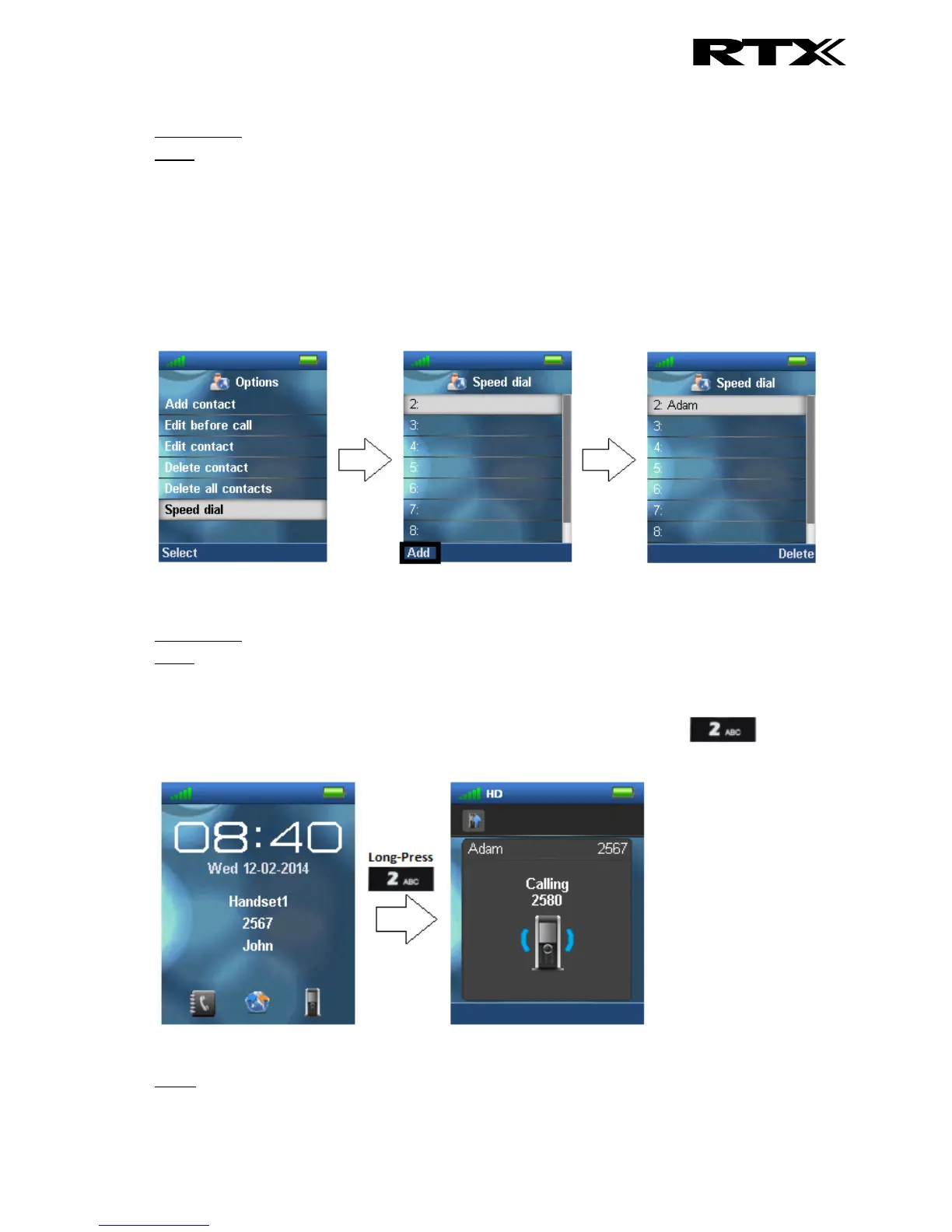
1. Go to the contact list > Move to the contact that you want to assign a speed dial number to.
2. Select “More” > Select “Speed dial”
3. Move to the speed dial number (2 – 9) that you want to assign the contact number to.
4. Select “Add”. The contact name should be appended to the speed dial number.
5. Leave the speed dial list by pressing the red “On-hook” key > Press “On-hook” key to exit
“More” menu, and exit contacts list by pressing “On-hook” key again.
In the picture below it is showed how the local contact ‘Adam’ is added as a speed dial number to 2.
7.1.4.2 How to call a speed dial number
Prerequisite: The handset is in idle and the key lock is not active.
Steps:
1. Make a long key press (> 2 seconds) on a speed dial key that is assigned to a contact. The first
number defined is dialed.
Hereby, the local contact ‘Adam’ can be called directly from idle by long-pressing as
displayed below:
NOTE: The speed dial function can also be set up for the F-Keys (for additional information on this see
section 7.8 F-Keys)



 To Next Page