32
Navigating the Web Interface
Navigating the Web Interface
Navigating the Web Interface
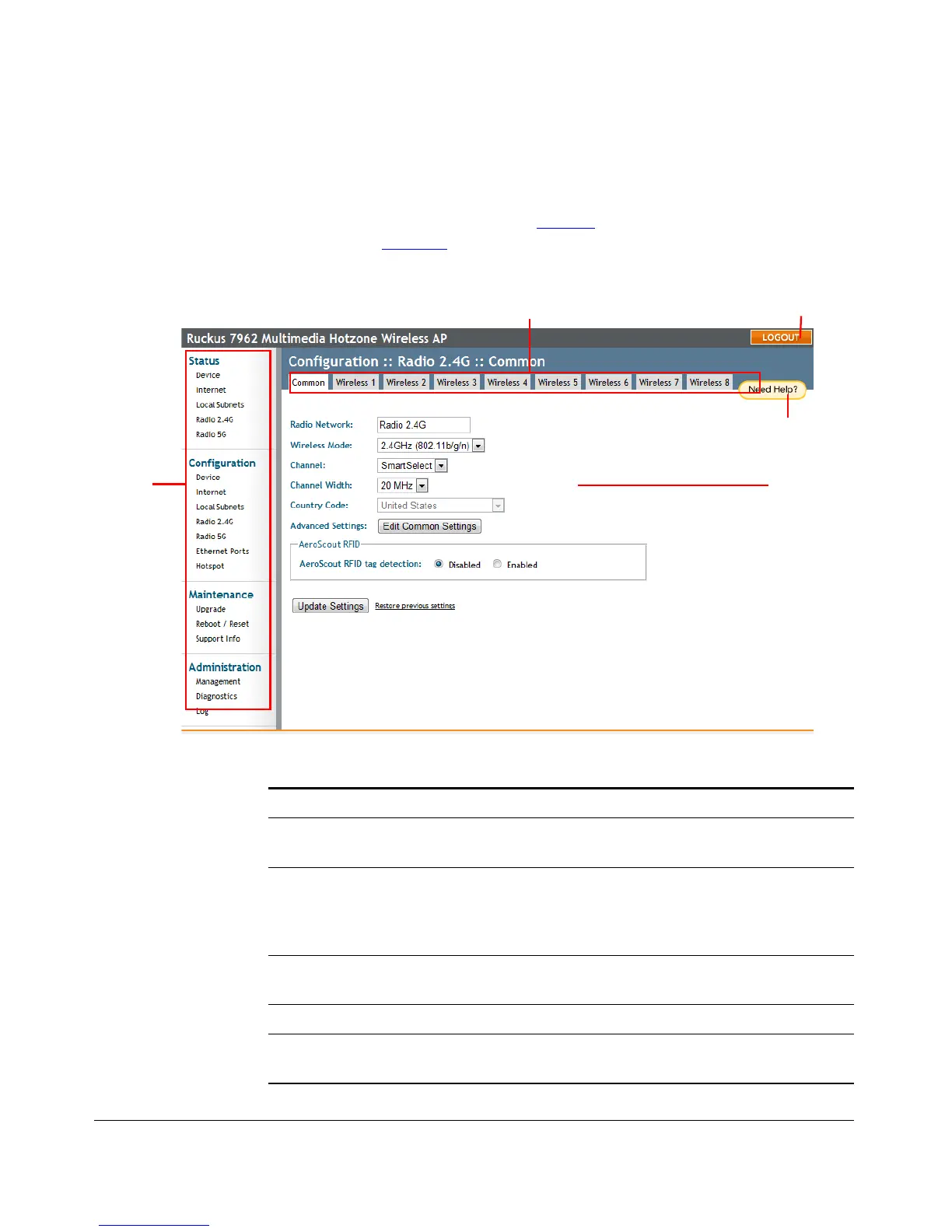
You manage the Access Point through a Web browser-based interface that you can
access from any networked computer. Table 13
lists the Web interface features that
are identified in Figure 16
.
Figure 16. Elements of the ZoneFlex AP Web Interface
Menu
Help Button
LOGOUT Button
Tabs
Workspace
Table 13. ZoneFlex AP Web interface elements
Element Description
Menu Under each category (Status, Configuration, etc.) are options that,
when clicked, open the related workspace in the area to the right.
Tabs Contains additional options for the configuration page. For
example, the Configuration > Wireless page includes one tab for
common wireless configuration and eight tabs for each of the
available WLANs.
Workspace This large area displays features, options and indicators relevant to
your menu bar choices.
Logout Button Click this button to log out of the AP.
Help Button Click this button to open a help window with information related
specifically to the options currently displayed in the workspace.











 To Next Page