5
1.3.1 BUTTON CONTROLS
OPERATION FUNCTION NOTE
Short press
Upper Button
(Power Button)
• To wake up/turn o the screen.
• To return to the previous, upper
or home screen.
• To pause a workout session in
progress.
• To switch between data screen
and pause screen during a
workout session.
Short press
Lower Button
• To wake up the screen.
• To enter workout application.
Press and hold
Upper Button
(Power Button)
• To power up the watch. Please fully
charge the
smartwatch
before first use.
Press and hold
Lower Button
• To enter SOS call application
from the home screen by holding
the button for at least 2 seconds.
• To end a workout session.
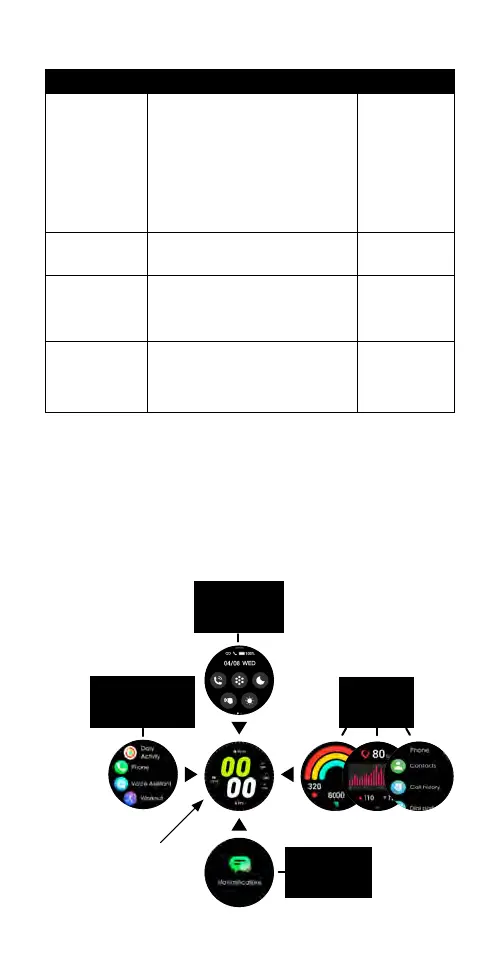
1.3.2 GESTURE CONTROLS
The smartwatch home screen is displayed on the
smartwatch face. The following diagram outlines the
various gesture controls on the smartwatch home
screen to access the smartwatch settings and other
information.
Swipe down
to view quick
settings
Swipe left
to view
widgets
Swipe up
to view
notifications
Swipe right
to view
applications list
Home
screen



 To Next Page