7
• To turn on Always-On Display, go to Settings >
Watch Faces & Themes > Always-On Display and
turn on the setting. Tap
on screen to confirm your
selection.
1.3.4 TURNING OFF THE SMARTWATCH SCREEN
The smartwatch home screen will turn o automatically
after a period of inactivity unless the Screen-On
Duration is set to Never.
1.4 CHARGING AND POWERING ON
1.4.1 CHARGING
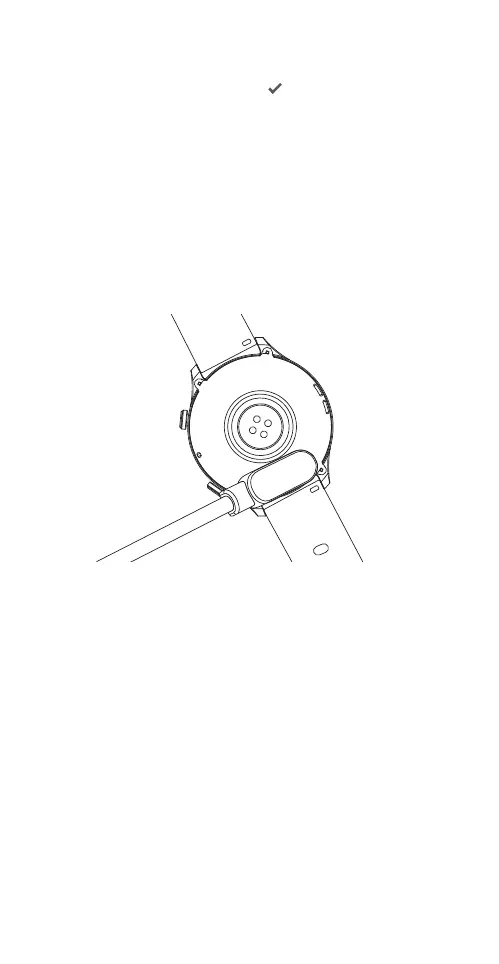
Please fully charge the smartwatch before first use.
1) Align and attach the supplied magnetic charging
cable to the magnetic contacts at the back of the
smartwatch.
2) Connect the other end of the magnetic charging
cable to a USB port of a computer, or a standard
adaptor with a DC output voltage of 5V and an
output current not exceeding 1A that complies with
safety standards as well as national and local laws
and regulations.
3) The charging icon will appear on the smartwatch
screen after a short while. When the smartwatch
is fully charged, the charging indicator will display
100%. The smartwatch and charger may become
slightly warm during charging. Detach the
smartwatch from the magnetic charging cable once
it is fully charged and allow the smartwatch to cool
down.



 To Next Page