21
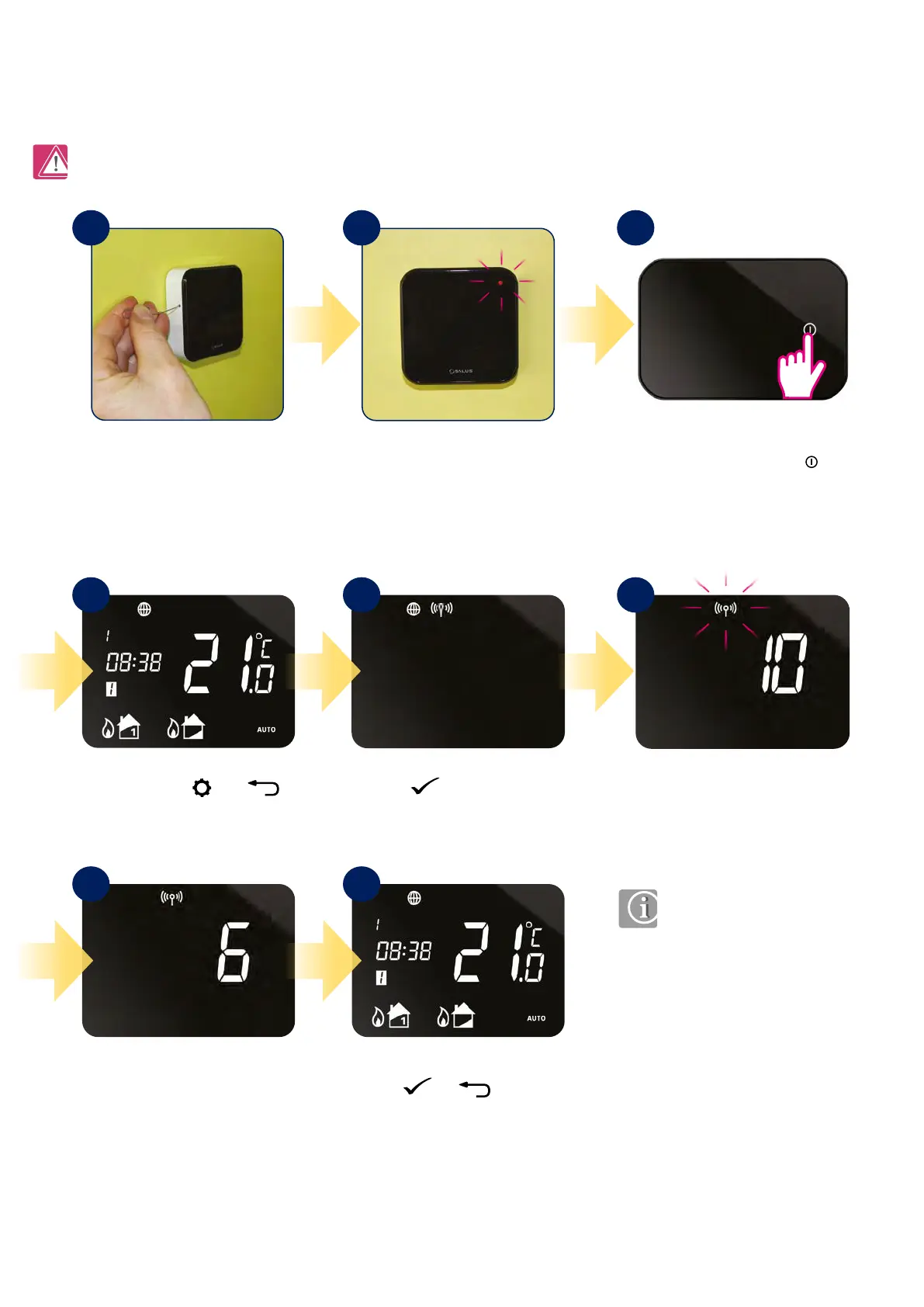
4.2 Pairing iT300 (additional second zone sensor) with iT500TR thermostat
Please note the red LED on the
iT300 can continue to ash and
eventually timeout.
Note: iT300 is purchased separately. Can only be used if your system supports second central heating zone.
iT500 has successfully paired with
iT300 when the antenna stops
ashing.
Using a paper clip, hold for 3
seconds button which is located
in the hole on the IT300 housing .
Press
button to launch
pairing process.
Red LED will start ashing means
iT300 is ready to pair. Go to
iT500TR thermostat.
Press the power button
to highlight the display.
Pairing process can take up to 10
minutes.
Press and hold and
buttons for 3 sec.
Press
or to return
to the home screen.
1
4
7 8
5 6
2 3
If you want to control the system with more than one heating zone, then iT300 is necessary to be installed. iT300 works as an additional sensor. Paired
with iT500TR gives you a possibility to control it directly from the iT500TR thermostat. The iT300 should be installed in the area of the house that the
second zone will be controlled from, ie. second oor, to measure proper temperature for the right place.



 To Next Page