46
3
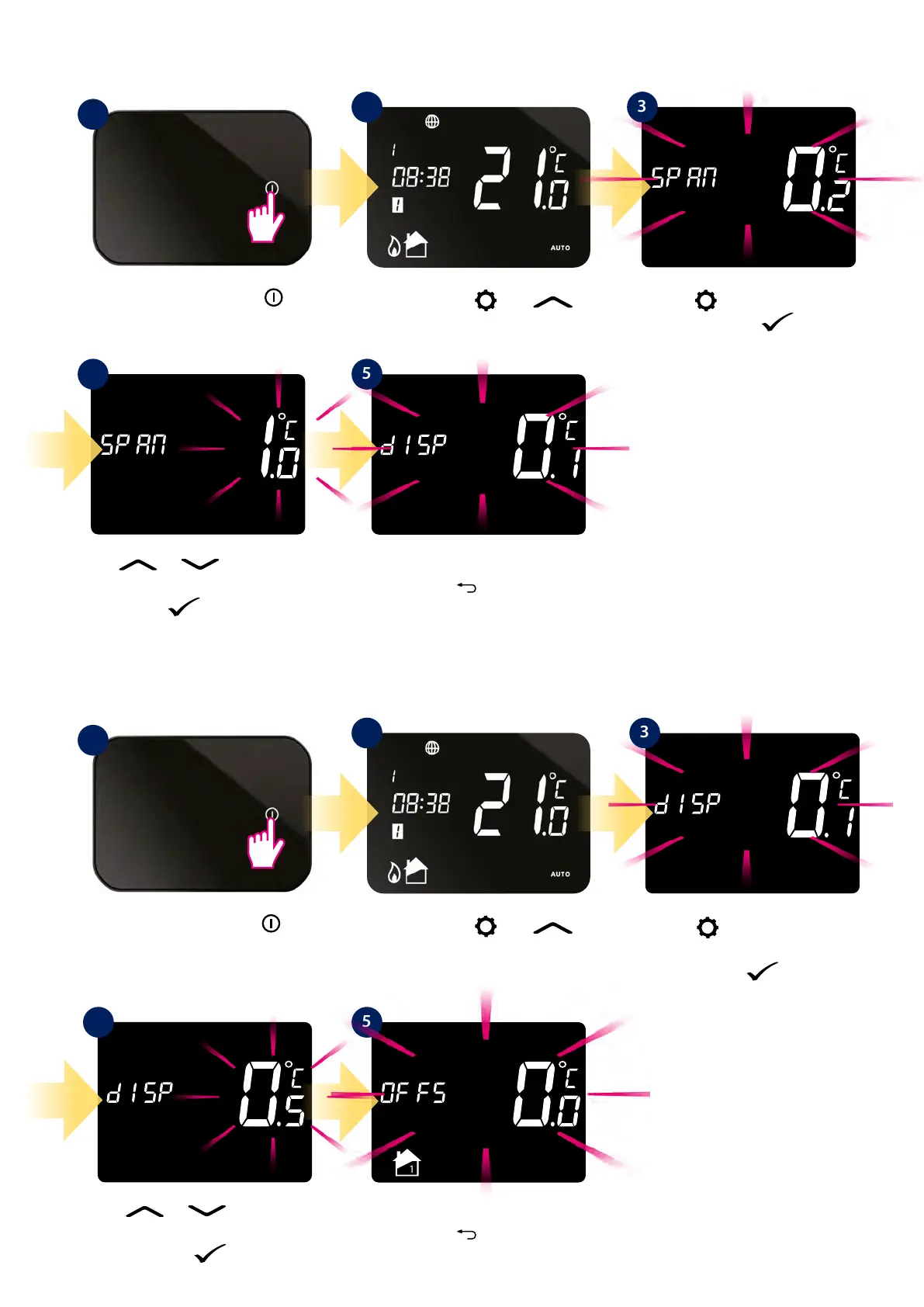
Using button search display
temperature accuracy option.
Conrm by button.
Using button search SPAN
option. Conrm by button.
8.6.5 Hysteresis (SPAN) setting
8.6.6 Display temperature accuracy
To set the proper hysteresis value, please follow steps below:
Adjust the measured thermostat temperature to the environement. Please follow steps below:
Press the power button
to highlight the display.
Press the power button
to highlight the display.
1
1
Press and hold and
buttons for 3 sec.
Press and hold and
buttons for 3 sec.
2
2
3
1
4 5
Use or buttons to set
hysteresis value. Conrm your choice
by button.
Use
or buttons to set
display accuracy value. Conrm your
choice by button.
Thermostat will go to the next
setting. Hold
button to exit to
main screen.
Thermostat will go to the next
setting. Hold
button to exit to
main screen.
4 5



 To Next Page