39
1
AU TO
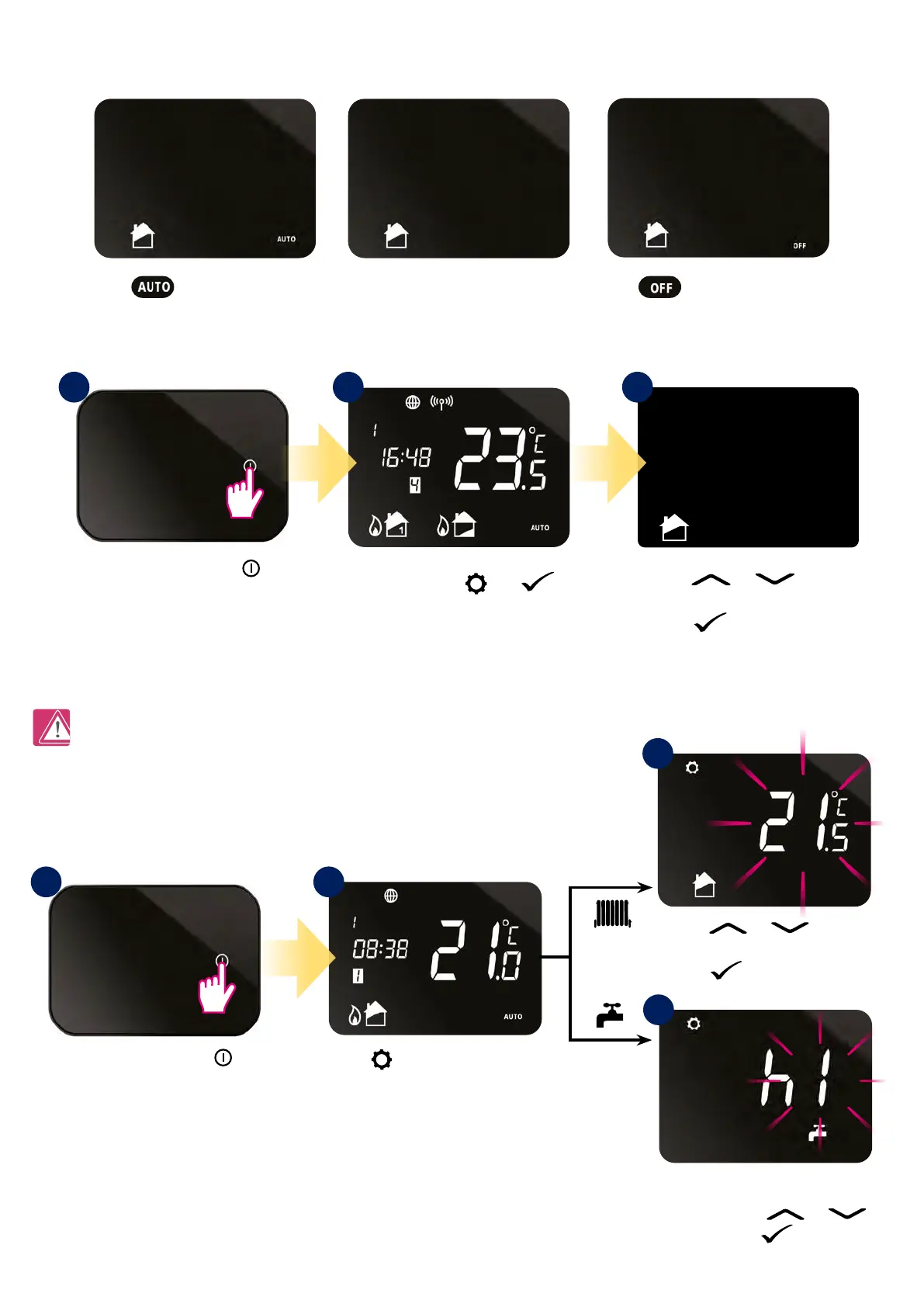
Press and hold and
buttons for 3 sec.
Press
or button
to select operating mode.
Press
button to conrm.
Press or button
to change temperature.
Press button to conrm.
3a
Note: If you set the temperature in AUTO mode (temporary override), then new setpoint temperature will be maintained until the next
program starts by schedule.
8. Operating in OFFLINE MODE
8.2 Setpoint temperature change (manual mode)
8.1 Operating modes
iT500TR is in manual mode by default. To change setpoint temperature please look at the steps below:
Set hour value of boosting your hot
water by pressing or
button. Press
button to
conrm.
Press
button to select heating
zone or DHW.*
*(only in two heating zones or one
heating zone + hot water system)
Press the power button
to highlight the display.
Press the power button
to highlight the display.
1
1 2 3
2
3b
- antifrost mode 5°C
(changing temperature is avaible only
through the app)
- automatic mode
(works according to the schedule)
Permanent manual mode



 To Next Page