CHAPTER 5
38
5.2. Feed and Cut
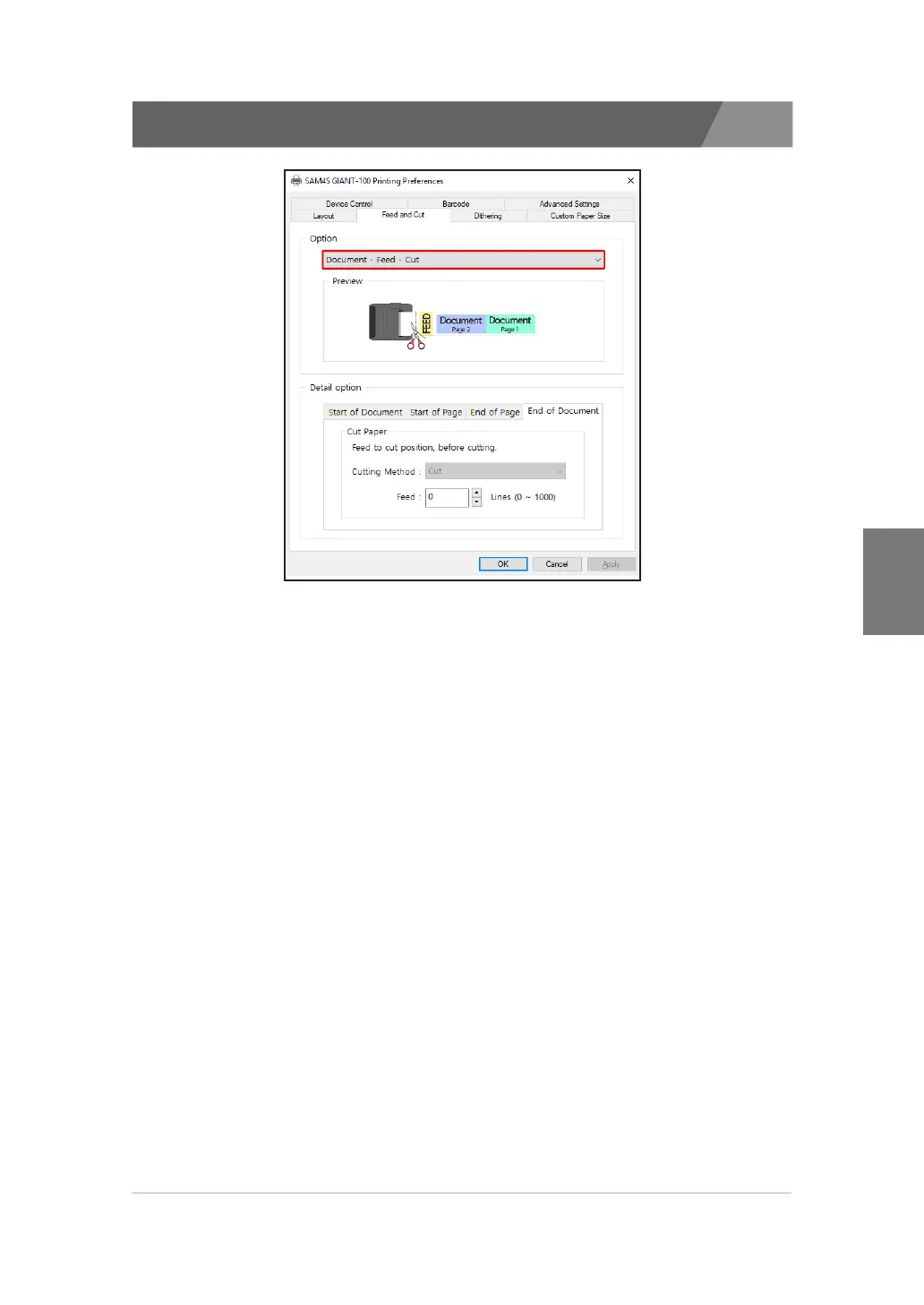
SAM4S Printer Drivers provides 8 paper feed and cut options.
1) Document - Feed - Cut
>>
When two or more pages of a document are printed, they are printed continuously.
>>
At the last page, The document are printed in order of 'Print' - 'Feed' - 'Paper Cut'.
2) Document - Feed - No cut
>>
When two or more pages of a document are printed, they are printed continuously.
>>
At the last page, The document are printed in order of 'Print' - 'Feed'.
3) Document - No feed - Cut
>>
When two or more pages of a document are printed, they are printed continuously.
>>
At the last page, The document are printed in order of 'Print' - 'Cut'.
4) Document - No feed - No cut
>>
When two or more pages of a document are printed, they are printed continuously.
>>
At the last page, The document are printed in order of 'Print' - 'Print Stop'.
5) Page - Feed - Cut
>>
When two or more pages of a document are printed, Printer performs the 'Cut'
operation at the end of each page.


 To Next Page