80
Program Mode Programming ER-180U
Programming the Postmble Logo Message
A postamble message of up to six lines can be printed at the bottom of each receipt.
Each line can consist of up to 24 characters.
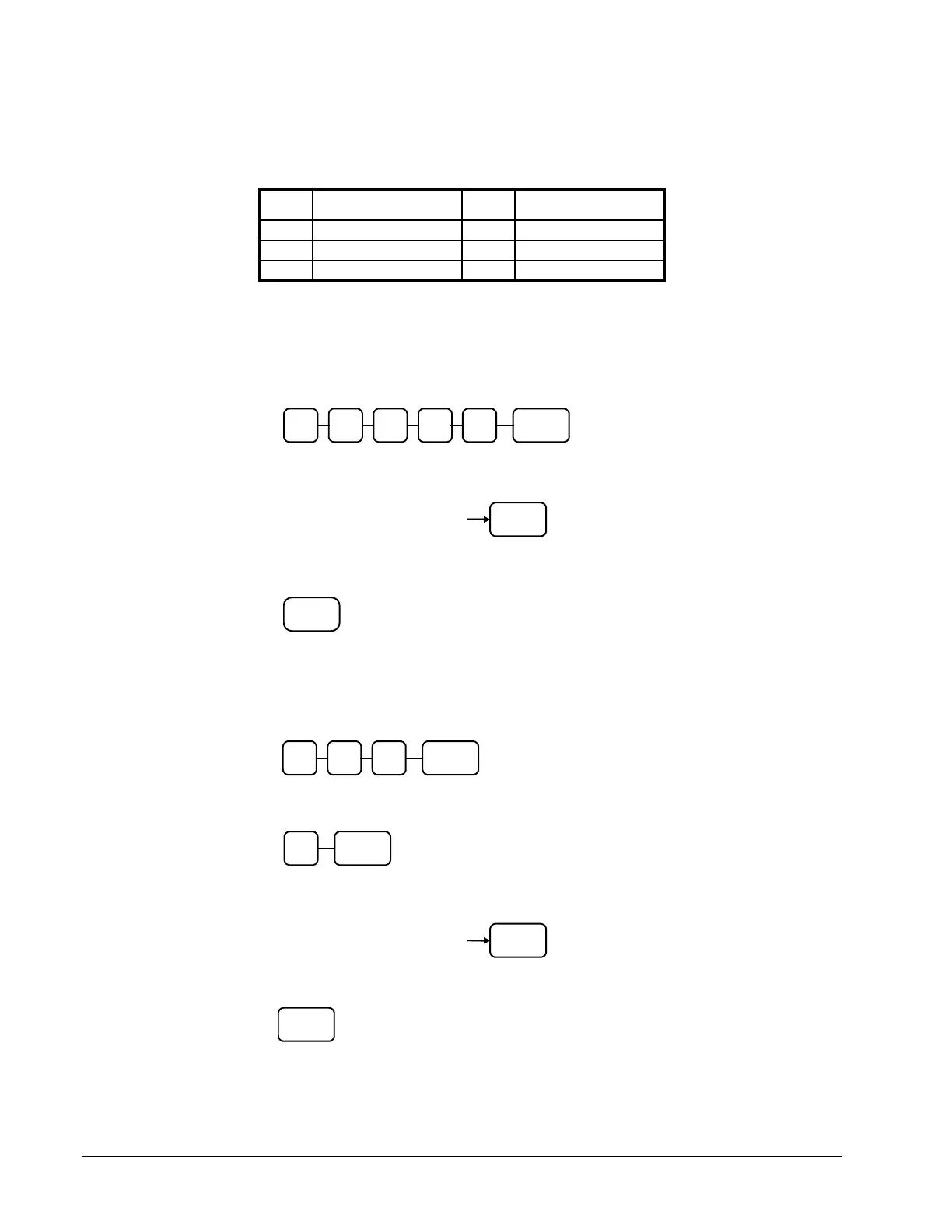
X Message Line X Message Line
1. Move to the PGM-Mode.
2. To begin the program, enter 4 0 0 0 X, press the SUBTOTAL key.
Where X is the Line number (1 ~ 6) you want to program. Please refer to the
table above.
3. Enter up to 24 Characters using Keyboard Alpha Layout (see page 52), then
press the SUBTOTAL key.
Enter up to 24 three-
character codes
4. To program additional Line, repeat from step 2, or press the CASH key to
finalize the program.
OR when Code Entry Method is the better choice…
1. Move to the PGM-Mode.
2. To begin the program, enter 7 5 0, press the SBTL key.
3. Refer to the chart above and enter the number that represents the line you wish to
program; press the X/TIME key.
4. If you are programming
Enter up to 24 three-
character codes
5. Press the CASH key to finalize the program.


 To Next Page