9-2 EB 8355-2 EN
Servicing
9.1 Changing the operating
direction of the positioner
control loop
Direct attachment to Type3277
If the operating direction of the positioner is
to be changed after it has been mounted,
turn the turnboard and change the position
of the connection block, positioner and
clamp for direct attachment (see the 'Installa-
tion' section).
Attachment according to IEC60534-6
ForattachmentaccordingtoIEC60534-6,
turn the turnboard and the positioner on the
adapter housing.
Attachment to rotary actuators
For positioners mounted on rotary actuators,
reassign the cam disk and turn the turn-
board.
9.2 Converting a positioner
from electropneumatic to
pneumatic
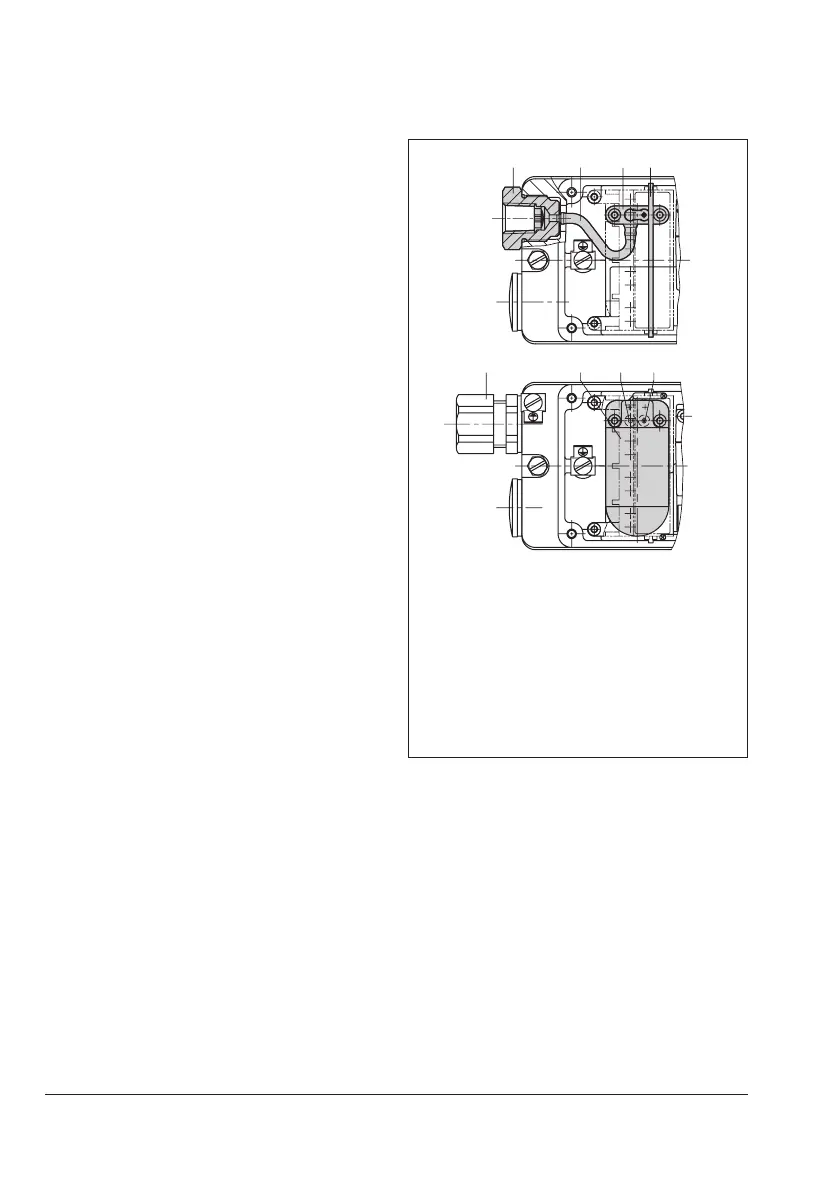
The electropneumatic positioner can be con-
vertedintoaType3766PneumaticPosition-
erwiththefollowingconversionkit:
Î Order number for M20x1.5 conversion
kit:1400-7575
Î See Fig.9-1
5678
1 Screwtting
2 Silicone hose
3 Connecting plate
4 Guard plate
5 Cable gland
6 i/pconvertermodule
7 Gasket
8 Gasket
Fig.9-1: Converting the positioner
1. Remove the holder with the terminal
block.Disconnectthecabletothei/p
module.
2. Unscrew the fastening screws and re-
movethei/pmodule(6)includingthe
seals(7and8).
3. Place the connecting plate (3) with the
seal on the housing bores and screw
tight. The restriction must be seated in the
seal above the right inner bore.


 To Next Page