Troubleshooting
4-59 Samsung Electronics
QInitial Tracking (Communication Check-up) - Display for Problem
1. For the display module of the outdoor unit, there are differences in the contents displayed depending on whether the relevant outdoor
unit is a master unit or a sub unit.
1) Master Unit
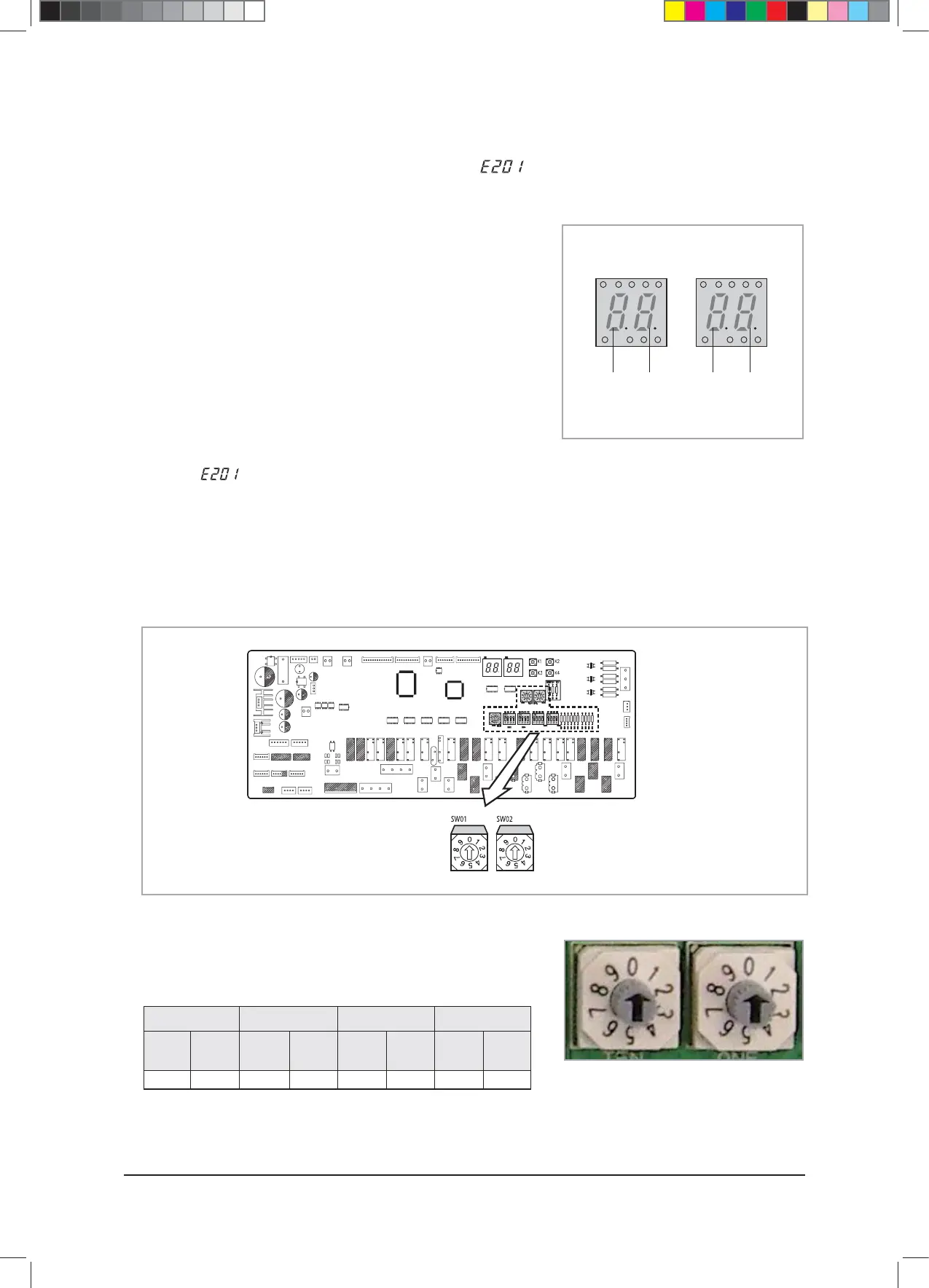
● The outdoor unit Micom attempts communication with the
indoor unit connected to the communication cable (F1/F2)
when the power is turned on.
● The two displaying parts on the left show the main address of
the indoor units with which the outdoor units are trying to
communicate in order. (Example : 0, 1, 2, ~ , 63)
● The two displayed parts on the right show the main address
of the indoor units that succeeded in communication with the
outdoor units. (Example : 0, 1, 2, ~ , 63)
● If the number of indoor units set by the outdoor unit is not in
accordance with the number of indoor units that succeeded
with communication, then the four displaying parts will
display
.
2) Sub (Slave) Unit
– Displays the Micom address of the main PBA inside the sub unit
connected to the master unit in order (Example : C9, CA, CB, CC,
CD, CE, DF)
g
SEG1
af
G1
G2
bced
SEG2
g
SEG3
af
G1
G2
bced
SEG4
Outdoor Unit Display Parts
3. If the quantity of the indoor units configured with the indoor unit installation quantity setup switch does not match the quantity of the
indoor units found during the tracking process, 201 and U200 will be displayed in order on the display module.
◆ Indoor Unit Installation Quantity Setup Switch
The following is an example of how to use the switch according to the
number of indoor unit installations. The maximum number of possible indoor
unit connections is 64.
Ten’s Digit
(0~9)
One’s Digit
(0~9)
2. The number of the indoor Units Connected to the outdoor unit can be configured by using the indoor unit installation quantity
setup switch.
3 Units Connected 17 Units Connected 31 Units Connected 64 Units Connected
Ten’s
Digit
0
One’s
Digit
3
Ten’s
Digit
1
One’s
Digit
7
Ten’s
Digit
3
One’s
Digit
1
Ten’s
Digit
6
One’s
Digit
4
$9;&6+B$BaLQGG



 To Next Page