Troubleshooting
4-79 Samsung Electronics
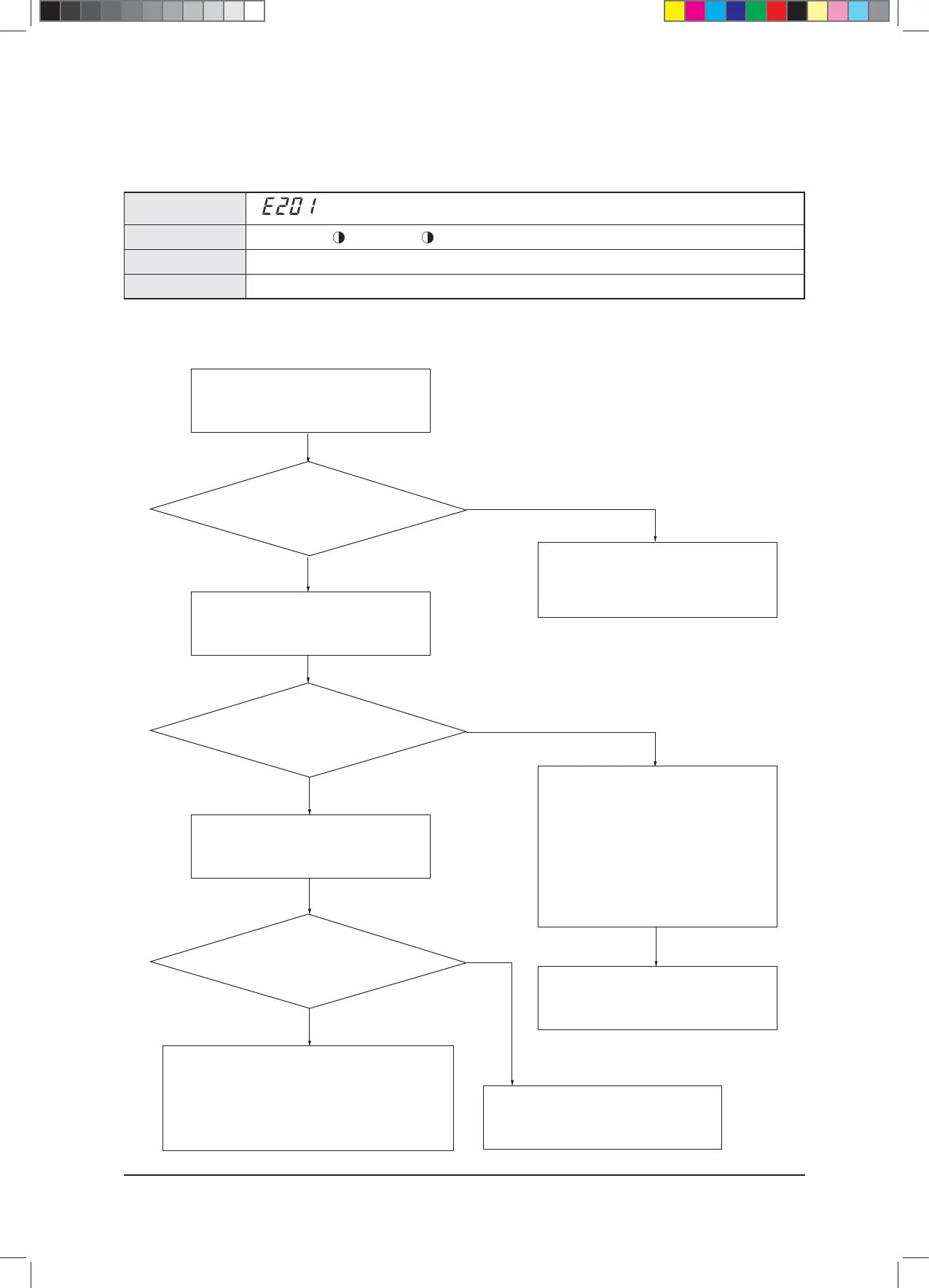
4-5-21 Communication Error between Indoor and Outdoor Units during Tracking
×(Operation) (Reservation) (Blast) ×(Filter) ×(Defrost)
t3FGFSFODFCFMPX
t$PNNVOJDBUJPOFSSPSCFUXFFOJOEPPSBOEPVUEPPSVOJUT
Indoor Unit Display
Judgment Method
Special Cause
Outdoor Unit Display
1. Inspection Method
Yes
Yes
Indoor Unit Installation Quantity Setup Switch of
Outdoor Unit Compare and check the set value and
the actual number of indoor units installed.
Press the reset key (K3) of the outdoor PCB,
and check the display module to check for the
quantity of indoor units that respond to the tracking.
Remove the communication cable which connects
the outdoor unit to the indoor unit, and measure the
2 cables of the outdoor unit with a scope.
Is there no sign of the indoor
response on the display during tracking?
Check the communication cable which connects the outdoor
unit to the indoor unit. If there is no peculiarity, then connect the
indoor units one by one to find the indoor unit that is interfering
with the communication for inspection and
change the indoor unit PCB.
Is the voltage between the
2 cables a square wave with DC±0.7V or more?
Are the number of
actual installed indoor units and the set value for the
installation quantity setup switch the same?
Correctly set the indoor unit installation quantity
setup switch of the outdoor unit, and press the reset
key (K3) of the outdoor PCB to re-execute tracking.
After 2 minutes, find the indoor unit which displays
the communication error for the indoor units,
and check for overlaps in the PCB address setup.
(If the indoor unit addresses are overlapped,
then a communication error will occur).
- In this case, a communication error will occur
in every indoor unit (two or more units) with the
address incorrectly set.
Change the indoor unit PCB after checking the
communication cable when there is no peculiarity
with the address.
Check the communication cable
and the connector of the outdoor unit PCB,
and change the PCB.
Yes
No
No
No
$9;&6+B$BaLQGG



 To Next Page