EasyManua.ls Logo

Samsung BD-C5900 - Output Resolution Modes

Samsung BD-C5900
85 pages
Print Icon
To Next Page IconTo Next Page
To Previous Page IconTo Previous Page
Loading...
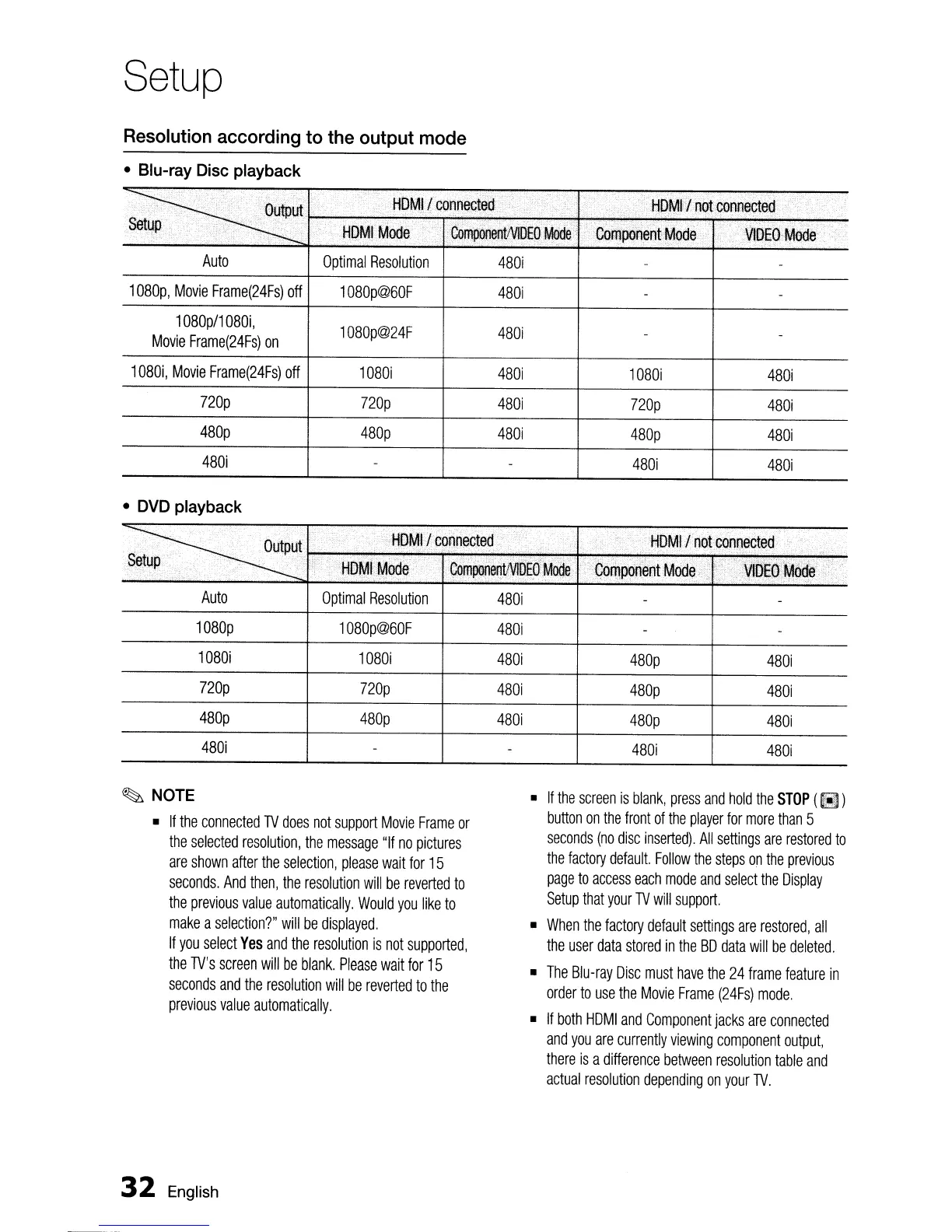
Setup
Resolution
according
to
the
output
mode
•
Blu-ray
Disc
playback
Auto
Optimal
Resolution
480i
1080p,
Movie
Frame(24Fs)
off
1080p@60F
480i
1
080p/1
080i,
1080p@24F
480i
Movie
Frame(24Fs)
on
1080i,
Movie
Frame(24Fs)
off
1080i
480i
1080i
480i
nop
nop
480i
nop
480i
480p
480p
480i
480p
480i
480i
480i 480i
•
DVD
playback
·~_'e
...
t
..
Lip"
c.
.
·c
.. c 0
ouuttDPu~ct!L;
".HOMll
c~nnec~ed,
_.'
....•...
~~!Up
".
~
i'
~bMh~ode
.•
'GOfIlpo~ent~DEO'Mooe
Auto
Optimal
Resolution
480i
1080p
1080p@60F
480i
1080i
1080i
480i
480p
480i
nop nop
480i
480p
480i
480p 480p
480i
480p
480i
480i
480i 480i
~
NOTE
•
If
the
connected
TV
does
not
support
Movie
Frame
or
the
selected
resolution,
the
message
"If
no
pictures
are
shown
after
the
selection,
please
wait
for
15
seconds.
And
then,
the
resolution
will
be
reverted
to
the
previous
value
automatically.
Would
you
like
to
make
a
selection?"
will
be
displayed.
If
you
select
Yes
and
the
resolution
is
not
supported,
the
TV's
screen
will
be
blank.
Please
wait
for
15
seconds
and
the
resolution
will
be
reverted
to
the
previous
value
automatically.
32
English
•
If
the
screen
is
blank,
press
and
hold
the
STOP
(
~
)
button
on
the
front
of
the
player
for
more
than
5
seconds
(no
disc
inserted).
All
settings
are
restored
to
the
factory
default.
Follow
the
steps
on
the
previous
page
to
access
each
mode
and
select
the
Display
Setup
that
your
TV
will
support.
•
When
the
factory
default
settings
are
restored,
all
the
user
data
stored
in
the
BD
data
will
be
deleted.
•
The
Blu-ray
Disc
must
have
the
24
frame
feature
in
order
to
use
the
Movie
Frame
(24Fs)
mode.
•
If
both
HDMI
and
Component
jacks
are
connected
and
you
are
currently
viewing
component
output,
there
is
a
difference
between
resolution
table
and
actual
resolution
depending
on
your
TV.

Table of Contents