Basic
Functions
Repeat Playback
Repeat the Title or Chapter
:~.,~,.
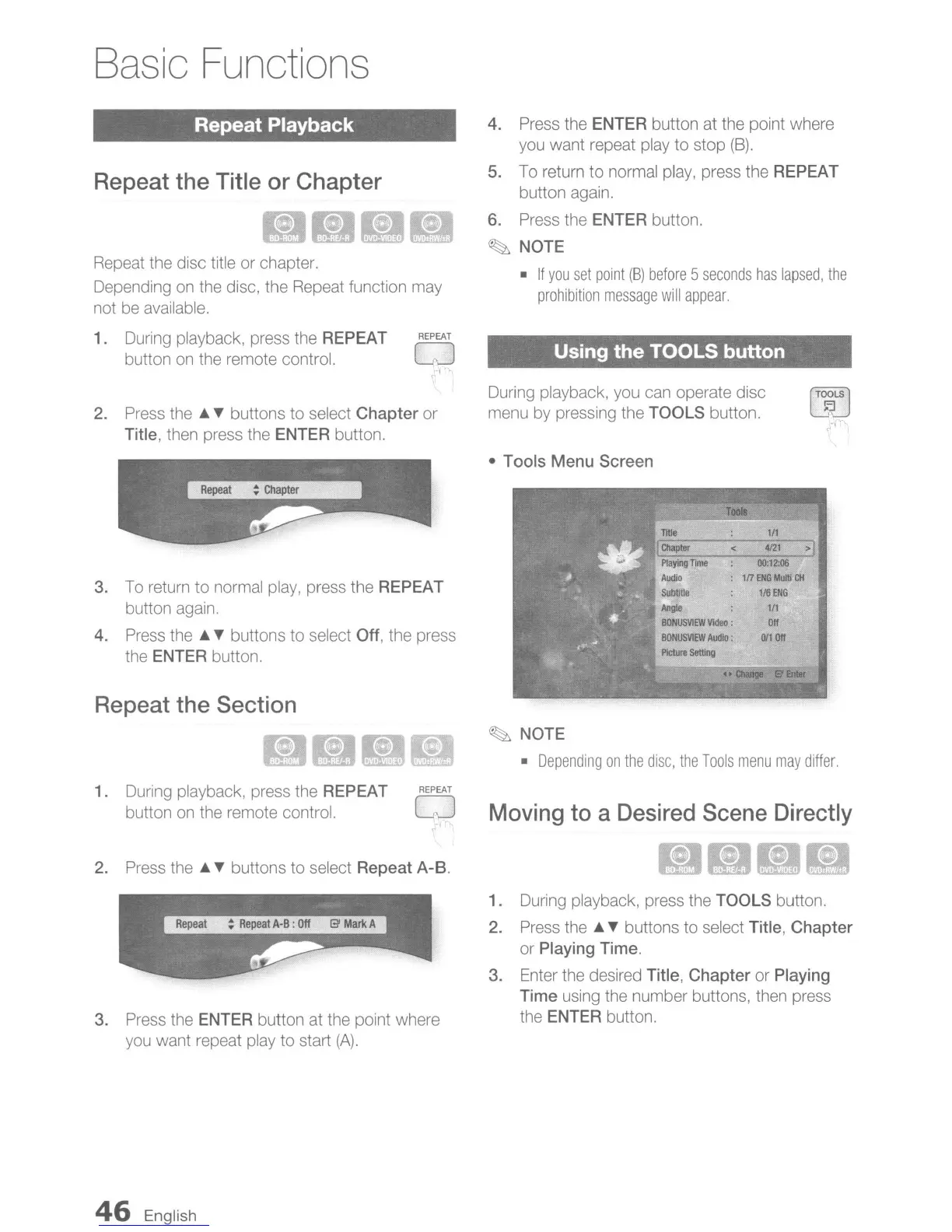
Repeat the disc title or chapter.
Depending
on
the disc, the Repeat function may
not be available.
1. During playback, press the REPEAT
REPEAT
button
on
the remote control.
CJ
I
4. Press the ENTER button at the point where
you want repeat play to stop
(B).
5. To return to normal play, press the REPEAT
button again.
6. Press the ENTER button.
~
NOTE
•
If
you
set
point
(B)
before
5
seconds
has
lapsed,
the
prohibition
message
will
appear.
Using the TOOLS button
2. Press
the'"
T buttons to select
Chapter
or
Title, then press the
ENTER button.
During playback, you can operate disc
menu by pressing the
TOOLS button.
[jj
15
3. To return to normal play, press the REPEAT
button again.
4.
Press
the'"
T buttons to select Off, the press
the
ENTER button.
Repeat the Section
1. During playback, press the REPEAT
REPEAT
button
on
the remote control. CJ
,
2.
Press
the'"
T buttons to select Repeat A-B.
3. Press the ENTER button at the point where
you want repeat play to start
(A).
46
English
•
Tools
Menu Screen
111Ie
:
1/1
!Chapter
.
<.
4i21
;'1
P1ayingTIm-e
-:
~.
~om6"-
Audio
:
1n
ENG
Multi
eN
Subti1le
116
ENG
Angle
1/1
BONUSVlEW
VIdeo:
Off
BONUSVIEW
Audio:
0/1
Off
PlclIJre
Setting
••
~
S'Enter
~
NOTE
•
Depending
on
the
disc,
the
Tools
menu
may
differ.
Moving to a Desired Scene Directly
,,~
••
I~'
1. During playback, press the TOOLS button.
2. Press
the'"
T buttons to select Title,
Chapter
or
Playing Time.
3. Enter the desired Title,
Chapter
or Playing
Time using the number buttons, then press
the
ENTER button.


 To Next Page